
Launching a new digital product is exhilarating but risky. Many startups fail because they invest months of effort building comprehensive solutions based on untested assumptions. Without external feedback, founders often learn the hard way that their "perfect" product solves a problem nobody truly cares about. An MVP prototyping process offers a structured route to avoid that scenario. Instead of throwing money at a full build, you can validate core assumptions, learn from real users and prioritize features before scaling.
This article demystifies the MVP prototyping process for startup founders, CTOs, product managers, innovation leaders and business owners. It explains the differences between proofs of concept, prototypes, MVPs and first release versions; shows how to map the user journey and create wireframes and clickable prototypes; and provides a realistic timeline and metrics. By the end you will know how to build a focused product that reduces risk, accelerates time to market, attracts investors and sets the stage for continuous improvement.
What Is MVP Prototyping?
A minimum viable product (MVP) is not a cheap or unfinished app; it is a functional first release that delivers the core value of your idea to early adopters while collecting evidence to guide future development. Prototyping is the process of translating your idea into concrete artefacts - sketches, wireframes, clickable prototypes and beta versions - that can be tested with users to learn quickly.
An MVP prototyping process combines the strategic discipline of product discovery with iterative design and technical planning. Its goals include:
- Validating problem–solution fit – ensuring the idea solves a real problem for real people before coding.
- Reducing business and technical risk – identifying feasibility issues and costly assumptions early.
- Prioritizing what matters – focusing resources on the smallest set of features that delivers the core value proposition.
- Learning through user feedback – refining the product based on actual user behaviour rather than internal opinions.
Prototyping is iterative. You start with low‑fidelity artefacts to explore ideas and gradually increase fidelity as confidence grows. Each iteration informs the next, ensuring that your final MVP is purposeful and user‑centred.
MVP vs Prototype vs Proof of Concept: What Is the Difference?
Many founders conflate proofs of concept, prototypes and MVPs. In reality, these artefacts serve different purposes at different stages of product development.
- Proof of Concept (PoC) – A PoC demonstrates that a technical solution is feasible. It is typically a small experimental implementation (e.g., a script, algorithm or integration) used internally to validate that a problem can be solved with available technologies. It does not focus on usability or features. For example, a PoC may test whether machine‑learning models can accurately recognise objects or whether a payment API can handle a specific transaction. Coherent Solutions notes that a PoC is “a small‑scale demonstration to test technical feasibility”.
- Prototype – A prototype visualises the user experience and flow of a product. Prototypes range from hand‑drawn sketches to interactive digital mock‑ups. They help teams explore design options, refine navigation and gather early feedback. Product School describes a prototype as a tangible model built to communicate the idea; it is “packaging of an empty box” without full functionality. Saigon Technology explains that prototypes often implement core features but are not fully functional; their purpose is to gather initial user feedback and improve the product concept.
- Minimum Viable Product (MVP) – An MVP is a functional product with just enough features to deliver value and validate market demand. Unlike prototypes, an MVP is built with production‑quality code and is used by real customers to test the core value proposition. Saigon Technology emphasises that an MVP is a “fully functional version” used to solve problems for real users. The purpose of an MVP is to learn what users truly need while minimising time and cost.
- First Release Version – Once the MVP has validated the core assumptions and you have iterated based on feedback, the first release version (sometimes called version 1.0) emerges. It includes the MVP's core features plus any improvements needed to satisfy a broader user base. This version is stable enough to support paying customers and acts as the foundation for future releases.
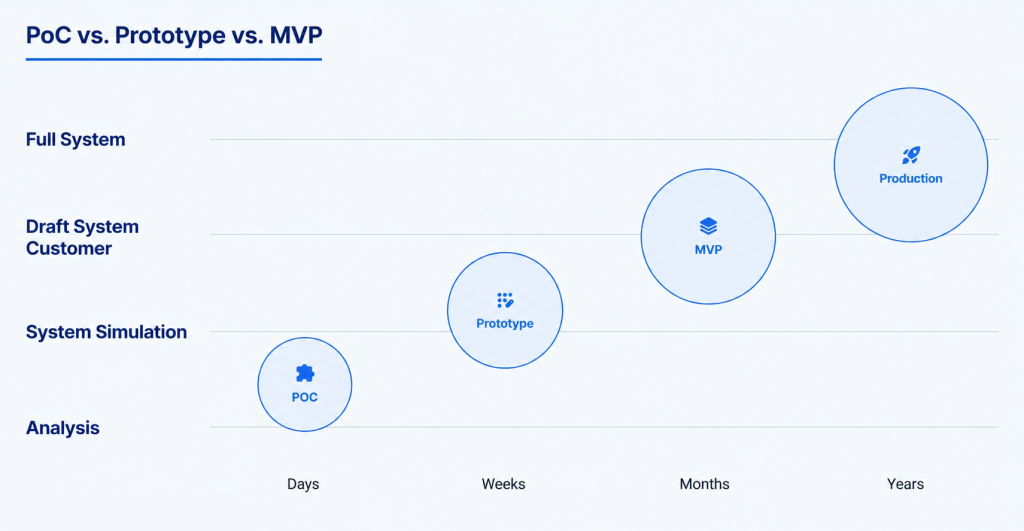
Comparison Table: PoC vs Prototype vs MVP vs First Release
| Artefact | Purpose | Scope & Functionality | Audience | Outcome |
|---|---|---|---|---|
| Proof of Concept | Validate technical feasibility | Minimal; often a script or isolated module to test an algorithm or integration | Internal stakeholders (engineers, CTO, technical advisors) | Confirmation that a technical solution is possible; informs whether to proceed. |
| Prototype | Explore user experience and flows | Visual mock‑up; may include limited interactions but not full functionality | Designers, product managers, potential users | Feedback on usability, navigation and concept viability. |
| Minimum Viable Product | Validate real user value and market demand | Functional application delivering core value; minimal features | Early adopters, testers, investors | Evidence of demand, data on usage, feedback for future iterations. |
| First Release Version | Serve real customers and scale | Production‑ready product; includes core MVP features plus improvements | Customers, larger user base | Sustainable revenue, platform for growth and new features. |
Understanding these distinctions prevents unrealistic expectations. A prototype is not a “quick MVP,” and an MVP is not just a polished prototype. Each stage has a specific goal and informs your decision about whether to move forward, pivot or stop.
Why the MVP Prototyping Process Matters
- Reducing Product Risk – By validating assumptions early, you avoid committing months of development to an idea that might not resonate. Rapid prototyping allows developers to turn ideas into interactive models, detect design flaws and gather feedback before building. It helps you avoid expensive changes later.
- Avoiding Overbuilding – Feature overload is a common MVP mistake. Building too many features obscures the core value and creates technical debt. MVP‑development.io warns that adding unnecessary features can drain resources and delay launch; instead, focus on fundamental features.
- Improving Time to Market – MVP prototyping shortens the discovery cycle. By iterating quickly with low‑fidelity prototypes and user feedback, you can release a basic solution faster and learn from real data. A lean MVP reduces the time between concept and launch, helping you outpace competitors.
- Aligning Stakeholders – Prototypes and wireframes are tangible artefacts that communicate the product vision to stakeholders. They align team members on the problem you are solving, the user experience and the roadmap. This shared understanding reduces miscommunication and ensures that executives, designers and engineers are on the same page.
- Creating Investor‑Ready Evidence – A functional MVP that demonstrates user traction, retention and revenue signals is compelling evidence for investors. Many venture funds want to see data from real usage before committing capital. An MVP built through a disciplined prototyping process generates the metrics that investors care about.
- Collecting Early User Feedback – Prototypes and MVPs invite users into your design process. User research reveals pain points and motivations that you cannot uncover through assumptions alone. Early feedback ensures you build something people actually need.
- Making Budgets More Predictable – Prototyping surfaces unknown risks and allows you to estimate development more accurately. It is easier to budget for a series of validated features than for a speculative full product.
- Planning Future Releases Based on Data – The MVP prototyping process is not the end of product development; it is the beginning of continuous learning. The metrics you gather (activation rates, retention, churn and revenue) inform your roadmap and help you decide what to build next. Instead of guessing, you respond to evidence.
Intersog specialises in helping startups de‑risk their ideas through this structured approach. To learn how, see our MVP development services page.
Step 1: Define the Product Vision and Business Goal
Every successful product begins with clarity. Before sketching a screen or writing code, you need to articulate the product vision and business goal. This foundation guides decision‑making throughout the MVP prototyping process. Key questions include:
- What problem does the product solve? Clearly define the pain points and jobs‑to‑be‑done.
- Who is the target user? Create personas based on demographics, behaviours and motivations.
- What business outcome should the MVP support? Is it revenue, user growth, engagement or cost savings?
- What is the core value proposition? Describe how your product will improve users' lives better than existing alternatives.
- What would make the MVP successful? Establish measurable success criteria (e.g., activation rate, retention rate, revenue) so you know when to iterate or pivot.
Answering these questions prevents scope creep. You can refer back to your vision when deciding which features to include in the MVP and which to postpone.
Step 2: Research the Market, Users and Competitors
Assumptions kill startups. User research and market analysis ensure that you build for real needs rather than imaginary ones. Wednesday Solutions emphasises that user research during the MVP phase uncovers genuine needs and combines qualitative interviews with quantitative behavioural analysis. Here’s how to conduct effective research:
Conduct User Interviews and Surveys
Start by talking to potential users. Ask open‑ended questions about their challenges, current solutions and ideal outcomes. Avoid leading questions; instead of “Do you like our app?” ask “What challenges do you face when doing X?” According to Molfar.io, feedback‑driven iteration is a core principle of rapid prototyping. Complement interviews with surveys to gather quantitative data at scale. Tools like Google Forms or Typeform can collect responses quickly.
Analyse Competitors and Market Gaps
Perform competitor analysis to see how other products solve the same problem. Look at their feature sets, pricing, user reviews and positioning. Identify gaps in the market that your product can fill or underserved segments you can target. Market mapping helps you understand where your offering fits in the landscape.
Create Personas and Journey Maps
Translate your research into user personas - archetypal descriptions that capture goals, behaviours and frustrations. Then map the user journey from initial awareness through onboarding and key tasks. StoriesOnBoard notes that mapping the user journey provides a comprehensive view of the stages and touchpoints in users’ experience. Journey maps prevent you from missing critical steps and ensure that features align with user goals.
Validate Assumptions
Use your research to challenge assumptions. For example, if you assume that users will pay for a subscription, interview potential customers to confirm their willingness to pay. Continuously refine your hypothesis based on evidence. This user‑centric approach reduces the risk of building something irrelevant.
Step 3: Prioritise Core MVP Features
Once you understand the problem and audience, decide which features are essential for delivering the core value. Prioritisation frameworks help you make objective decisions:
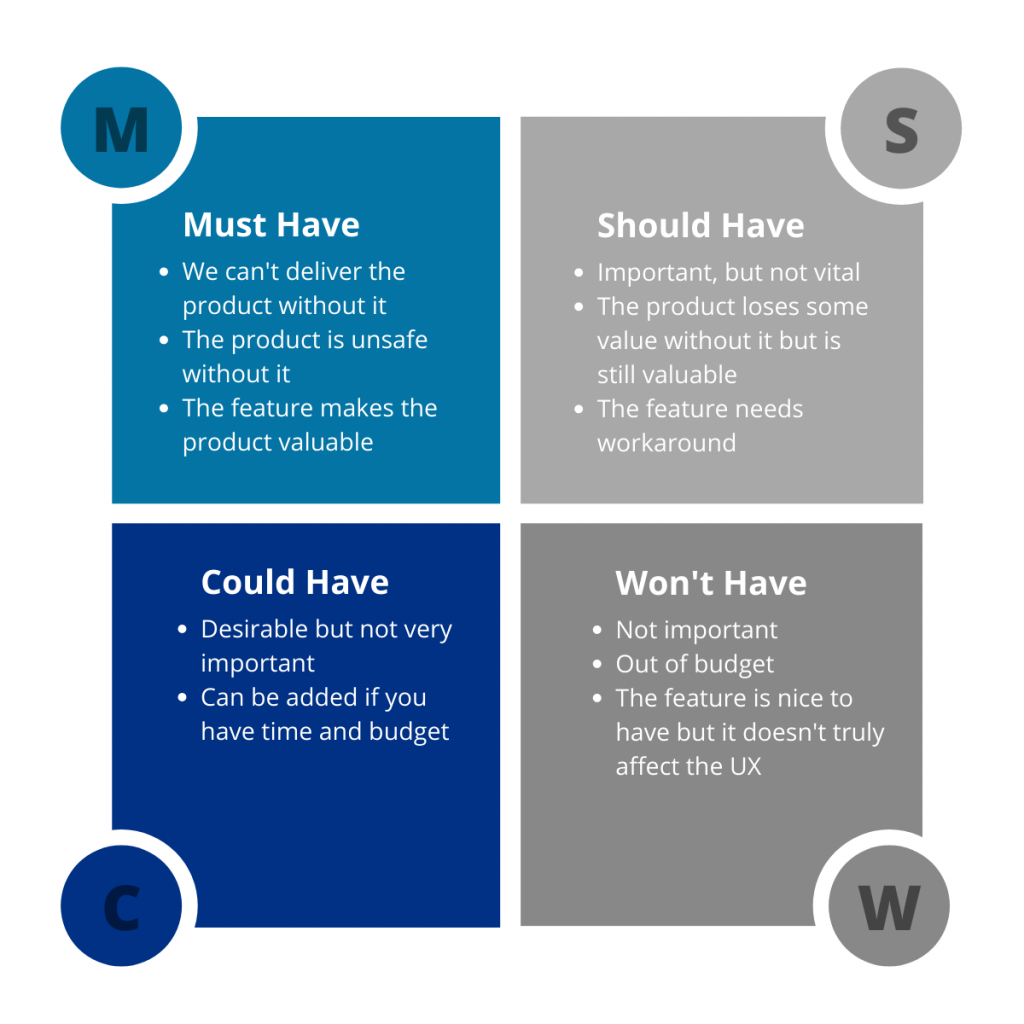
- MoSCoW (Must have, Should have, Could have, Won't have) – Classify features based on necessity. Must‑have features form the minimum viable scope; should‑haves can appear in later releases; could‑haves are nice but not critical; won’t‑haves explicitly exclude features for now. StoriesOnBoard uses MoSCoW to convert research insights into prioritised user stories.
- RICE (Reach, Impact, Confidence, Effort) – Score features based on potential reach, expected impact, confidence level and development effort. Multiplying these values yields a prioritisation score.
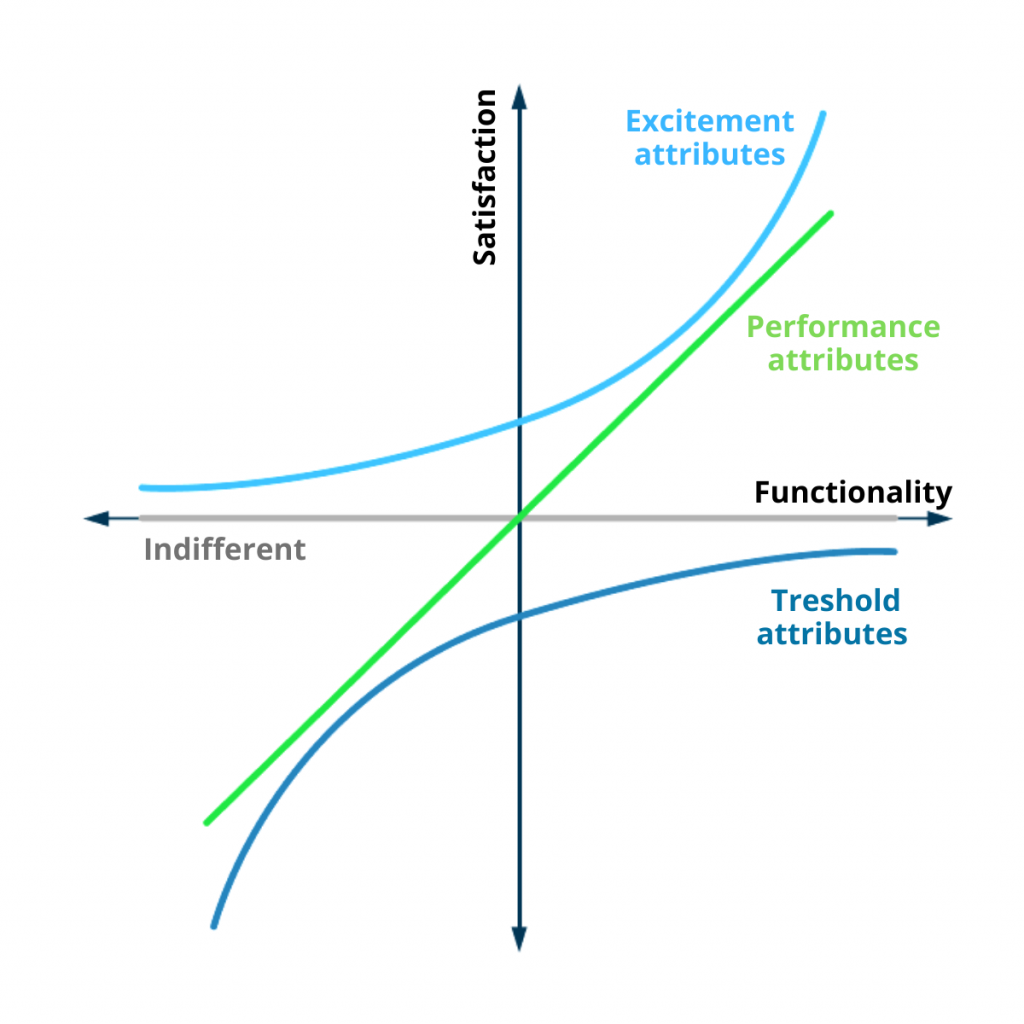
- Kano Model – Categorise features into basic needs (must be satisfied), performance needs (more is better) and delights (unexpected features that pleasantly surprise). The model helps differentiate between mandatory and differentiating features.
- Impact–Effort Matrix – Plot features on a quadrant (high impact vs low impact; low effort vs high effort) to identify quick wins.
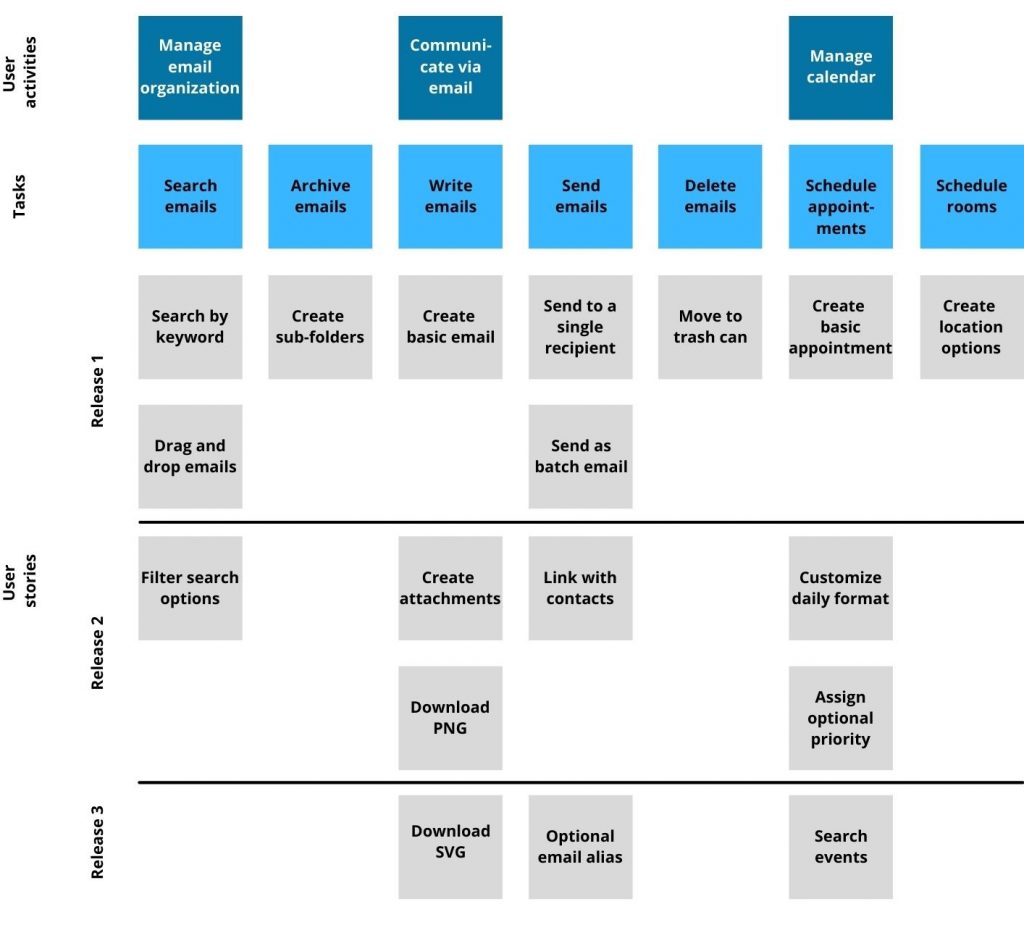
- User Story Mapping – Map tasks against user activities to see how features support user goals. According to StoriesOnBoard, user story mapping gives deeper insights than flat backlogs because it visualises the entire journey and emphasises user needs.
Remember, the MVP is the minimum viable, not an incomplete product. Minimum means focused on delivering the core value, not low quality. Resist the temptation to include features that are not essential to the core problem. Feature overload dilutes the learning purpose and prolongs development.
Step 4: Map the User Journey
User journey mapping outlines how users interact with your product from start to finish. It covers every touchpoint - from discovering your app to achieving the desired outcome. Mapping helps you design seamless flows and spot missing functionality.
- Onboarding and Registration – How do users find your product and sign up? Do they need to create an account, verify an email or link a payment method? Do you offer guest access?
- Core Actions – What steps must users take to accomplish the main task? For a marketplace, this may include searching, filtering and checking out; for a productivity tool, it may involve creating items, collaborating and tracking progress.
- Dashboards and Data – What information do users need to see at a glance? Dashboards summarise data, analytics and notifications.
- Payments and Transactions – If your product involves monetisation, design flows for payments, subscriptions, refunds and invoices.
- Admin and Support – Consider the workflows for administrators (managing users, settings, content moderation) and support features (help centre, chat, FAQs).
Mapping these flows ensures that wireframes and prototypes cover all critical interactions. User story mapping is particularly useful for identifying dependencies, sequences and user roles.
Step 5: Create Wireframes
A wireframe is a basic visual representation of a user interface. It outlines the structure and layout of each screen, focusing on element placement rather than colours or high‑fidelity design. The Interaction Design Foundation describes wireframes as akin to “blueprints for a house”. They help you plan and visualise designs, make adjustments based on feedback and save time and resources.
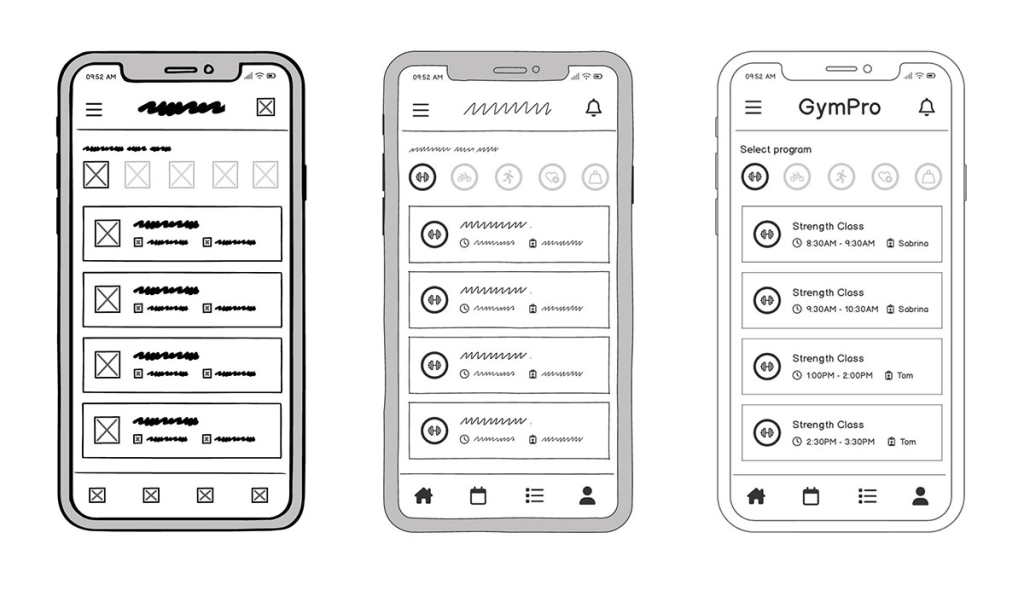
Wireframes enable you to:
- Test screen structure and navigation – Determine where buttons, menus and content should appear.
- Clarify information hierarchy – Ensure that important information stands out.
- Discuss design decisions – Provide a shared artefact for conversations among designers, developers and stakeholders.
- Identify gaps early – Catch missing elements or confusing flows before investing in high‑fidelity design or development.
Wireframes can be low‑fidelity (hand sketches, Balsamiq) or medium‑fidelity (greyscale digital mock‑ups). They do not include real content or polished visuals, focusing instead on structure. Once the structure is approved, you can move to more detailed design.
Step 6: Build a Clickable Prototype
A clickable prototype brings wireframes to life by simulating interactions. Users can click buttons, navigate between screens and experience flows similar to the planned product. Building a prototype has several benefits:
- Validate User Experience – Interactive prototypes show how users will move through the app. This reveals friction points and usability issues early.
- Gather Feedback – Stakeholders and testers can provide specific feedback when they interact with a realistic prototype. Asking users whether the main value is clear and whether they can complete key actions helps refine the design.
- Align Stakeholders – A prototype serves as a single source of truth for the team. It reduces misinterpretations and ensures everyone understands the scope and functionality.
- Reduce Development Risk – By testing flows before writing code, you avoid costly rework later. Rapid prototyping emphasises speed over perfection and feedback‑driven iteration.
Prototype fidelity ranges from low (simple clickable wireframes) to high (pixel‑perfect designs resembling the final product). Early prototypes may be black‑and‑white or greyscale. High‑fidelity prototypes include colours, fonts and micro‑interactions but still lack backend logic. Choose the fidelity based on what you need to learn—early on, low fidelity is faster; later, high fidelity provides more realistic feedback.
At this stage, involve designers and product managers. Tools like Figma, InVision, Sketch or Adobe XD can create interactive prototypes. To learn how our team can help you build prototypes efficiently, explore our MVP prototyping services page.
Step 7: Test the Prototype with Real Users
Testing is not a one‑time event - it is an ongoing conversation with your audience. According to Wednesday Solutions, user research during MVP development should combine qualitative interviews with behavioural analysis. Here’s how to test effectively:
- Usability Testing – Invite users from your target audience to interact with the prototype while observing their behaviour. Ask them to think aloud, describing what they expect to happen when they click. Record sessions (with permission) to analyse later.
- Stakeholder Reviews – Share prototypes with internal stakeholders (engineers, marketing, support) for feedback. They may catch technical feasibility issues or suggest important features.
- Feedback Sessions – Conduct post‑test interviews. Ask users whether the main value was clear, whether they could complete key actions, where they hesitated, what felt unnecessary and what would make the product more useful.
- Iterate – Use the feedback to improve the prototype. Rapid prototyping encourages fast cycles of design, test and learn.
Collecting early feedback prevents you from launching a product that confuses users. It highlights where to simplify flows, remove extraneous features or clarify content. Do not skip this step; ignoring user feedback is a common mistake that leads to building the wrong solution.
Step 8: Define MVP Scope and Technical Requirements
After testing the prototype and refining features, translate insights into a development roadmap. Documenting requirements ensures that developers, designers and stakeholders share an explicit understanding of what to build.
Functional Requirements
Describe the features and behaviours the MVP must support. For each user story, define inputs, outputs, rules, conditions and success criteria. Include acceptance criteria to guide testing.
Non‑Functional Requirements
Define performance, scalability, security and reliability standards. For example, specify response times, uptime requirements, data retention policies and encryption levels.
Architecture and Technical Assumptions
Outline the high‑level architecture: front‑end frameworks, back‑end technologies, databases, third‑party integrations and cloud infrastructure. Document assumptions about concurrency, data storage and failure scenarios.
User Roles and Permissions
List the different user types (e.g., basic user, admin, manager) and their permissions. Roles determine which features and data each user can access.
Data Structure and Integrations
Design the data model and APIs. Document integrations with external services (payment gateways, analytics platforms, email services, etc.) and describe how data will flow between components.
Security Requirements
Define authentication methods (e.g., OAuth, JWT), encryption in transit and at rest, compliance with GDPR or other regulations, and vulnerability management.
Analytics and Tracking
Decide which metrics to track (activation, retention, churn) and integrate analytics tools (e.g., Google Analytics, Mixpanel). Modall emphasises that the activation rate measures how many users experience the core feature, while retention rate indicates how many return after specific periods. Plan events to capture these actions.
Release Roadmap
Outline the schedule for developing, testing and launching the MVP. Set milestones for sprints, code reviews, QA, beta testing and release candidates. Having a roadmap makes the project manageable and transparent.
Documenting these requirements helps manage scope creep and aligns development with the validated vision. It also provides a clear reference for future iterations.
Step 9: Develop the MVP
Development turns your validated design into a working product. While the feature set is deliberately small, the code should meet production standards. Build with quality in mind so that your MVP can serve real users and form the foundation for future versions.
Choose the Right Development Approach
- Agile Methodology – Agile emphasises iterative development, customer collaboration and responding to change. Each sprint delivers a potentially shippable increment. Frequent demos and retrospectives keep the team aligned and ensure the product reflects user feedback.
- Tech Stack Selection – Select languages, frameworks and tools based on your requirements, team skills and long‑term goals. Consider using modern frameworks such as React or Vue for front‑end, Node.js or Python for back‑end, and cloud services like AWS or Azure for infrastructure. Low‑code/no‑code platforms may be suitable for simpler products or prototypes.
Build Core Components
- Frontend – Implement the user interface based on high‑fidelity designs. Use responsive layouts to support multiple devices (desktop, tablet, mobile).
- Backend – Develop APIs, business logic and data persistence. Implement authentication, authorisation and error handling.
- Database – Design schemas and set up data storage. Choose SQL or NoSQL databases based on data structure and scalability needs.
- Integrations – Connect to third‑party services (payments, messaging, mapping, analytics) via APIs.
- Admin Panel – Provide administrative functionality for user management, content moderation and system configuration.
- Infrastructure – Configure hosting, containerisation (e.g., Docker), CI/CD pipelines and monitoring.
- Analytics – Instrument events to track user actions. Set up dashboards to visualise activation rate (percentage of users who complete the core action), retention (percentage of users returning after a defined period), churn (percentage of users leaving) and revenue.
Throughout development, maintain close communication between product managers, designers and engineers. Ensure that each build meets the previously defined requirements and acceptance criteria.
Step 10: Test the MVP Before Launch
Testing ensures that the MVP works as intended, meets quality standards and provides a good user experience. The following types of testing are essential:
- Functional Testing – Verify that each feature works according to requirements. Test positive and negative scenarios, edge cases and error handling.
- Usability Testing – Validate that the product is intuitive and easy to use. Observe how real users interact with the application and refine the experience.
- Performance Testing – Check how the system behaves under load. Determine response times, throughput and resource usage. Identify bottlenecks and optimise.
- Security Testing – Assess vulnerabilities such as SQL injection, XSS and authentication weaknesses. Ensure that data is encrypted and access control is enforced.
- Cross‑Browser and Cross‑Device Testing – Ensure that the application works consistently across different browsers (Chrome, Firefox, Safari) and devices (iOS, Android, various screen sizes).
- Integration Testing – Test interactions between components and third‑party services. Simulate failures to ensure that the system degrades gracefully.
- User Acceptance Testing (UAT) – Invite selected users to test the near‑final product. UAT confirms that the MVP meets user expectations and business goals.
By thoroughly testing, you deliver a reliable product that reflects your brand and inspires confidence in early adopters. Testing also reveals technical debt and prioritises improvements for the next release.
Step 11: Launch the First Release Version
Launching your first release version is an important milestone, but it is not the end of your journey. Consider the following launch strategies:
- Beta Launch – Release the product to a small group of users (beta testers) under NDA or invitation. Use their feedback to fix bugs and improve UX.
- Pilot Launch – Introduce the product in a limited geographic area or to a single customer segment. This reduces risk and lets you observe usage patterns before scaling.
- Early Access or Limited‑Market Launch – Open the product to early adopters who sign up to test new features. Offer incentives or discounts to encourage adoption.
Remember that launching is the beginning of learning. Stay engaged with your early users, gather feedback and monitor key metrics. Use early engagement to build a community that feels invested in your product’s evolution.
Step 12: Measure Results and Plan the Next Release
After launch, measurement is crucial. Metrics provide objective evidence of whether your MVP solves the intended problem and where it needs improvement. Modall’s guide on MVP KPIs emphasises focusing on actionable metrics rather than vanity metrics. Key metrics include:
- Activation Rate – The percentage of users who experience the product’s core value. Calculate it as (users who complete the specific core action ÷ total sign‑ups) × 100. A ride‑sharing app’s core action might be booking a ride. Best‑in‑class SaaS products see activation rates above 30%.
- Retention Rate – The percentage of users who return after a defined period. Formula: ((users at the end of the period – new users) ÷ users at the start) × 100. Benchmarks suggest average Day 1 retention rates around 25–28% and Day 30 retention rates around 6–8%.
- Customer Acquisition Cost (CAC) – Total marketing spend divided by the number of new paying customers. Keeping CAC low is critical in the early stages; focus on organic growth before spending heavily on paid ads.
- Client Lifetime Value (CLV) – The total revenue expected from a customer over their relationship. A healthy business aims for LTV to be at least three times higher than CAC.
- Monthly Recurring Revenue (MRR) / Average Revenue per User (ARPU) – These metrics track predictable revenue. ARPU helps you understand if you are attracting high‑value or low‑value customers.
- Churn Rate – The percentage of users who leave the product over a given period. Targets vary by industry; for SMB SaaS, 3–7% monthly churn is typical.
- Net Promoter Score (NPS) – Measures customer loyalty by asking how likely users are to recommend the product. An NPS above 30 is considered great; above 70 is excellent.
In addition to quantitative metrics, collect qualitative feedback through interviews, surveys, A/B tests and usability tests. Qualitative data explains why users behave as they do, enabling you to make informed decisions.
Use these insights to prioritise improvements for the next release. Update your roadmap, refine features, address user pain points, and experiment with new ideas. Continual measurement and iteration turn your MVP into a product that grows with user needs and market trends.
Common MVP Prototyping Mistakes to Avoid
- Building Too Many Features – Overbuilding increases costs and dilutes the core value. MVP‑development.io warns that feature overload obscures the main value and creates technical debt. Focus on essentials and leave extras for later.
- Skipping User Research – Assumptions can be deadly. Wednesday Solutions emphasises that user research is essential to uncover genuine needs. Skipping research leads to misaligned products.
- Confusing MVP with Prototype – Prototypes explore the user experience and are not production ready, while MVPs validate market demand. Treating a prototype as an MVP can lead to poor user experience and technical issues.
- Ignoring Technical Feasibility – A PoC validates that your technology stack can handle the problem. Skipping this may result in unsolved technical hurdles later.
- Treating MVP as a Low‑Quality Product – Minimum means focused, not sloppy. Users expect reliability and value even from an MVP. Meduzzen’s article emphasises that modern users expect useful, reliable solutions. An unreliable MVP damages your reputation.
- Launching Without Analytics – If you cannot measure activation, retention or churn, you cannot learn. Instrument tracking from day one.
- Designing Only for Investors – Building features to impress investors rather than serving users leads to misalignment. While investor interest matters, product‑market fit matters more.
- Failing to Plan the Next Release – An MVP is the first step in an ongoing journey. Without a roadmap for continuous learning, you may stall after launch. Plan for future iterations based on evidence.
How Long Does the MVP Prototyping Process Take?
Timelines vary based on product complexity, team size, integrations and regulatory requirements. However, several reputable sources provide realistic ranges:
- Discovery and Research (1–3 Weeks) – Forcoda’s timeline indicates that discovery and scoping involve user research, competitive analysis and feature prioritisation. It usually takes 1–2 weeks. We have an article on how to do it the best.
- Wireframes and User Flows (1–2 Weeks) – During this phase, you create user flows, wireframes and early UX design. Vivasoft notes that design and prototyping often take 7–10 days.
- Clickable Prototype (2–4 Weeks) – Building high‑fidelity prototypes and validating them with real users may take 2–4 weeks. Rapid prototyping emphasises speed but also requires iteration.
- MVP Scope and Roadmap (1–2 Weeks) – After testing the prototype, you document requirements and plan the MVP. This phase is crucial for aligning the team and budgeting.
- MVP Development (8–16+ Weeks) – Development timelines vary widely. Forcoda notes that the development phase ranges from 4–10 weeks, but integration tasks can add 1–2 weeks per integration. Vivasoft suggests 4–8 weeks for development. Complex products with multiple integrations or strict compliance requirements may take longer.
- Testing and Launch Prep (2–3 Weeks) – QA, user acceptance testing, performance and security checks and infrastructure setup usually take 2–3 weeks.
Overall, a typical MVP prototyping and development process spans 12–26 weeks. This range provides enough time to validate, design, build and test without rushing quality. However, timelines depend on scope. Startups building simple apps may finish sooner, while enterprise products or regulated industries will require more time.
Conclusion
The MVP prototyping process transforms uncertainty into evidence. By distinguishing between proofs of concept, prototypes, MVPs and first release versions, you can apply the right tool at the right stage. Research, prioritisation, user journey mapping, wireframing and prototyping ensure that you build a product people need. Testing and analytics turn subjective opinions into measurable insights. The result is a focused, reliable first release that reduces risk, accelerates time to market and lays the groundwork for continuous learning.
Remember, minimum does not mean low quality - it means concentrated value. The goal of an MVP is not to cut corners, but to learn faster than your competitors. When built through a disciplined prototyping process, an MVP becomes your best experiment: it validates the problem, engages users and informs the roadmap. With the right partner, you can navigate this journey confidently and build products that grow based on real feedback rather than assumptions.
Leave a Comment