
The operational architecture of small and medium-sized enterprises is undergoing a fundamental transition from static, rule-based process structures to adaptive, probabilistic systems. Traditional digital process automation was built on strict, deterministic "if-then" parameters, which inevitably broke down when confronted with unstructured inputs such as conversational emails, varying invoice formats, or unstandardized customer support queries. Modern automation platforms, by contrast, utilize cognitive software agents capable of interpreting intent, maintaining contextual memory, and executing complex, multi-step tasks.
Choosing the optimal technology stack requires a rigorous analysis of each platform's architectural alignment, license fees, limits, and operational boundaries.
| Platform | Core Licensing Tiers & Pricing | User & Seat Limits | Native Integration Ecosystem | G2 Customer Rating | Economic Model Constraints |
| HubSpot Breeze AI | Smart CRM Starter: $10 - $20/month per seat; Professional: $50/month per seat. | Seat-based access limits; Starter is tailored for small teams. | Unifies marketing, sales, service, content, and commerce hubs natively. | Not independently rated; tied to Hub ratings. | Actions such as data enrichment and agent conversations consume transactional credits. |
| monday.com Work OS AI | Free basic tier; Paid tiers starting from $9/seat/month. | Subject to seat-based contract structures; offers 14-day trials. | Core work management boards, workdocs, and pre-built SaaS integrations. | 4.7 out of 5 stars. | Operational velocity is bound by monthly AI action credits assigned to plans. |
| Airtable AI | Standard database plans; AI capability pricing varies by plan tier. | Workspace permission structures restrict configuration access. | Merges relational structured database tables with external APIs. | Not isolated; tied to parent database platform. | Custom Agent Autofill relies on transactional credits; Basic Autofill has no extra credit fees. |
| QuickBooks Intuit Assist | Essentials: $75/month ($37.50 promo); Plus: $115/month; Advanced: $275/month. | Essentials: 3 users; Plus: 5 users; Advanced: 25 users. All include accountant access. | Intuit ecosystem, bank feeds, and standard e-commerce point-of-sale platforms. | Not isolated; rated within general financial suite. | Advanced capabilities like cash flow forecasting require higher tier upgrades. |
| Zapier Agents / Central | Pricing is tied to general task volume; AI steps count as standard tasks. | Workspace-wide administrative permissions govern execution. | Connects directly to over 8,000 to 9,000 cloud applications. | Not isolated; rated within Zapier ecosystem. | Task-based billing models escalate costs linearly with workflow execution volume. |
| Make.com AI | Free basic tier; Paid plans scale by monthly operational volume. | Enterprise security tiers with role-based access controls. | Connects to 3,000+ pre-built applications and custom APIs. | 4.7 out of 5 stars. | Complex scenario debugging and heavy multi-modal execution require higher tiers. |
| Microsoft Power Automate | Included with M365 Business; Premium is $15/user/month. | Per-user licenses govern both cloud and desktop instances. | Deeply embedded in Microsoft 365, Teams, Excel, and SharePoint. | Not isolated; rated within Power Platform. | AI Builder credits are consumed rapidly at scale, leading to additional costs. |
| Notion AI | Add-on for Business ($20/user/month) or Enterprise ($30/user/month). | Workspace owner admin rights required for external connections. | Slack, Google Drive, Microsoft Teams, SharePoint, and Jira. | #1 G2 rating in Enterprise Search and Document Synthesis. | AI Connectors require 72 hours for initial indexing and data ingestion. |
Domain-Specific AI Agents and Native Capabilities
HubSpot Breeze AI
Breeze AI functions as the central intelligence engine for the HubSpot Customer Platform, embedding agentic automation across all six functional hubs. Rather than operating as an isolated chat widget, the Breeze Assistant uses contextual, role-aware CRM data to generate copy, summarize deals, and answer product questions.
Operational efficiency is driven by targeted virtual teammates :
- The Customer Agent utilizes localized customer service knowledge bases to resolve inbound support tickets automatically and on-brand, handling requests like order status checks and password resets.
- The Prospecting Agent continuously monitors target accounts for intent signals, aggregates contact information directly in HubSpot, and automatically drafts personalized outreach campaigns.
- The Company Research Agent (Beta) prepares sales representatives for meetings by pulling account details, recent news, and historical CRM touchpoints.
- The Customer Health Agent (Beta) reviews usage patterns, ticket histories, and CRM records to assess account churn risk and draft proactive outreach.
- The Data Agent identifies duplicate records, flags inconsistent data entries, and implements automated cleanup workflows.
These specialized workflows deliver measurable business value. 1 One year after implementation, small businesses using these automated tools observe an average increase of 129% in lead generation, a 36% improvement in closed deals, and a 37% increase in support ticket closure rates. 1 Marketing teams can also utilize the Content Remix tool to automatically transform a single piece of long-form content into social media updates, marketing email drafts, and targeted landing pages. 2
monday.com Work OS AI
The monday.com Work OS injects artificial intelligence directly into the planning and execution stages of project lifecycles. Its conversational Sidekick assistant translates simple text prompts into fully structured project boards, complete with customized columns and automated operational steps.
The platform's virtual project management teammates automate daily coordination :
- The Project Planner analyzes project briefs to construct work breakdown structures, identify missing task dependencies, and estimate timelines.
- The Workload Balancer reviews capacity and deadlines across the team, automatically suggesting reassignments to keep work evenly distributed.
- The Milestone Tracker monitors real-time task progress, alerting owners to potential delays before they impact delivery dates.
- The Blocker Resolver identifies stalled tasks, runs root-cause diagnostics, and escalates blockers to the correct team members.
- The Decision Logger captures meeting transcripts and automatically logs key decisions and follow-up tasks to project boards.
- The Risk Analyzer flags tasks approaching risk thresholds, providing teams with early warning signals and contextual suggestions.
Additionally, the Monday Vibe app builder enables non-technical builders to convert natural language descriptions into custom, secure workspace applications. This simplifies process management while removing standard administrative burdens.
Airtable AI
Airtable operates as the operational backbone of a business by embedding generative model prompts directly within database records. This architecture ensures that AI-driven classifications, content generation, and document parsing reside directly alongside the organization's core data, streamlining the transition from data input to downstream action.
These custom AI Field Agents run background actions at the record level :
- Data Classification Agents analyze incoming text fields, such as customer feedback, and automatically tag them by category, sentiment, and urgency.
- Content Generation Agents write custom product descriptions, social copy, and email responses using structured database records as reference material.
- Research and Enrichment Agents browse the web to enrich CRM records with details about company size, industry, recent news, and LinkedIn profiles.
- Document Analysis Agents parse uploaded contracts, invoices, and resumes to extract line items, key dates, and technical skills.
Using Airtable's native automation builder, these structured records can trigger instant updates across downstream channels like Slack, email, or third-party CRMs. This approach reduces review cycles, normalizes unstandardized data, and cuts down on manual data entry.
QuickBooks Intuit Assist
QuickBooks uses machine learning algorithms to automate financial administration and transaction categorization. Intuit Assist provides real-time oversight of financial health, enabling small businesses to maintain clean, compliant ledgers with minimal administrative work.
The platform's core automation capabilities include :
- Accounting AI matches direct deposit payrolls, tax payments, and vendor invoices automatically, enabling single-click bank reconciliation. On average, 45% of customers save 12 hours each month on monthly bookkeeping by using these AI-powered bank feeds.
- Anomaly Detection scans Balance Sheets and Profit & Loss reports to identify duplicate transactions, miscategorizations, and deferred revenue discrepancies.
- Business Tax AI tracks tax deductions year-round based on historical transaction categorization to ensure compliance and maximize savings.
- Payments AI analyzes outstanding balances and automatically schedules personalized invoice reminders, which helps companies collect payments an average of five days faster.
- Finance AI analyzes cash flow patterns and supply chain variations to generate predictive models and trend analyses for month-end close reviews.
By automating transaction matching, receipt verification, and trend analysis, QuickBooks helps small businesses maintain accurate, CPA-ready ledgers.
Zapier Agents and Central
Zapier Agents represent an evolution from linear, rule-based app connections to goal-oriented, multi-step automation. Users build these agents on a visual canvas using plain English prompts. The platform's built-in prompt assistant enhances instructions, while version control preserves historical setups.
These agents leverage key automation features :
- Multi-App Execution grants agents access to specific triggers and actions across a tech stack of 8,000+ to 9,000+ connected applications.
- Live Data Integration allows agents to reference up-to-date data stored in Google Drive, Notion, Box, or Airtable to answer queries or run tasks.
- Agent-to-Agent Calling enables agents to communicate and delegate sub-tasks to other agents, simulating a team of specialized virtual workers.
- Model Context Protocol (MCP) provides a code-free way to connect external models (e.g., ChatGPT, Claude) with app actions.
- AI Guardrails detect personally identifiable information (PII), toxic language, prompt injections, and negative sentiment to ensure compliance.
Zapier's Chrome extension also allows users to trigger these agents from any active browser tab, bringing automation directly into daily web browsing.
Make.com AI
Make.com provides a visual automation platform where teams can build, test, and run complex process automations and custom AI agents. The platform treats AI as a core, production-grade component, offering visual controls and deep customizability.
Make.com’s core automation and agent capabilities include :
- Visual Scenario Editor lets builders drag, drop, and connect modules to design multi-step workflows with built-in data manipulation tools.
- In-Canvas Chat allows developers to test prompts and chat with agents directly inside the editor to speed up setup and debugging.
- Reasoning Panel shows the exact decision-making steps an agent took during a run, providing a transparent audit trail for compliance.
- Robust Flow Controls support sophisticated conditional branching, error handling, retries, and data parsing to ensure system resilience.
- Make Grid maps all active agents, webhooks, and workflows in one visual view to help administrators manage sprawl and spot bottlenecks.
Using the Model Context Protocol (MCP), Make.com serves as a centralized orchestration hub. It securely connects internal and external business tools, allowing teams to scale AI automation across their entire business infrastructure.
Microsoft Power Automate
Microsoft Power Automate provides a comprehensive suite that spans digital process automation (DPA), robotic process automation (RPA), and generative AI models. Copilot assists in building flow structures from natural language instructions. The platform's native AI Builder offers pre-built and custom-trainable models for document parsing, text classification, and predictive forecasting.
A key differentiator is Power Automate Desktop, which records and replays user-interface actions on legacy Windows software lacking APIs—a critical capability for businesses relying on older database systems. Because Power Automate executes entirely within the Microsoft 365 tenant, it ensures high security, centralized governance, and direct compliance with data protection standards.
Notion AI
Notion AI functions as a centralized knowledge base, writing assistant, and workspace search engine. It connects directly with external work tools like Slack, Google Drive, Jira, GitHub, Teams, and SharePoint. Through these secure connectors, Notion AI searches across siloed business files and communications to answer questions, cite source documents, and draft reports.
For data management, Notion's database autofill provides Basic Autofill for localized summarization and Custom Agent Autofill to run multi-step tasks, execute web searches, and apply conditional data logic. This allows small businesses to quickly gather, synthesize, and compile actionable knowledge bases, bridging the gap between raw data storage and daily operational execution.
Off-the-Shelf SaaS Integration vs. Custom Agentic Development
When planning automation projects, small businesses must weigh the trade-offs between utilizing off-the-shelf SaaS AI embeddings and developing custom, agentic workflows.
| Evaluation Dimension | Off-the-Shelf Embedded SaaS AI | Custom Agentic Development |
| Primary Advantage | Immediate time-to-value with zero setup or engineering overhead. | High operational flexibility and customized data routing. |
| Data & Governance | Natively inherits existing SaaS permissions, security logs, and compliance controls. | Custom database schemas, self-hosted deployment options, and complete data ownership. |
| Model Control | Limited to the vendor's selected model; no custom prompt adjustments. | Custom multi-model routing; direct API key integration and prompt versioning. |
| Cost Scaling | Per-user subscription fees; pricing scales with seat count. | Execution-based pricing; self-hosting options eliminate per-user licensing fees. |
| Workflow Scope | Bound to the vendor's product ecosystem and data schema. | Multi-system orchestration spanning legacy and cloud software. |
Custom AI development allows organizations to select and optimize model backends for specific use cases. Businesses can use fast, lightweight models (e.g., GPT-4o mini, Gemini Flash) for simple tasks like text classification and routing, while reserving highly capable, larger models (e.g., Claude 3.5 Sonnet, o1) for complex document analysis and calculations.
| Model Family | Key Architectural Strength | Optimal Business Use Case | Context Windows | Ecosystem Integration | Strategic Trade-Offs |
| OpenAI GPT (o-series, GPT-4o) | Step-by-step logic, multi-step code execution, sandbox data processing. | Complex financial calculations, data analytics via CSV, automated coding. | 128K tokens. | Broad API connections, custom GPT Store. | Slower latency for complex reasoning models; potential drift on long, unstructured tasks. |
| Anthropic Claude (Sonnet/Opus) | High instruction-following, natural writing tone, consistent behavior. | Contract reviews, marketing copy, customer-facing persona enforcement. | 200K (Work) / 500K+ (Enterprise). | Strong workspace search, Slack & Google Drive integrations. | Smaller native app marketplace; custom integrations require developer effort. |
| Google Gemini (Pro/Flash) | Massive context processing, native Google Workspace integration, multimodal. | High-volume support ticket analysis, video/audio context processing. | 1M+ tokens. | Deeply embedded in Google Docs, Sheets, and Gmail. | Underperforms on highly creative writing or specific, complex structural prompting. |
Transitioning to custom development requires moving from deterministic to probabilistic process logic. Traditional workflows rely on strict string matching that breaks when formats change. Probabilistic setups leverage language models to evaluate context and adapt paths dynamically. However, because probabilistic systems introduce variability, developers must implement deterministic validation rules around model outputs.
Functional Use Cases across Business Domains
Client Acquisition, Sales Prospecting, and Lead Enrichment
Manual prospecting and lead enrichment often distract sales teams from core customer interactions. This process can be automated using an integrated chain of HubSpot Breeze, Zapier Agents, and Airtable AI.
When a new lead submits a web form, the submission triggers a multi-app workflow. A Zapier Agent searches the web and social media networks to aggregate company details, recent funding news, and industry classifications. This unstructured research is sent to Airtable AI, which categorizes the data, normalizes messy entries into structured database records, and assigns a lead tier based on ideal customer profile (ICP) parameters.
Simultaneously, the HubSpot Prospecting Agent monitors the lead’s on-site behavior and buyer intent signals to draft personalized email copy. The qualified contact, enriched records, and draft outreach email are then synced to the CRM, and a notification containing the lead's strategic score is posted to Slack, letting the sales team review and send the email with one click.
Customer Support Triage and Conversational Resolution
Managing a high volume of inbound inquiries often overwhelms small customer service teams. An organization can address this challenge by deploying a customer service automation loop using Notion AI and HubSpot Customer Agents.
When a customer submits a support ticket, the HubSpot Customer Agent parses the content to classify the request (e.g., billing issue, bug report, shipping update) and evaluate the sentiment. If the inquiry is routine, such as a request to reset a password or check order status, the agent resolves the query autonomously using CRM context. For complex technical questions, the ticket is routed to a support Slack channel.
There, a Notion AI Support Bot scans the company’s internal product documentation and historical Jira tickets to draft a detailed troubleshooting response, citing the exact documents consulted. The support engineer reviews the draft, makes any necessary adjustments, and sends the resolved response, logging the interaction in the central knowledge base for future model refinement.
Check out a related article:
How Offline Businesses Use AI in 2025-2026
Project Lifecycle Management and Resource Optimization
Administrative overhead during project execution—such as timeline adjustments, meeting logs, and status updates—often distracts delivery teams from core technical tasks. Implementing monday.com Work OS AI and Notion AI Meeting Notes resolves this operational friction.
During a project kickoff meeting, the team records the call. The audio transcript is ingested by Notion’s AI Meeting Notes block, which automatically extracts action items and assigns owners. These tasks are synced directly to monday.com project boards, where the Project Planner agent designs a structured timeline, identifies task dependencies, and maps the timeline against historical data.
During execution, the monday.com Workload Balancer evaluates team capacity, suggesting task reassignments when bottlenecks occur, while the Risk Analyzer monitors milestone progression. When a developer completes a task, the status change triggers monday.com’s AI custom workflow to draft a status update for the client, sending it automatically.
Financial Bookkeeping and Automated Cash Flow Management
Manual transaction ledger matching, invoice collection, and trend analysis consume valuable accounting resources. Small businesses can automate this ledger lifecycle using QuickBooks Intuit Assist and accounting automation models.
QuickBooks Accounting AI connects directly to bank feeds and e-commerce platforms like Shopify or Amazon, automatically posting matched direct deposits and payroll tax payments. As receipts are uploaded, Accounting AI parses invoice line items, matches them to ledger accounts, and flags anomalies. Concurrently, QuickBooks Payments AI reviews customer accounts to identify past-due balances and issues personalized invoice reminders.
At month-end, Finance AI runs root-cause assessments across Balance Sheets and Profit & Loss statements to highlight trend irregularities and deferred income anomalies. These findings are compiled into a comprehensive report for review by the company's CPA, ensuring compliance and tax readiness with minimal manual intervention.
Structural and Technical Implementation Failures
Implementing AI-driven automation without proper guardrails can lead to process instability and system failures.
- Unchecked Autonomy and Missing Human Checkpoints: Deploying highly autonomous agents to send client-facing communications or update financial ledgers without human verification introduces significant operational risk. System hallucinations, data drift, or prompt exploits can result in incorrect billing, security vulnerabilities, or off-brand customer interactions.
- High-Entropy Source Data: Automated systems require structured, clean, and consistent reference data. If core CRM records, product descriptions, or inventory fields contain missing data exceeding 15%, automated data classification, matching algorithms, and predictive routing will yield inaccurate results.
- Brittle Output Parsing and Missing Fallbacks: Relying on unstructured language model outputs to drive database updates or API requests can break downstream workflows. If a downstream webhook expects a strictly structured JSON response, but the model occasionally returns markdown code blocks or conversational text, the parser fails and halts the workflow.
- Unmonitored Credit and Token Consumption: Running recursive, multi-step loops without volume limits or cost alerts can lead to sudden platform charges. A recursive automation loop or an agent repeatedly calling other agents can quickly exhaust available transactional balances.
- Data Governance and Compliance Non-Compliance: Processing sensitive client data (e.g., financial ledger entries, personal contact information, proprietary documents) through external consumer-grade AI models without a formal Data Processing Agreement (DPA) violates basic data privacy standards.
Strategic Deployment Roadmap for Small Business AI Integration
Implementing AI-driven automation successfully requires a phased, progressive approach. This systematic playbook details a structured, 6-month digital transformation roadmap.
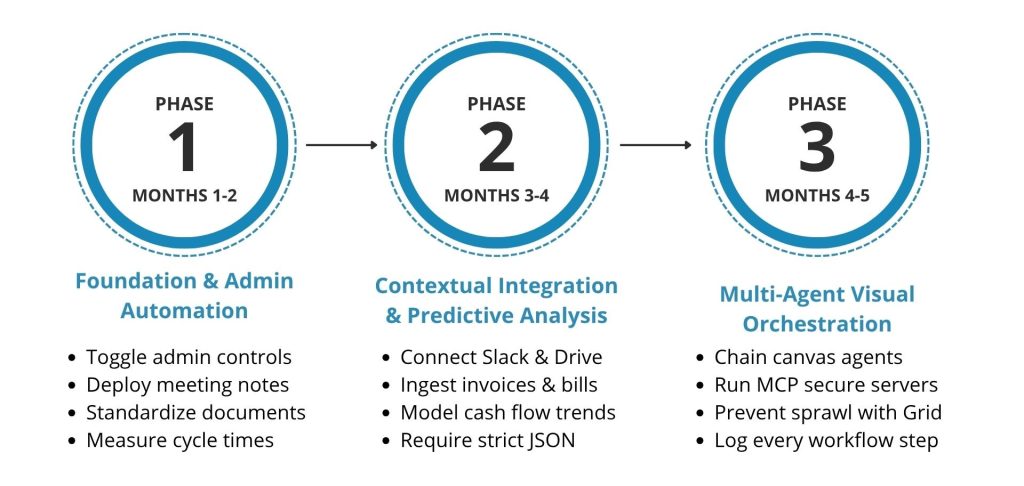
Phase 1: Foundation and Low-Stakes Administrative Automation (Months 1–2)
The objective of this phase is to establish technical foundations, security protocols, and operational guardrails by automating low-risk, internal administrative tasks.
- Configure Admin Controls: Access workspace administration settings (e.g., monday.com customization panels or Notion settings) to enable developer tools, set API access rules, and enforce single sign-on (SSO) and two-factor authentication.
- Deploy Meeting Notes and Summarization: Add the AI Meeting Notes block to active database templates, linking calendars to automatically transcribe and summarize team syncs, and log decisions directly to project boards.
- Standardize Internal Documentation: Integrate Notion AI or monday sidekick to automatically analyze internal drafts (e.g., statements of work, press releases) against the company's official style guide pages using
@mentions. - Establish Performance Baselines: Document manual task cycle times (CM) to measure operational velocity and demonstrate concrete efficiency improvements prior to broader automation rollouts.
Phase 2: Deep Contextual Integrations and Predictive Analysis (Months 3–4)
The objective of this phase is to connect primary data silos, ingest semi-structured and unstructured documents, and utilize predictive models.
- Deploy Safe Enterprise Connectors: Authorize Notion AI Connectors for Slack, Google Drive, and Jira, enabling cross-departmental search capabilities within localized knowledge vaults.
- Automate Document Processing: Configure Power Automate AI Builder or Airtable Field Agents to ingest incoming PDF invoices, receipts, or contracts. Use custom-trained models to extract critical values (dates, line items, amounts) and map them to structured database fields.
- Model Financial Forecasts: Connect QuickBooks Intuit Assist to active bank feeds, configuring automated transaction rules and running weekly cash flow forecasts based on historical spending trends.
- Implement Structured Prompting Standards: Standardize custom model prompts by requiring specific formats (e.g., JSON schemas) and incorporating clear boundaries like XML tags (
<context>... </context>) to minimize output errors.
Phase 3: Autonomous Multi-Agent Orchestration and Closed-Loop Operations (Months 5–6)
The objective of this phase is to deploy multi-agent orchestration across custom visual canvases, establishing autonomous systems with human-in-the-loop checkpoints.
- Orchestrate Multi-Agent Systems: Build goal-based agents using Make.com or Zapier Agents, utilizing agent-to-agent delegation to handle multi-step workflows.
- Deploy the "Gather, Think, Check, Act" Design Pattern: Configure workflows on a visual canvas where the model gathers data, structures it, runs validation checks, and prompts a human for approval before executing external actions.
- Integrate Proprietary Systems via MCP: Deploy Model Context Protocol (MCP) servers to securely connect legacy on-premise systems with external LLM platforms.
- Establish Centralized Governance: Utilize Make Grid or the Zapier Agent activity dashboard to monitor execution logs, detect bottlenecks, verify data residency compliance, and prevent automation sprawl.
Nuanced Strategic Conclusions
Implementing AI-driven automation successfully does not require adopting a single, monolithic system. Instead, the most resilient operational design utilizes a structured database (such as Airtable or a Smart CRM) as the central spine of the business , connected to a visual orchestration hub (like Make.com) that integrates specialized LLM capabilities based on the specific task.
By maintaining strict human-in-the-loop validation for customer-facing or financially sensitive actions, small businesses can achieve the operational scale of larger enterprises while remaining agile and maintaining tight quality control.
Leave a Comment