
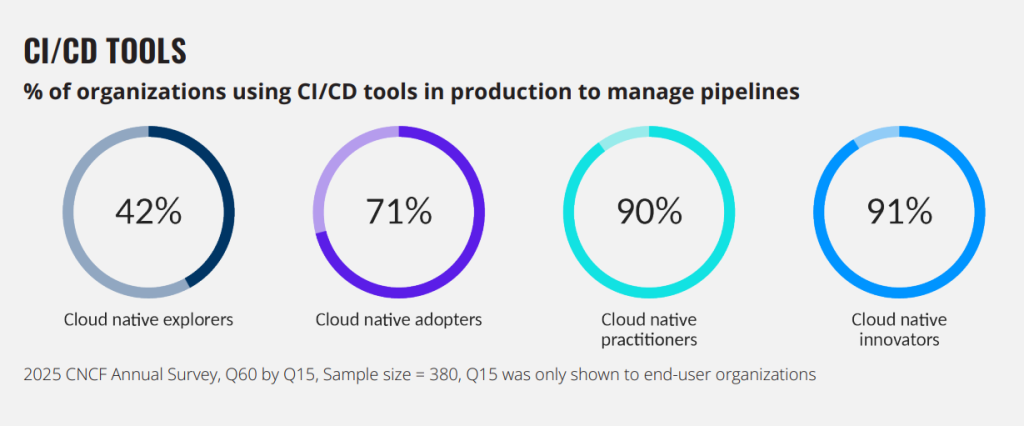
In modern software engineering, rapid code delivery is no longer the sole metric of organizational success. High-performing engineering teams must balance release velocity with rigorous software quality, robust cloud cost controls, strict regulatory compliance, and a seamless developer experience. This shifting landscape has transformed continuous integration and continuous delivery from simple build-and-deploy tasks into a core competitive advantage. According to the Cloud Native Computing Foundation (CNCF), continuous integration and continuous delivery (CI/CD) acts as the essential gateway to cloud-native maturity, with adoption reaching 91% among advanced innovators.
To achieve elite performance levels, technology leaders require pipelines that do not merely execute shell scripts, but rather orchestrate the build, test, scan, package, deploy, and rollback phases across multi-cloud, hybrid, and Kubernetes environments. Selecting the right CI/CD pipeline automation tools is an architectural decision that directly impacts developer friction, cloud spend, and operational risk.
This guide provides a comprehensive, technically grounded analysis designed to help Chief Technology Officers (CTOs), engineering directors, and platform architects evaluate, choose, and design a modern, highly secure pipeline architecture tailored to their organization's maturity.
Architectural Evaluation Criteria for CI/CD Pipeline Automation Tools
Selecting a software delivery automation platform based solely on vendor market share or default cloud provider integrations often leads to vendor lock-in, inflated running costs, or scaling bottlenecks. Before committing to a tool, platform engineering teams must establish a rigorous evaluation framework based on key operational pillars:
- Source Control Management (SCM) Integration: The pipeline engine must integrate natively with the SCM provider (e.g., GitHub, GitLab, Bitbucket) to leverage event-driven webhooks, security contexts, and pull request statuses.
- Build and Test Optimization: Performance during continuous integration relies heavily on the platform's support for concurrent step execution, distributed build matrices, and sophisticated caching of compiler dependencies and container layers.
- Container and Kubernetes Support: As microservices dominate modern topologies, the chosen CI/CD automation tools must seamlessly handle image compilation, register artifacts securely, and deploy natively to Kubernetes clusters using tools like Helm or Kustomize.
- GitOps and Declarative Delivery: Modern continuous delivery tools are shifting from imperative push models to declarative, pull-based reconciliation loops. This ensures cluster states are continuously aligned with a single source of truth in Git.
- Secrets and DevSecOps Workflows: The toolchain must enforce security posture at every step, incorporating static application security testing (SAST), software bill of materials (SBOM) generation, artifact signing, and dynamic policy gates.
- Pipeline-as-Code and Reusability: Workflows must be defined declaratively in version-controlled configuration files, allowing teams to build reusable templates, maintain version control, and standardize pipelines across hundreds of repositories.
- Runner and Agent Scalability: Organizations must evaluate the operational overhead of the platform's runner model, comparing cloud-managed runners with self-hosted agents that autoscale inside private networks to maintain isolation and reduce data egress.
- Total Cost of Ownership (TCO): Licensing fees represent only a fraction of total cost. A complete financial analysis must calculate direct compute runtime costs, configuration overhead, and indirect developer wait times resulting from bottlenecked queues.
In-Depth Analysis of Leading CI/CD Pipeline Automation Tools
A mature DevOps culture relies on choosing the right tool for the right environment. Below is an exhaustive evaluation of the leading CI/CD automation tools, analyzing their architectures, strengths, limitations, and pricing models.
GitHub Actions
GitHub Actions has become highly popular within the open-source and startup ecosystems, securing a 68% adoption rate in recent years. By hosting workflows inside the .github/workflows directory of the SCM repository, it eliminates the need to run separate coordination servers.
- Architectural Fit & Developer Experience: The platform runs on YAML-defined workflows triggered directly by SCM events such as pull requests, tag creations, or issue updates. Developer experience is elevated by the GitHub Actions Marketplace, which contains over 20,000 reusable community actions. This reduces the need to write custom integration scripts for external cloud providers or security scanners.
- Enterprise Governance & Cost at Scale: While highly efficient for mid-sized workloads, larger enterprises often struggle with decentralized pipeline configurations and complex RBAC policies across thousands of repositories. Compute costs can also scale rapidly. Under pricing adjustments, GitHub-hosted runner charges include a $0.002 per-minute platform fee alongside updated base rates: x64 Linux runners cost $0.006 per minute, Windows runners cost $0.010 per minute, and macOS runners cost $0.048 per minute.
- Self-Hosted Runner Economics: To optimize cost and maintain network isolation, many organizations rely on self-hosted runners. However, starting in March 2026, GitHub introduced a $0.002 per-minute platform charge for self-hosted runner execution routed through its cloud platform, changing the financial dynamics of running large private runner fleets.
GitLab CI/CD
GitLab CI/CD operates as an all-in-one DevSecOps platform rather than a standalone SCM tool with added runners. It has emerged as the fastest-growing enterprise delivery platform, experiencing a +34% YoY increase in enterprise adoption.
- Architectural Fit & DevSecOps Platform: GitLab’s single-application approach combines code hosting, package registries, continuous integration tools, built-in security dashboards, and compliance frameworks into a unified database and interface. Features like "Auto DevOps" can automatically generate compliant, production-ready pipelines for 60% to 70% of standard projects without requiring manual custom configurations.
- Governance & Compliance: For highly regulated sectors like financial technology and healthcare, GitLab’s built-in compliance frameworks and security scanners (SAST, DAST, container scanning) offer a unified audit trail that reduces compliance mapping overhead.
- Pricing & Lock-In: Organizations can choose between GitLab SaaS and GitLab Self-Managed. SCM and CI compute minutes are divided across tiers: the Free plan offers limited features; the Premium plan is priced at $29 per user per month, providing advanced analytics and merge trains; and the Ultimate plan costs $99 per user per month to unlock the full enterprise compliance and security suite. This high-tier pricing represents a significant commitment, and migrating off GitLab's tightly coupled ecosystem can introduce high refactoring costs.
Jenkins
Jenkins remains a major player in software delivery automation. Despite losing overall market share at a rate of -8% YoY, it continues to power CI/CD workflows for 40% of enterprises and remains deeply embedded in 80% of the Fortune 500.
- Architectural Fit & Customizability: Jenkins utilizes a controller-agent model built on an open-source Java foundation. Its primary strength is its ecosystem of over 1,800 community-contributed plugins, allowing it to integrate with nearly any legacy version control system, on-premises testing suite, or obscure build target. Workflows are configured via Jenkinsfiles using Groovy, a full programming language. This allows platform engineers to write highly complex conditional branches, loops, and custom pipeline controls that standard YAML cannot easily represent.
- Operational Burden: This flexibility comes with a high maintenance overhead, often referred to as the "Jenkins tax". Managing plugin deprecation cycles, patching recurring security vulnerabilities, and scaling static runner nodes requires dedicated DevOps engineering hours.
- Modernizing Jenkins: To address scalability issues, modern platform engineering teams are shifting away from static VM controllers. Deploying Jenkins on Kubernetes with dynamic, on-demand agent provisioning has become the standard architecture, representing 60% of new Jenkins setups.
CircleCI
CircleCI is a managed, cloud-native continuous integration engine designed for fast build times, minimal server management, and excellent developer workflows.
- Architectural Fit & CI Optimization: CircleCI excels at optimizing compilation and testing feedback loops. It natively supports Docker Layer Caching (DLC), test splitting, and concurrent execution classes that allow pipelines to scale compute vertically and horizontally. Configuration is managed via a centralized YAML syntax that integrates with GitHub, GitLab, and Bitbucket.
- Pricing Model: CircleCI uses a credit-based consumption model. The Performance plan starts at $15 per month, which includes 30,000 credits and covers 5 active users. Additional user seats cost $15 per month, and teams purchase blocks of credits to scale their compute resources. Larger configurations require the Scale or Server (self-hosted) plans.
- Limitations: While highly optimized for continuous integration (compiling, linting, and running test suites), CircleCI does not offer a native, declarative continuous delivery engine. Organizations with complex Kubernetes topologies or multi-cluster GitOps setups must pair CircleCI with specialized delivery operators.
Azure Pipelines
Azure Pipelines is the central engine of the Azure DevOps suite, providing automated deployment pipeline capabilities across multiple clouds and operating systems.
- Architectural Fit & Microsoft Synergy: For organizations standardized on Microsoft platforms, Azure Pipelines offers tight, out-of-the-box integration with Azure Active Directory (Entra ID), Azure Kubernetes Service (AKS), and Azure Key Vault. Unlike fragmented cloud tools, it combines CI and CD into a single, unified interface that simplifies tracking code changes through to release.
- Capabilities & Constraints: It supports multi-language projects and provides hosted agents across Windows, macOS, and Linux. However, for teams operating entirely outside of Microsoft's ecosystem (e.g., AWS-native architectures or GCP-centric platform teams), the tool is often less natural and harder to integrate compared to platform-agnostic tools.
AWS CodePipeline, CodeBuild, and CodeDeploy
AWS offers a modular, serverless suite of DevOps automation tools designed to build, test, and deploy applications directly on AWS infrastructure.
- Architectural Fit & AWS Native Integration: This suite divides release orchestration across three distinct, managed services. CodePipeline coordinates the end-to-end release stages; CodeBuild compiles source code and executes automated test suites in serverless containers; and CodeDeploy automates application deployments across Amazon EC2, AWS Lambda, and Amazon Elastic Container Service (ECS). Security is handled natively through AWS IAM roles, eliminating the need to store long-lived credentials in external third-party CI systems.
- Platform Engineering Constraints: The developer experience can feel fragmented because pipelines are divided across multiple AWS consoles. Configuring these services via CloudFormation, Terraform, or the AWS CDK is highly customizable but requires significant YAML expertise. This AWS-native focus makes the suite impractical for multi-cloud, hybrid-cloud, or highly customized platform topologies.
Argo CD
Argo CD is a declarative, Kubernetes-native continuous delivery tool designed specifically to implement GitOps principles. It has become the standard GitOps solution for cloud-native innovators.
- Architectural Fit & Pull-Based Delivery: Argo CD runs as a controller inside a Kubernetes cluster. Instead of relying on external CI runners to push changes via the Kubernetes API, Argo CD continuously pulls declarative manifests (Helm, Kustomize, or raw YAML) from Git and compares them to the active cluster state. It automatically reconciles any detected configuration drift, ensuring the cluster matches the desired state defined in SCM.
- Progressive Delivery & Multi-Cluster Management: Platform engineers (who represent 37% of Argo CD’s user base) leverage the tool to manage complex deployments across multiple clusters. When paired with Argo Rollouts, it supports advanced progressive delivery strategies, including automated canary and blue-green deployments. These deployment processes can automatically roll back if application metrics degrade.
- CI Dependency: Argo CD is strictly a continuous delivery operator. It cannot compile code, run unit tests, or build container images. It must be paired with an upstream continuous integration engine (such as GitHub Actions, GitLab CI, or CircleCI) to manage the initial build and test phases.
Harness
Harness is a commercial, enterprise-grade software delivery platform designed for large-scale engineering organizations requiring strict governance, cost control, and progressive delivery.
- Architectural Fit & Enterprise Capabilities: Harness utilizes a modular architecture to coordinate the entire software delivery lifecycle. It provides built-in modules for continuous integration, continuous delivery, feature flags, security orchestration, and cloud cost management (FinOps). Harness’s AI-powered engine (AIDA) automates canary analysis, identifying post-deployment performance regressions and orchestrating safe rollbacks without manual intervention.
- CI Cost Optimization: A key differentiator for Harness is its deep focus on build efficiency. It provides automated test selection, intelligent caching, and cloud-native runner autoscaling. Implementing these strategies can reduce direct infrastructure spend and developer wait times by 50% to 75%.
- Enterprise Pricing Model: The platform is optimized for larger organizations. The median annual spend for Harness is approximately $48,000 , with typical pricing for a 200-employee company ranging from $23,000 to $41,000, depending on the modules and developer seats selected. It is generally too complex and expensive for small startups or early-stage product teams.
Comparison Table: Which CI/CD Tool Fits Which Use Case?
The table below provides a structured comparison of the primary DevOps automation tools, mapping them to their optimal use cases, architectural strengths, key limitations, and best-fit engineering environments.
| Tool | Best For | Key Strengths | Core Limitations | Best-Fit Team Type |
| GitHub Actions | SCM-native workflows | Low maintenance, huge marketplace, rapid setup | Runner cost scaling, difficult complex enterprise governance | Startups, scale-ups, and product-focused teams |
| GitLab CI/CD | All-in-one DevSecOps | Unified security dashboard, compliance frameworks, registry | High Ultimate-tier license costs, risk of platform lock-in | Regulated enterprises (finance, health) |
| Jenkins | Custom/Legacy hybrid build workflows | Groovy-based pipeline logic, unmatched custom plugin library | High operational maintenance, secure hardening required | Enterprises with legacy infrastructure or dedicated platform teams |
| CircleCI | High-performance managed CI | Intelligent layer caching, fast setup, customizable resource classes | Credit-based billing predictability, limited native CD features | Software organizations focused on fast build feedback loops |
| Azure Pipelines | Microsoft/Azure enterprise environments | Tight integration with Entra ID, Azure, and multi-platform runners | Harder to integrate with non-Microsoft cloud stacks | Enterprise teams with existing hybrid/Azure infrastructure |
| AWS CodePipeline | AWS-native serverless setups | Serverless compute, native IAM security, AWS ecosystem integration | Confusing multi-console UX, impractical for multi-cloud | Infrastructure teams standardized entirely on AWS |
| Argo CD | Kubernetes GitOps continuous delivery | Active drift correction, declarative cluster state, multi-cluster CD | No continuous integration capabilities; requires separate CI | Platform engineering teams running containerized workloads |
| Harness | Enterprise release safety and governance | AI automated canary analysis, built-in cloud cost FinOps | Costly enterprise seat licensing, complex initial onboarding | Multi-cloud enterprise teams with strict delivery governance |
Selecting the Right Tooling Stack by Operational Scenario
Modern platform engineering emphasizes that organizations rarely rely on a single tool. Instead, they build a cohesive pipeline architecture where different tools handle distinct stages of the delivery lifecycle. Below is a strategic guide to matching tools with specific operational scenarios.
GitHub-Based Startups
For early-stage startups hosting their code on GitHub, speed and minimal operational overhead are critical.
- Recommended Stack: GitHub Actions for continuous integration, paired with Argo CD for continuous delivery inside Kubernetes.
- Rationale: Developers can quickly define build steps inside their repositories using pre-built Marketplace actions. Container images are pushed to a registry, and the deployment manifest repository is updated. Argo CD then pulls the changes into the cluster, maintaining a secure separation of concerns without requiring the startup to manage complex server infrastructure.
All-in-One DevSecOps
For organizations seeking to eliminate tool sprawl and consolidate their engineering dashboards into a single pane of glass.
- Recommended Stack: GitLab CI/CD (Premium or Ultimate).
- Rationale: GitLab provides a unified repository, CI execution, container registry, security scanning, and release tracking platform. This reduces the integration overhead of connecting separate SCM, CI, and vulnerability management platforms.
Legacy Enterprise Environments
For large enterprises with complex hybrid-cloud topologies and legacy systems that cannot easily migrate to SaaS-based engines.
- Recommended Stack: Jenkins running on Kubernetes-managed dynamic agents.
- Rationale: Groovy-based Jenkinsfiles allow the team to program custom, highly complex build steps, supporting integrations with legacy version control systems, physical testing rigs, and on-premises databases. Deploying on Kubernetes allows the enterprise to autoscale the execution agents on demand, reducing idle compute costs while keeping the master controller isolated inside a private network.
Kubernetes-First Platform Teams
For organizations where Kubernetes serves as the foundational operating system for all production workloads.
- Recommended Stack: GitHub Actions or GitLab CI/CD for the continuous integration phase, combined with Argo CD or Flux CD for pull-based GitOps continuous delivery.
- Rationale: This division of labor ensures that the continuous integration engine focuses entirely on compiling, testing, and building container images. The continuous delivery phase is handed off to a cluster-native GitOps controller, which keeps Kubernetes cluster credentials secure by preventing external CI tools from initiating direct connection pushes.
AWS-Native Environments
For platform teams operating exclusively within the AWS cloud ecosystem.
- Recommended Stack: AWS CodePipeline, AWS CodeBuild, and AWS CodeDeploy.
- Rationale: This serverless pipeline architecture scales automatically on demand without requiring VM configuration. Using native AWS IAM roles ensures secure access to AWS resources (such as ECS, EKS, or Lambda) without needing to configure and rotate external API keys.
Microsoft/Azure Enterprises
For enterprise environments standardized on Microsoft active directory, Office systems, and Azure services.
- Recommended Stack: Azure Pipelines.
- Rationale: Azure Pipelines provides enterprise compliance, out-of-the-box Windows and macOS runner configurations, and integration with the broader Azure DevOps ecosystem.
High-Velocity Teams Requiring Managed CI
For engineering organizations that want high-performance continuous integration builds but do not want to manage execution runners or SCM platform upgrades.
- Recommended Stack: CircleCI or Buildkite.
- Rationale: These platforms offer specialized execution environments with high concurrency and advanced caching, giving developers fast feedback loops without requiring platform teams to manage runner clusters.
Complex Enterprise Release Governance
For large companies managing hundreds of developers across multiple clouds, where release safety, automated verification, and regulatory compliance are critical.
- Recommended Stack: Harness or GitLab Ultimate.
- Rationale: These platforms provide advanced compliance templates, AI-driven canary verification, and policy-as-code enforcement to ensure that no code reaches production without passing every security and operational gate.
Continuous Integration and DevSecOps: Automated Pipeline Security
Integrating security checks directly into the automated deployment pipeline often called "shifting left" is essential for preventing supply chain attacks. Rather than treating security as an afterthought, a modern DevSecOps pipeline enforces automated policy gates at every stage of the release process.
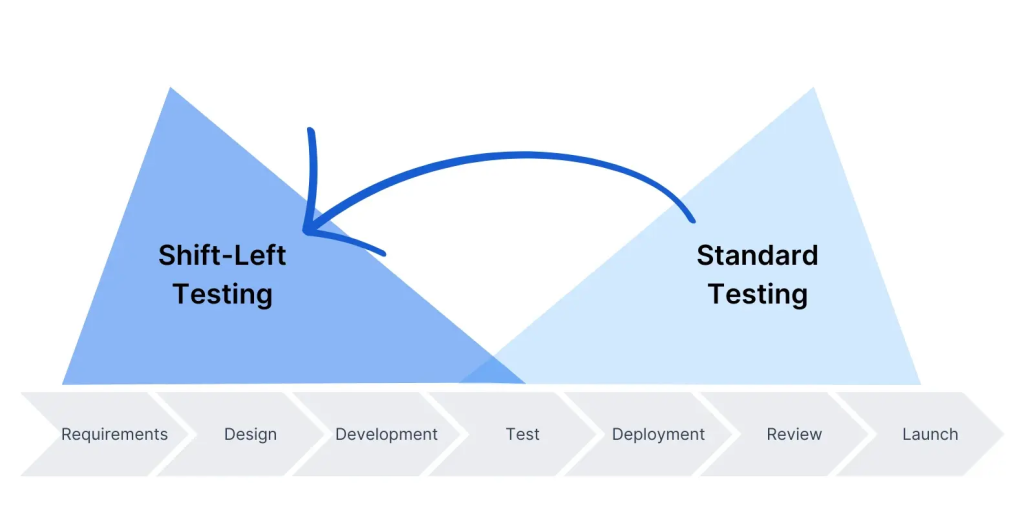
A comprehensive DevSecOps pipeline must include several critical validation steps:
- Static Application Security Testing (SAST): Scans the source code for common security vulnerabilities (such as SQL injection or cross-site scripting) during the early stages of the build.
- Secret Detection: Scans the repository to ensure developers have not accidentally committed plain-text credentials, API keys, or certificates.
- Dependency and Container Scanning: Identifies known vulnerabilities in open-source libraries and container base images using tools like Trivy or Grype.
- Software Bill of Materials (SBOM) Generation: Creates a machine-readable inventory of all third-party dependencies, libraries, and licenses included in the build artifact.
- Cryptographic Artifact Signing: Signs container image digests using tools like Cosign. This creates a verifiable chain of custody, ensuring that only container images verified during the pipeline build can be executed in production.
- Policy Gates: Enforces security standards programmatically. Using policy-as-code engines (such as Open Policy Agent or Kyverno), the deployment pipeline can automatically block container images if they contain critical vulnerabilities or lack a valid cryptographic signature.
Kubernetes and Cloud-Native Continuous Delivery
The transition to containerized microservices has changed deployment architectures, leading many organizations to separate their continuous integration and continuous delivery phases. Traditional continuous delivery models pushed deployments directly from runner agents. In contrast, cloud-native deployments rely on GitOps controllers to reconcile cluster state dynamically.
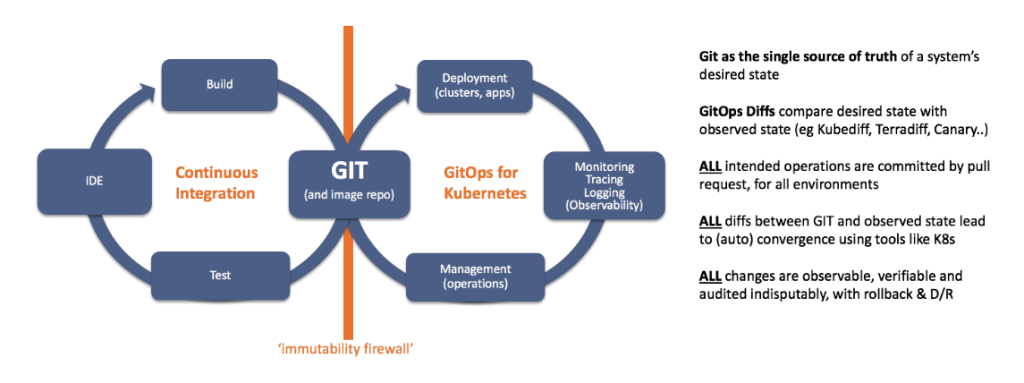
Implementing a Kubernetes CI/CD architecture requires several key components:
- Manifest Management: Declarative configurations should be structured using tools like Helm or Kustomize, allowing teams to manage environment-specific variables (such as resource limits and replica counts) across dev, staging, and production environments.
- Progressive Delivery: To minimize blast radius, deployments should use advanced patterns like canary or blue-green releases. Platforms like Argo Rollouts manage these strategies by gradually routing a small percentage of user traffic to the new version.
- Automated Rollback Integration: The delivery controller must integrate directly with monitoring systems (such as Prometheus or Datadog) to watch application error rates and latency. If metrics degrade during a rollout, the controller triggers an automated rollback to the previous stable state, improving mean time to recovery (MTTR).
A Strategic Decision Framework for Technology Leaders
Choosing a software delivery automation platform is a long-term architectural decision. To identify the right pipeline architecture, technology leaders should guide their teams through a structured decision framework:
- Where is the application source code hosted? If the code is already standardized on GitHub or GitLab, starting with their native CI/CD tools minimizes configuration and authentication overhead.
- What is the primary cloud provider strategy? AWS-native or Azure-native teams can leverage native cloud tools to simplify security and role access. Multi-cloud, hybrid, or on-premises configurations require platform-agnostic tools like CircleCI, GitLab, or Jenkins.
- What is the deployment target? If the application runs in a Kubernetes environment, separating the architecture into a CI runner and a GitOps-based CD operator ensures better cluster security.
- What is the team's operational maturity? Startups with limited platform engineering resources should avoid the complex maintenance of self-hosted build servers and choose managed SaaS options. Large enterprises can leverage self-hosted runners to handle custom, highly isolated workloads.
- How is pipeline cost and efficiency managed? To optimize runtime performance and costs, teams should monitor build runtimes and implement intelligent caching for package managers and Docker layers.
Designing, implementing, and maintaining this pipeline architecture is where professional cloud and DevOps services become highly valuable. Partnering with experienced cloud strategists allows companies to design compliant, cost-effective pipelines without taking focus away from core product development.
Common Pitfalls in CI/CD Automation
Even when using advanced tools, organizations can run into performance and security bottlenecks due to poor pipeline design. Common mistakes include:
- Overengineering Pipelines Early: Building complex, multi-stage pipelines with dynamic environments for early-stage applications can create unnecessary maintenance overhead and slow down development.
- Underestimating Self-Hosted Runner Costs: Organizations often switch to self-hosted runners to avoid cloud-provider minutes charges, but they frequently overlook the engineering time required to maintain, secure, and scale that infrastructure.
- Failing to Optimize Caching: Skipping dependency caching (such as npm, Maven, or Gradle) and failing to leverage Docker layer caching leads to slow build times and inflated compute bills.
- Managing Secrets Poorly: Hardcoding database credentials, api keys, or cloud access tokens within pipeline definition files or repository files, rather than pulling them dynamically from secret vaults or using IAM roles.
- Permissive Runner Permissions: Giving CI build agents broad administrator privileges on cloud accounts, exposing the organization to supply chain attacks if an external library or runner is compromised.
Performance Modeling for CI/CD Cost and Efficiency
To evaluate pipeline efficiency, engineering managers can model total execution costs and performance metrics mathematically. We can express the Change Failure Rate (CFR), a core DORA metric, as:

Similarly, the Total CI/CD Execution Cost (Ctotal) can be modeled as:

Where:
- Tbuild represents the execution duration of build
in minutes.
- Rcompute represents the per-minute billing rate of the selected runner tier.
- Clicensing represents the seat license cost of the platform.
- Cmaintanance represents the indirect engineering labor cost required to manage the pipeline infrastructure.
By implementing intelligent step caching and parallelizing automated test suites, teams can significantly reduce execution duration, lowering overall compute costs while accelerating developer feedback loops.
Final Thoughts: Designing a Reliable Delivery System
There is no single "best" CI/CD pipeline automation tool. The ideal platform depends entirely on your organization’s cloud strategy, security constraints, Kubernetes adoption, and team size. Successful software delivery automation is not simply a matter of installing a popular tool; it is about designing a reliable, secure, and cost-effective software delivery system that enables your engineering team to ship high-quality code with confidence.
Frequently Asked Questions
What is the best CI/CD tool for startups?
For startups, minimizing operational overhead is crucial. GitHub Actions or GitLab CI/CD (SaaS) are highly recommended because they are managed services integrated directly into the code repository, requiring zero infrastructure maintenance and offering rapid setup speeds.
Is Jenkins still worth using?
Yes, Jenkins remains valuable for organizations with complex, legacy, on-premises, or air-gapped environments. Its ability to execute complex Groovy-based pipeline logic and integrate with old systems through its plugin library makes it indispensable for certain enterprises, provided they have a dedicated platform team to manage its maintenance overhead.
What is the difference between CI/CD and GitOps?
Traditional CI/CD typically uses a push-based model where the build runner executes scripts to push code directly to target environments. GitOps is a declarative, pull-based delivery method where an agent inside the target cluster (like Argo CD) continuously pulls state configurations from Git and reconciles them with the live environment.
Do Kubernetes teams need Argo CD?
While not strictly required, using a GitOps tool like Argo CD is highly recommended for Kubernetes environments. It improves cluster security by removing the need to share API keys with external CI tools and automatically corrects any configuration drift in production.
How do CI/CD tools support DevSecOps?
Modern tools support DevSecOps by integrating automated security scans directly into the deployment pipeline. This includes static code analysis (SAST), software dependency scanning, vulnerability checks on container images, and software bill of materials (SBOM) generation before application code reaches production.
Leave a Comment