
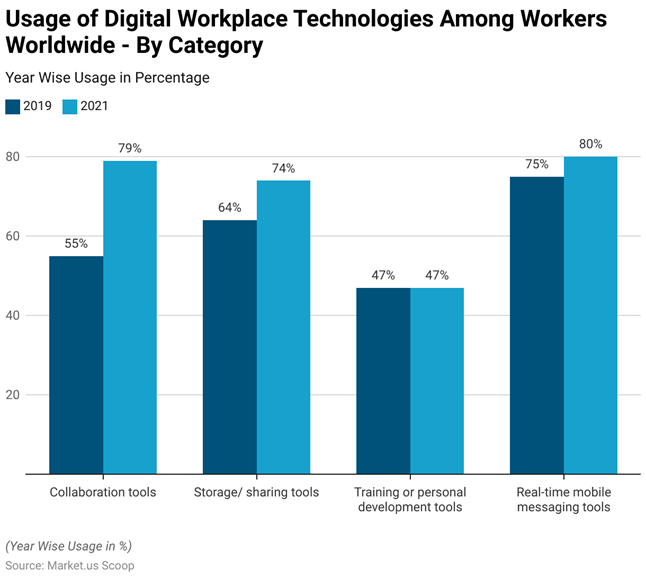
Modern work is built on collaboration. Teams operate across different locations and time zones, often mixing office‑based, hybrid and fully remote colleagues. Collaboration software sits at the heart of how these teams communicate, coordinate projects, share knowledge and stay aligned on goals. When it works, collaboration software drives productivity gains, deeper engagement and business agility. Research shows that good collaboration improves both employee productivity and business outcomes, and 79 % of workers in highly collaborative organisations feel ready to adapt to new challenges. In a survey of workplace collaboration trends, half of remote‑capable employees now operate in hybrid roles, and collaboration tools help keep these distributed employees connected. Unsurprisingly, adoption of digital collaboration tools has surged: the share of respondents using them rose from 55 % in 2019 to 79 % in 2021.
This boom has created a crowded marketplace of software‑as‑a‑service (SaaS) products promising to streamline teamwork. Yet purchasing decisions made in haste or based solely on feature lists can be costly. Studies suggest that up to 30 % of purchased software licences remain unused due to misalignment with business needs or lack of vendor support. Decision makers must therefore select tools that not only meet today’s functional requirements but can also scale with organisational growth, integrate smoothly with existing systems and support secure, compliant collaboration.
This article provides a consultative guide for startup founders, CTOs, operations managers and product leaders evaluating team collaboration software. Drawing on research, industry statistics and practical experience, it explains what collaboration SaaS products offer, how to assess your team’s collaboration model, the key criteria for evaluation, common pitfalls to avoid, and when custom solutions may be warranted. The goal is to empower you to choose a platform that drives productivity, visibility and growth - not one that ends up gathering dust.
What a team collaboration SaaS product is
A team collaboration SaaS product delivers cloud‑based tools that help colleagues work together in real time and asynchronously. The core categories include:
- Communication - instant messaging, video calls and discussion boards keep conversations flowing and bridge time zones. Without these capabilities, remote teams struggle with miscommunication and disorganised workflows.
- Task and project management - visual boards, task assignments, due dates and automation features help teams plan work, track progress and hold one another accountable. Integrated workflows reduce the overhead of context switching between different applications.
- Document and knowledge management - shared repositories, real‑time co‑authoring and search functions ensure everyone has access to up‑to‑date information. Effective collaboration software provides a central place to save time, improve project management and create alignment.
- Workflow coordination - the ability to design and adapt workflows to match how your organisation operates. Modern SaaS tools allow no‑code automations, rules and integrations so that tasks flow seamlessly between people and systems.
Because these services are offered as SaaS, you typically pay subscription fees rather than buying perpetual licences. Updates, maintenance and hosting are handled by the vendor. This model makes collaboration tools accessible to companies of all sizes, from startups to global enterprises, but it also raises questions about data security, vendor reliability and long‑term cost.
Why the right platform affects productivity, visibility and growth
Choosing the right collaboration platform is not merely a matter of convenience - it has a direct impact on how work gets done. Several data points illustrate this:
- Productivity and efficiency - Surveys report that remote teams without the right digital solutions suffer from miscommunication and inefficient project management. Collaboration tools streamline communication, provide structured workflows and centralise documents, reducing time wasted hunting through email threads or waiting for responses. Centralised document storage and real‑time collaboration features eliminate delays and miscommunication, while visual progress views help teams stay on track and clarify responsibilities.
- Employee engagement and retention - Highly engaged teams deliver about 23 % higher profitability than low‑engagement teams. Collaboration software helps create that engagement by giving everyone a voice, uniting teammates and fostering trust. Lack of effective collaboration contributes to burnout: knowledge workers today handle around 117 emails and 153 Teams messages per day, and constant interruptions leave little room for deep work.
- Adaptability and innovation - Companies that organise work around people plus AI report that employees are far more likely to say their company is thriving. With hybrid work here to stay, collaboration platforms must enable both synchronous and asynchronous collaboration, support flexible schedules and integrate emerging technologies such as AI assistance.
- Market momentum and growth - The collaboration software market has grown rapidly, reaching $7.42 billion in 2024 and projected to climb to $9.49 billion in 2026. Adoption has accelerated, rising from 55 % to 79 % of workers between 2019 and 2021. This momentum underscores that collaboration tools are no longer optional; they are essential infrastructure.
When the platform aligns with team needs and business goals, it becomes a competitive advantage. When it does not, it creates friction, frustration and wasted spend. The following sections outline how to evaluate options thoughtfully.
Assess your team’s collaboration model before choosing software
Before you open a demo or sign up for a free trial, take time to understand how your team collaborates today and where it is heading. Failing to do so is a common reason why software sits unused on the shelf. Consider these aspects:
Communication rhythms and culture
Map out the mix of synchronous and asynchronous collaboration. Do you rely heavily on meetings, or does much of your communication happen through chat and comments? A study on workplace collaboration found that employees are interrupted by meetings, emails or chat every few minutes and spend around 60 % of their time on these channels. That indicates a need for tools that help focus and reduce context switching.
Equally important is understanding communication styles and inclusion. Hybrid work has introduced friction: about 55 % of employees believe managers view in‑office colleagues as more trustworthy, and 72 % say meetings start late due to technical issues. Look for platforms that support inclusive meetings (e.g., equal access to chat, reactions and shared notes) and asynchronous updates so remote teammates are not sidelined.
Team location and work mode
The balance between office, hybrid and fully remote workers influences tool requirements. Gallup’s latest data shows that about half of remote‑capable employees are hybrid, a quarter are fully remote and the rest are on‑site. If your team spans time zones, features like scheduled send, asynchronous task updates and robust mobile apps become critical.
Existing technology stack
Most organisations already use many applications; the average company now runs more than 100 apps. Switching costs and integration effort can be high. Inventory your current systems - email, CRM, project management, document storage - and identify which integrations are essential. Also consider identity management (e.g., SSO providers), security policies and regulatory requirements. A collaboration tool that cannot integrate may create silos and duplicate data.
Governance and compliance
Assess the level of control you need over data, permissions and auditing. Industries that handle sensitive information (healthcare, finance, public sector) require robust security certifications, data residency options and granular admin controls. Regulatory frameworks such as GDPR, HIPAA or SOC 2 may dictate specific features.
Pain points and goals
Talk to different departments to understand their pain points: are tasks slipping through the cracks? Are decisions buried in email threads? Is knowledge scattered across personal drives? Clear goals such as reducing meeting overload, accelerating project delivery, improving document version control or enhancing cross‑department visibility will guide your evaluation.
Key criteria for evaluating a collaboration SaaS product

1. Usability and adoption
Usability is not a nice‑to‑have; it’s foundational for adoption. The best features mean nothing if employees cannot or will not use them. Evaluate the user interface through demos and trials. Look for clean design, intuitive navigation, and the ability to personalise views or notifications for different roles. Tools should provide in‑app guidance or learning resources to help users onboard quickly.
Poor adoption can be costly. Forrester research estimates that inefficient software usage, workarounds and searching for information cost employees 36 days of productivity per year, and half of workers feel under‑trained on the tools they use. Ensuring your chosen tool is simple to learn and offers role‑based guidance reduces this burden.
During evaluation:
- Ask for a trial and invite a cross‑section of users to test. Observe how quickly they navigate, how many features they use and whether they require extensive support.
- Check the vendor’s training resources: documentation, video tutorials, in‑product tooltips and the availability of customer success support.
- Review mobile experiences. Mobile project management is no longer optional; it provides flexibility and enables real‑time decisions. Studies show that roughly 79 % of employees use a mobile device for job‑related tasks, so your collaboration platform should have a robust mobile app, offline access and responsive design.
2. Integration with existing tools
Integration prevents data silos, eliminates duplicate work and ensures your collaboration platform fits naturally into existing workflows. Key questions include:
- Does the vendor provide robust APIs and pre‑built connectors to popular systems like CRM, ERP, HRIS and productivity suites? A well‑documented API or iPaaS support enables deeper automation.
- Does it support single sign‑on (SAML or OAuth) to integrate with your identity provider? This simplifies user management and improves security.
- Can you easily import/export data or back up your information? Open formats and data portability reduce lock‑in.
- Are there webhooks or event triggers to push notifications into other tools? For example, sending task updates to Slack or logging changes in your CRM.
Testing integrations during a pilot is essential. Many businesses underestimate the time and cost of connecting systems. Look for vendors that offer integration assistance and clear documentation.
3. Workflow flexibility
Every team’s processes are different. A good collaboration platform should allow you to adapt workflows without extensive coding. Features to consider:
- Customisable task statuses and boards so you can mirror your unique processes.
- Automated reminders and approval flows to reduce manual coordination. For example, real‑time document sharing and editing eliminates version control problems.
- Rule‑based triggers or low‑code automation to route work between teams or systems.
Evaluate whether the tool supports both agile (Kanban, Scrum) and traditional workflows, and whether it scales from small teams to enterprise‑wide coordination. Workflow flexibility also means supporting both synchronous and asynchronous communication and providing ways to work offline or on mobile.
4. Document and knowledge management
Documents are often the lifeblood of collaboration. Traditional methods of sharing files via email or local drives are inefficient and error‑prone. Efficient document management software centralises storage, streamlines communication and enhances security, empowering remote teams and clients. Look for:
- Centralised repositories with version control and granular permissions. Centralised storage reduces delays, ensures everyone accesses the latest information and prevents data loss.
- Real‑time collaboration (co‑authoring, comments, @mentions) to avoid duplicate documents and endless email threads.
- Knowledge bases or wikis for persistent documentation. Research on hybrid work notes that writing things down - keeping living homes for specifications, decisions and “how we work” guides - reduces repeat questions and speeds onboarding.
- Search and metadata so employees can quickly find relevant files.
Also consider compliance requirements for data retention and privacy. Does the vendor allow you to set retention schedules, audit logs and access controls? If you operate in regulated industries, ensure the tool supports encryption, data residency options and compliance certifications.
5. Security and admin controls
Data security is paramount, especially when collaboration platforms hold intellectual property and personal information. The RFP.wiki checklist stresses that vendors should provide data encryption (TLS 1.2+ for data in transit and AES‑256 for data at rest), multi‑tenant isolation and third‑party security certifications like SOC 2, ISO/IEC 27001 or PCI DSS. Evaluate:
- Authentication and identity – support for multi‑factor authentication, SSO and granular role‑based access. Check whether administrators can set password policies or integrate with your identity provider.
- Compliance certifications – confirm whether the vendor is audited for SOC 2 Type II, ISO 27001, GDPR, HIPAA or other relevant frameworks.
- Data residency and privacy – ask where data is stored and whether you can choose regional data centres. Confirm who owns your data and how easily you can export it on termination.
- Audit logs and reporting – ensure the platform maintains comprehensive logs of user actions, file access and permission changes. This is essential for investigations and regulatory compliance.
- Incident response and disaster recovery – understand the vendor’s uptime guarantees (many commit to 99.9 % or higher), how often they back up data and their process for notifying customers of security incidents.
6. Mobile accessibility
Work is increasingly done on the go. As noted above, mobile project management allows teams to update statuses, schedule tasks and share files from a smartphone. Mobile access brings several benefits:
- Flexibility and responsiveness - managers can approve tasks, view schedules and make real‑time decisions from anywhere. In crisis situations, instant alerts enable rapid action.
- Inclusion - mobile apps ensure that field workers, traveling staff and remote team members are not excluded from decision making. Mobile access breaks down geographical barriers and fosters transparent project management.
- Efficiency - mobile notifications keep teams aligned and reduce delays, helping maintain momentum.
When evaluating mobile capabilities, test the app on different devices, check offline functionality and verify that the vendor releases frequent updates. Look for support across iOS and Android, including tablets.
7. Reporting and visibility
Insight into how work is progressing is crucial for leadership. A good collaboration platform should provide dashboards and reporting that allow you to:
- Track tasks and milestones across teams and projects.
- Measure engagement and adoption (e.g., number of active users, messages sent, documents created).
- Identify bottlenecks - analytics should highlight where work is stuck or communication loops are failing.
- Forecast capacity - resource management and workload charts help you allocate staff effectively.
Avoid platforms that lock data into their own analytics; exporting data to your BI tools or data warehouse is often necessary. Also ensure privacy controls are respected—reporting should not expose sensitive information.
8. Scalability
Your chosen platform should grow with your organisation. Assess both technical and financial scalability. On the technical side, confirm that the vendor’s infrastructure can handle growth in users, data volume and global distribution. On the financial side, examine pricing models and simulate costs if your user count doubles or you add premium features. Vendors often offer tiered plans; ensure you understand what is included and the cost of moving up tiers.
If you plan international expansion, ask about multi‑language support, data residency options and the vendor’s presence in different regions. Also consider whether the vendor’s roadmap aligns with your future needs.
9. Pricing and hidden costs
Price should be weighed against value. Understand the pricing structure (per user, per month, per seat, storage limits, feature tiers) and contract flexibility (monthly vs. annual commitments, volume discounts, proof‑of‑concept periods). Hidden costs often include onboarding fees, integration charges, API usage fees and upgrade costs. Evaluate the total cost of ownership over at least three years, including training, data migration and any additional services. The cheapest tool may lack key features, while a more expensive tool might deliver a strong ROI by eliminating manual work.
10. Vendor stability and support
You are not just buying software; you are entering a partnership. Evaluate vendor stability by researching market reputation, financial health and customer reviews. A vendor’s track record for uptime, innovation and customer success matters. Key aspects include:
- Support channels and response times – does the vendor offer 24/7 support via phone, email or chat? Are support staff knowledgeable?
- Account management – higher‑tier plans often provide a dedicated customer success manager to assist with adoption and escalations.
- Training and onboarding – comprehensive documentation, knowledge bases and optional training sessions improve user adoption.
- Community and ecosystem – user forums, peer communities and partner networks add value and support.
A reliable vendor should have a clear product roadmap, involve customers in feedback loops and respond quickly to security incidents. Weigh whether you prefer a large, established player (stable but possibly slower to innovate) or a niche vendor (more agile but riskier). Remember that poor alignment with vendor capabilities is a major reason for unused software licences.
11. Reporting ethics and data protection
Collaboration platforms increasingly integrate AI features for summarising meetings, suggesting tasks and analysing sentiment. While these can boost productivity, they raise ethical considerations. Ensure the vendor is transparent about how AI models are trained, whether your data is used for training and whether you can opt out. Data should be anonymised, and you should retain control over whether AI analyses internal communications. Check privacy policies and data processing agreements.
Common mistakes businesses make when choosing collaboration software
Focusing solely on features
A product with an impressive feature list can still fail if it does not align with your processes or if users find it clunky. Many organisations buy multiple overlapping tools - research shows the average company runs more than 100 apps, which leads to context switching and information silos. Instead of chasing every feature, prioritise core workflows and choose a tool that integrates and adapts.
Ignoring adoption and change management
High adoption does not happen automatically. One survey found that 75 % of employees said their remote or hybrid work software needs improvement and 72 % want new technology investment. Even if you pick the right tool, without proper onboarding, training and communication, adoption will lag. Budget time and resources for training, involve change champions and communicate the “why” behind the new tool.
Overlooking total cost and long‑term fit
Cost comparisons often ignore hidden expenses such as integration work, customisation, migration and future upgrades. A SaaS that seems affordable for 10 users can become expensive at 100 users. Conversely, paying for unused features wastes money. Evaluate contract length, renewal terms and exit clauses.
Neglecting security and compliance
Assuming that cloud software automatically meets your security requirements can be risky. Always verify certifications, encryption, data ownership and incident response plans. For regulated industries, involve compliance experts early and require the vendor to sign data processing agreements.
Failing to plan for scale and evolution
Selecting a tool based on immediate needs without considering future growth leads to painful migrations later. Ensure the vendor’s roadmap aligns with your trajectory. Ask how the product will evolve to support new collaboration modes (e.g., AI‑driven summarisation, immersive VR meetings) and whether upgrades will incur additional costs.
Check out a related article:
IT Outsourcing for Small Businesses: Guide to Growing Without Growing Your Costs
How to compare shortlisted options and run a smart pilot
Once you have a shortlist of 2–3 collaboration platforms, run a structured evaluation rather than relying on vendor demos. A weighted scorecard approach helps quantify the decision. The RFP.wiki guide suggests assigning weights to criteria such as functionality, security, cost, support and integrations, and scoring each vendor accordingly.
Here’s a recommended process:
- Create evaluation criteria and weighting - define critical factors (e.g., usability 25 %, security 20 %, cost 15 %, integration 10 %, support 10 %, scalability 10 %, vendor stability 10 %) based on your priorities.
- Gather detailed requirements - compile must‑have and nice‑to‑have features by interviewing stakeholders. Use the criteria list above as a starting point.
- Request vendor documentation – ask vendors for security certifications, SLAs, roadmap, case studies and integration guides.
- Run a pilot - select a cross‑section of users across departments for a 2–4 week trial. Set up typical projects, import sample data and test integrations. Measure metrics such as user satisfaction, time saved, number of support tickets and ease of onboarding.
- Collect feedback - use surveys, interviews and analytics to capture user experiences. Evaluate whether the tool reduced communication gaps and improved visibility.
- Assess total cost of ownership - project costs over at least three years, including subscriptions, onboarding, integration work and potential upgrades. Compare this against expected productivity gains.
During the pilot, pay attention to soft factors like vendor responsiveness and alignment with your company culture. A vendor that listens to feedback and adapts will likely be a better long‑term partner.
When off‑the‑shelf SaaS tools are no longer enough
Many organisations can achieve their goals with off‑the‑shelf collaboration platforms. However, certain situations warrant exploring custom or hybrid solutions:
- Highly specialised workflows - industries such as manufacturing, healthcare or legal services may have unique processes that generic tools cannot accommodate. For example, you might need custom data models, complex approval chains or deep integration with proprietary systems. In such cases, partnering with a development firm to build tailored collaboration capabilities on top of existing platforms may be more effective.
- Compliance and data residency - if you operate under stringent regulatory regimes or require local data hosting, a generic SaaS may not suffice. Custom solutions can be hosted in specific regions, provide granular auditing and meet niche compliance requirements.
- Scalability and performance - very large organisations with tens of thousands of users or heavy data volumes might hit the limits of mainstream tools. Building a bespoke or semi‑custom solution allows you to optimise performance and cost at scale.
- Differentiated user experience - if collaboration is part of your core product or customer offering (e.g., a marketplace, professional services platform or educational portal), you may want the user experience to reflect your brand and workflows rather than that of a generic tool.
In these situations, working with experts who specialise in software development services or SaaS development services can help you design, build and maintain a platform tailored to your needs. For example, Intersog offers consulting and development services that can customise and integrate collaboration features into your existing systems without reinventing the wheel. Exploring MVP development services can also be useful when you need to test a bespoke collaboration concept with a small team before rolling it out broadly. These partnerships should feel strategic rather than promotional - aim to complement your in‑house capabilities and ensure long‑term maintainability.
Conclusion and practical takeaways
Selecting a SaaS product for team collaboration is a strategic decision that impacts productivity, engagement and growth. With hybrid and remote work becoming the norm, collaboration software is now core infrastructure. However, the abundance of options means that choosing the right tool requires more than simply comparing feature lists.
To recap:
- Understand your collaboration model - map out communication rhythms, work modes and existing tools. Identify pain points and goals.
- Prioritise usability and adoption - poor adoption wastes licences and drags down productivity. Seek intuitive interfaces, robust mobile apps and in‑app training.
- Insist on integrations and workflow flexibility - your collaboration platform should connect seamlessly with your tech stack and adapt to your processes.
- Centralise knowledge and secure your data - choose tools that provide strong document management, encryption, compliance certifications and admin controls.
- Plan for growth and evaluate total cost of ownership - model costs over multiple years, assess scalability and examine vendor roadmaps.
- Run smart pilots and compare vendors using weighted criteria - collect real user feedback and score vendors across functionality, security, cost and support.
- Consider custom solutions when off‑the‑shelf tools fall short - specialised workflows, regulatory requirements or brand differentiation may require bespoke development. Partnering with expert SaaS development services can help you build or integrate tailor‑made collaboration capabilities.
By taking a structured, consultative approach, you can select a team collaboration platform that not only meets immediate needs but also scales with your organisation, fosters a culture of openness and creativity, and positions you for sustainable growth.
Leave a Comment