
Many ecommerce teams try to solve weak sales by spending more on acquisition. That is becoming harder to justify. In a recent digital experience benchmark, the cost of an online visit rose while conversion rates fell, a reminder that traffic efficiency and on-site efficiency are now inseparable business problems. If visitors arrive with intent but encounter friction, your paid media, SEO, marketplaces, and CRM investments all become less productive.
That is why how to improve ecommerce website conversion rates should be treated as a product discipline, not a superficial CRO exercise. Real ecommerce conversion rate optimization sits at the intersection of UX, analytics, merchandising, performance, checkout design, and engineering. The brands that consistently increase ecommerce conversions are usually the ones treating the store as a living digital product rather than a one-off marketing asset.
Rethink Conversion as a Commerce System
What Ecommerce Conversion Rate Really Means
An ecommerce website conversion rate is the percentage of visits that end in a purchase, but that headline number is only the final output. The more useful view separates macro-conversions from micro-conversions. A completed purchase is the macro goal; product views, on-site search, add-to-cart events, begin-checkout events, shipping-info submission, and payment-info submission are the micro signals that show where intent is building or leaking. “Good” performance also depends on context. Benchmarks vary by industry, device, and channel, and in practice they also shift with average order value, geography, and product complexity because those factors change how much reassurance and effort a customer needs before buying.
Start With Data, Not Guesswork
If your instrumentation is incomplete, optimization becomes opinion. A mature ecommerce analytics stack should reliably capture product views, search, add-to-cart, checkout starts, shipping and payment steps, and completed purchases. From there, segment by device, traffic source, product category, and new versus returning visitors. Pair quantitative funnel analysis with behavioral tools such as heatmaps and session replays, and do not ignore on-site search logs: they often expose unmet intent, poor synonyms, weak taxonomy, and dead-end searches faster than dashboard averages do.
The most useful metrics are the ones that localize friction. Track add-to-cart rate, product-page exit rate, checkout completion rate, cart abandonment rate, revenue per visitor, mobile conversion rate, search success, and repeat purchase rate. Those are the measures that tell you whether the issue is product content, pricing clarity, mobile ecommerce optimization, checkout optimization, or retention. Overall revenue can hide all of those underlying weaknesses.
Fix Discovery, Product Pages, and Speed
Improve Website Speed and Technical Performance
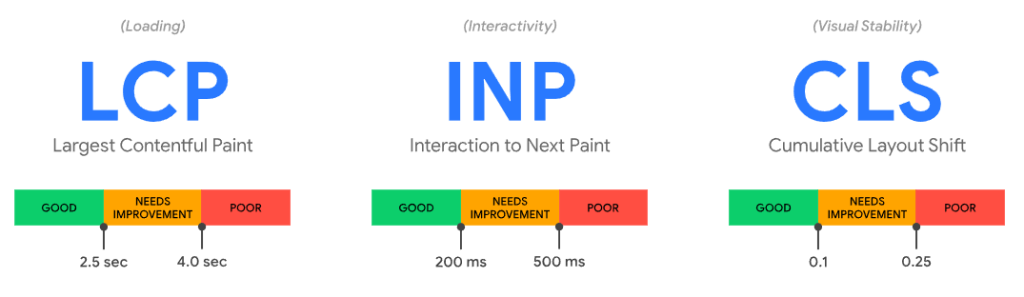
Speed is not “technical hygiene.” It changes buying behavior. Core Web Vitals define a good experience as an LCP of 2.5 seconds or less, an INP of 200 milliseconds or less, and a CLS of 0.1 or less at the 75th percentile. Google’s mobile research has also shown that even a one-second delay can materially reduce retail conversions, while broader mobile studies found that improving speed in the pre-checkout journey increased progression through the funnel, transaction rates, and average order value. More recent case studies continue to connect faster experiences with measurable sales lifts.
In practice, ecommerce website performance usually improves through disciplined engineering rather than a theme refresh: compress and properly size images, lazy-load only offscreen assets, audit third-party scripts, reduce render-blocking JavaScript, use a CDN, and fix backend bottlenecks that slow search, pricing, or inventory calls. Just as importantly, performance work should survive peak traffic, campaign bursts, and merchandising changes. For retailers carrying front-end debt or script sprawl, this is often where conversion work becomes inseparable from scalable web development services.
Make Product Discovery Easier
Users cannot buy what they cannot find. Search, navigation, filters, sort logic, autocomplete, and recommendations are not secondary UX details; they are the product-finding layer of the revenue engine. Large-scale UX research shows that roughly half of users prefer search as their product-finding strategy, yet most sites still perform poorly here. Recent benchmarks found that 56% of sites fail to adequately support search needs, while only a small minority get autocomplete design details right. Filtering matters just as much: good faceted navigation reduces scanning effort, narrows large catalogs quickly, and shortens time to product.
That means product discovery should be treated as part of ecommerce platform optimization, not as a cosmetic layer added after launch. Search should handle synonyms, abbreviations, misspellings, and intent-rich queries. Category pages should expose filters that reflect how customers actually shop, not just how merchants classify inventory. Autocomplete should reduce effort, not create choice paralysis. And if internal site-search analytics show repeated no-result queries, that is not just a search problem; it may point to missing products, bad metadata, or weak catalog structure.
Build Product Pages That Answer Buying Questions
Most product page optimization fails for a simple reason: the page still leaves open questions. Product pages need to reduce uncertainty, not just showcase the item. Research benchmarks continue to show that many sites have mediocre or worse product-page UX, especially on mobile. The strongest pages combine clear imagery, useful video, specific descriptions, consistent variant information, review summaries, reviewer context, size or fit guidance where relevant, stock visibility, delivery expectations, returns information, warranty details, and unambiguous pricing near the primary CTA.
Transparency is especially important before the cart. In product-page testing, 64% of users looked for shipping costs on the product page before deciding to add an item to cart. That is why product pages should surface estimated shipping, delivery windows, and returns policies early enough to support the decision, not after the shopper has already invested effort. This is one of the clearest places where better content and better conversion design overlap.
Remove Mobile and Checkout Friction
Optimize Mobile Ecommerce Experience
Mobile ecommerce optimization should start from the reality of small screens, limited patience, and one-thumb behavior. Mobile shoppers need prominent add-to-cart actions, thumb-friendly controls, fast category pages, practical filters, short forms, browser autofill, and payment paths that reduce typing. Research on mobile checkout consistently shows that fewer steps and less manual input improve completion, while ecommerce mobile UX benchmarks continue to document widespread friction on mobile journeys. Promotional overlays deserve special caution: intrusive popups that interrupt critical tasks are repeatedly associated with annoyance and abandonment.
Reduce Cart Abandonment Before Checkout
Cart abandonment usually begins before the payment step. The biggest drivers are remarkably consistent: unexpected extra costs, slow delivery, weak trust, forced account creation, complicated checkout, unclear total order cost, unsatisfactory returns policy, errors, and limited payment methods. In Baymard’s latest breakdown of solvable abandonment causes, extra costs were the most common issue, followed by delivery speed, trust, account creation requirements, and checkout complexity. In other words, many abandonment problems are caused by uncertainty and effort, not lack of purchase intent.
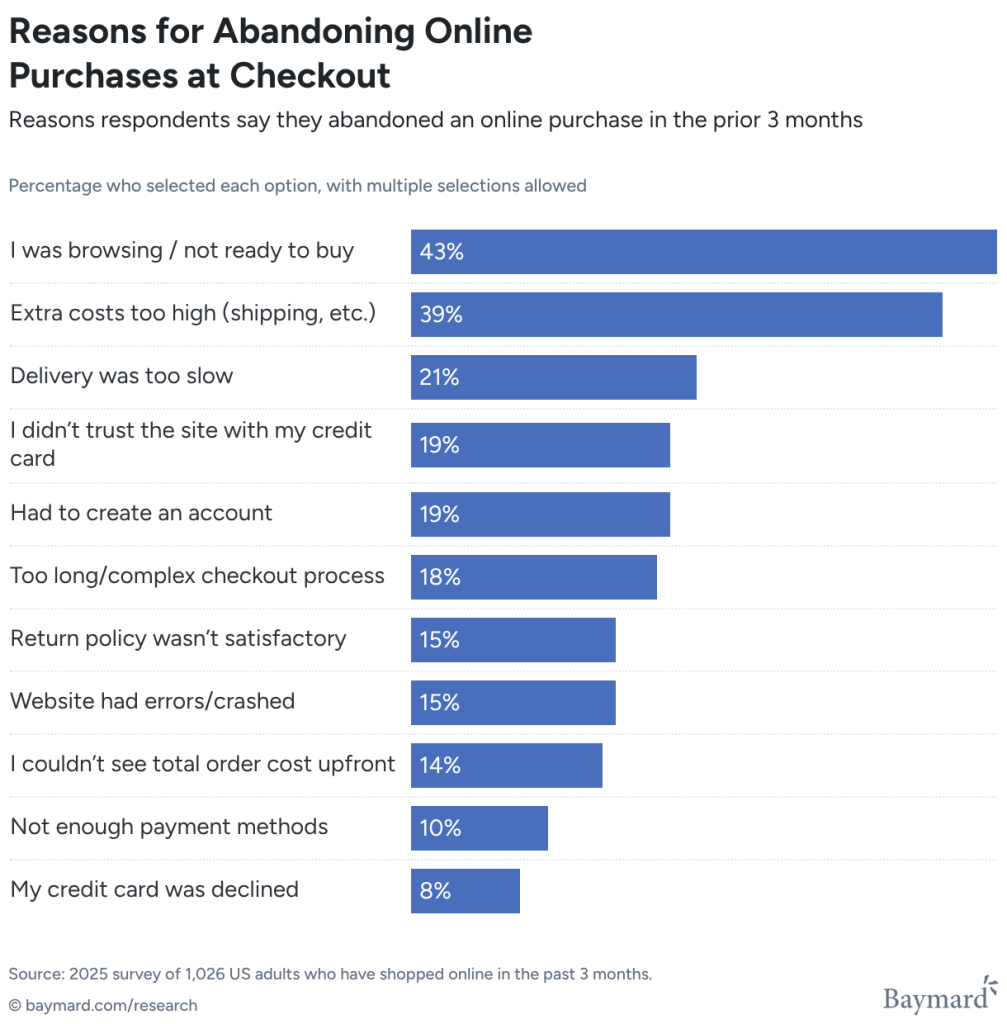
The practical implication is straightforward: remove friction before the user enters checkout. Show realistic delivery timing, total-cost expectations, return terms, accepted payments, and stock clarity on product and cart pages. Give shoppers a dedicated, editable cart that helps them make final decisions instead of rushing them into a cramped minicart flow. The cart is often where customers compare, reconsider, and validate purchase choices, so this stage needs to support decision-making rather than force momentum.
Simplify Checkout
A high-performing checkout is boring in the best possible way. It asks for little, explains itself clearly, and never makes the user wonder what happens next. Large-scale checkout research shows that an ideal flow can be as short as 12–14 form elements, while the average checkout still exposes far more. Prominent guest checkout, fewer fields, address lookup, inline validation, progress indicators, specific error messages, and multiple payment methods all reduce friction. Research also shows that many sites still fail to make guest checkout sufficiently visible, do not offer automatic address lookup, or leave users to discover errors only after form submission.
Reinforce Trust and Relevance
Build Trust Throughout the Journey
Trust should not be bolted on with a wall of badges. It should be built into the journey through coherent design, transparent pricing, credible reviews, visible support options, clear company information, realistic delivery promises, understandable returns, and product detail that answers the questions shoppers actually have. Trust research in ecommerce consistently ties credibility to product information, pricing, policies, support, and the handling of personal information. If trust is lost, the sale is usually lost as well.
Personalize Without Becoming Intrusive
The best ecommerce personalization feels helpful, not invasive. Recently viewed items, smart bundles, reorder prompts, location-based delivery messaging, category-specific merchandising, and return-customer homepages can all reduce effort when they are grounded in real behavior. But personalization depends on clean data and strong integrations. Official recommendation-system documentation makes this explicit: useful recommendations require product catalogs, recorded user events, trained models, and careful delivery logic; personalized results also must not leak from one user to another. In other words, personalization is not just a marketing layer. It is a data and systems problem.
Test and Retain
Use A/B Testing Carefully
A/B testing for ecommerce is most effective when it validates a meaningful hypothesis, not when it replaces thinking. It is a quantitative method for comparing live variations against a business metric, but the strongest tests are usually informed by UX research first. That means testing changes on high-impact pages where friction is already visible: search-result layouts, product-page shipping visibility, review summaries, sticky add-to-cart patterns, guest-checkout prominence, address lookup, delivery-date language, or payment-method order. Testing headline color before you fix broken search or a confusing checkout is a classic misallocation of traffic.
Improve Post-Purchase Experience to Increase Future Conversions
Conversion does not end at the thank-you page. Post-purchase UX directly influences repeat purchase rate, review generation, support load, and lifetime value. Good order confirmations, clear tracking, low-friction returns, timely service, and sensible account-creation prompts all help turn first-time buyers into return customers. Research on post-checkout UX shows that many sites still miss straightforward opportunities here, while longstanding ecommerce usability work has argued that treating customers well after the first order is one of the clearest ways to generate subsequent ones.
Fix the Technology Beneath the Funnel
When Conversion Problems Are Actually Technology Problems
Sometimes the CRO issue is not copy, layout, or button hierarchy. It is architecture. Legacy platforms can be hard to adapt, rigid checkout flows can limit payment and fulfillment changes, weak integrations can create inventory blind spots, and large carts with complex discounts or shipping logic can degrade performance under load. Modern commerce documentation repeatedly frames the tradeoff this way: monolithic systems are convenient early on but hard to evolve, while modular, API-first architectures are easier to extend across checkout, search, payments, order management, and regional expansion. During peak periods, scalable cloud infrastructure also matters because uptime and responsiveness directly shape whether sessions turn into orders. When those constraints appear, ecommerce platform optimization, custom ecommerce development, specialized ecommerce software development services, and resilient Cloud and DevOps services move from “IT considerations” to conversion work.
Practical Ecommerce Conversion Rate Optimization Checklist
Use this checklist as an operational baseline, not a one-time launch task. The strongest CRO programs revisit these areas continuously as merchandising, traffic mix, and platform complexity change.
- Audit event tracking for product views, search, add-to-cart, begin checkout, payment, and purchase.
- Segment performance by device, channel, category, and new versus returning users.
- Set Core Web Vitals targets and trim image weight, script bloat, and backend latency.
- Improve search, filters, taxonomy, and autocomplete before spending more on traffic.
- Treat product pages as decision-support tools, not just merchandise displays.
- Show shipping, delivery, returns, and total-cost expectations earlier in the journey.
- Make guest checkout obvious and reduce default form length wherever possible.
- Use address lookup, inline validation, clear progress indicators, and broad payment coverage.
- Build trust with real reviews, honest pricing, clear support options, and visible policies.
- Prioritize experiments on high-friction pages and keep improving post-purchase flows to raise repeat purchases.
Improving an ecommerce website conversion rate is not a redesign sprint with a finish line. It is an ongoing operational discipline that combines ecommerce analytics, ecommerce UX design, engineering quality, checkout optimization, and customer understanding. The retailers that consistently grow are not the ones chasing isolated CRO hacks. They are the ones treating commerce as a product system, reducing acquisition waste by making every visit easier to convert today and more likely to return tomorrow.
Leave a Comment