
AI image generators have quietly transitioned from "fun demos" to real workflows, including campaign creative exploration, e-commerce variations, product concepting, storyboards, internal design sprints, and early-stage UI mood boards. However, for many business users, the interface still feels like a magic box: type a sentence, receive an image, and repeat. The problem is that teams often adopt the tool before understanding how it works, which can lead to surprises like unpredictability, inconsistent brand style, or legal and safety constraints.
This article is an in-depth explanation of how AI image generators work, from prompts to pixels, written for product leaders, founders, marketers, and CTOs who want clarity without needing to be machine learning researchers. We will walk through the modern text-to-image pipeline, explain why diffusion models dominate image generation today, detail why output quality varies, and outline what companies should evaluate before incorporating generative image features into production workflows.
What an AI image generator is
An AI image generator is a generative model that has been trained using large amounts of paired visual and text data (or related labeling signals). Rather than storing a catalog of images and "collaging" them on demand, the generator learns statistical relationships between words and phrases and visual patterns, such as objects, textures, styles, composition, and lighting cues. Then, it synthesizes a new image that is probable given the prompt and the model’s learned distribution.
A critical point for business readers is that these systems do not "paint like humans" in the literal sense. There is no hidden brush, intention, or semantic understanding in the human sense. What you're seeing is probabilistic visual synthesis: The model repeatedly updates an internal representation until it produces an image that matches the prompt and its learned priors.
Prompts and training
Prompts are converted into representations, not followed like human instructions
When you type a prompt - say, “minimalist product photo of a smart ring on marble, soft studio lighting” - the model does not parse it like a designer reading a brief.
Most modern systems first tokenize the text and pass it through a text encoder (often transformer-based) to produce embeddings: numerical vectors representing meaning and context. Those embeddings become conditioning signals that steer generation. In practical terms: the prompt becomes math, not instructions.
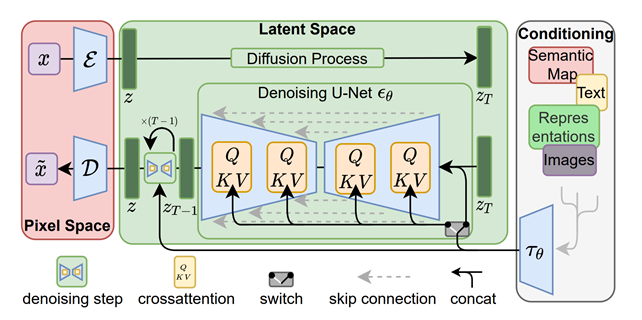
In many widely used diffusion pipelines, the text encoder produces a sequence of embeddings (not just a single vector), and those are injected into the image generator through mechanisms like cross-attention - so the model can “attend” to different words while refining different parts of the image.
This is the first business implication: prompt quality matters because you’re shaping a conditioning signal. When someone asks how text to image ai works, this is the essence -text is mapped into a representation space that the image generator can use while sampling.
How training works
In general, training teaches the model which visual structures tend to co-occur with which language patterns across large amounts of data. For diffusion-based systems, the training objective is often to take an image (or its latent representation), add noise, and learn to predict the noise in order to remove it.
A practical way to picture it:
- During training, the model sees many image-text pairs.
- The system corrupts images with varying amounts of noise.
- The model learns a denoising function conditioned on the text embedding: “given this noisy input and this prompt embedding, what denoised step moves me toward an image matching the prompt?”
Modern production systems often do not operate directly on raw pixels, but rather in a compressed latent space produced by an autoencoder, typically a variational autoencoder (VAE). This approach reduces computing and memory costs while preserving enough visual detail to reconstruct a high-quality image. The "latent diffusion" concept is a key reason why image generation has become widely accessible beyond hyperscale research labs.
From prompt to image: the generation pipeline
How generation works: from prompt to image
This is the core ai image generator process most product teams are integrating today.
A typical diffusion-style text-to-image pipeline looks like this:
1) Prompt → embeddings (conditioning)
The system tokenizes your text and produces embeddings via a text encoder. These embeddings will condition the denoising model.
2) Initialize with randomness (a seed / generator)
Generation usually begins from a random noise tensor. In latent diffusion, that noise lives in latent space, not pixel space. If you reuse the same seed and keep other parameters identical, you can often reproduce the same image (or very close to it).
3) Iterative denoising (the sampling loop)
The denoising model (commonly U-Net–based in classic latent diffusion pipelines) runs for a number of steps. Each step predicts how to remove a bit of noise, gradually turning random structure into coherent shapes, colors, and details. More steps usually improve quality, but increase latency and cost.
4) Prompt guidance steers the trajectory
To increase prompt adherence, many systems use classifier-free guidance (CFG). Conceptually, CFG combines conditional and unconditional predictions to trade off “follow the prompt closely” vs “allow more diverse outputs.” That’s why you see a guidance scale / cfg_scale slider in many UIs and APIs.
5) Decode latent → pixels
If the model generated in latent space, the final latent is decoded through an autoencoder decoder back into an image you can view (PNG/JPEG, etc.).
Why diffusion models matter
Diffusion models have become central to modern image generation because they transform the difficult problem of generating an image in one shot into a series of simpler problems. "Remove a little noise repeatedly." This approach tends to produce high-quality images and supports flexible conditioning, such as text prompts, masks, and reference images.
Specifically, latent diffusion is a pragmatic engineering breakthrough. By pushing the diffusion process into a learned latent space, systems can generate high-resolution images more efficiently while preserving detail during decoding. The original latent diffusion work describes this process as balancing complexity reduction with detail preservation and highlights cross-attention conditioning as a mechanism for text and other conditioning inputs.
Controllability, workflows, variability
What affects the output
The same base model can look “brilliant” or “broken” depending on settings. Output quality and consistency are shaped by a handful of levers that most platforms expose (explicitly or implicitly):
Prompt wording and specificity matter because the system is conditioning on embeddings, not interpreting intent like a human.
Sampling settings matter because diffusion is iterative and probabilistic:
- Seed / randomness drives the starting point. Same prompt + same seed + same settings often yields deterministic or near-deterministic output in many pipelines.
- Number of inference steps: more denoising steps typically improve quality, but cost more time/compute.
- Guidance scale (CFG): higher guidance increases adherence but can reduce diversity and can degrade image quality at extremes (some docs describe “fried” artifacts when too high).
- Negative prompts (when supported) guide what the model should avoid including.
- Aspect ratio / resolution matters because many models have “native” resolutions where they perform best; deviating can introduce cropping or composition quirks depending on the model family.
Finally, model choice matters: Fine-tuned or domain-tuned models can significantly improve consistency for a specific brand style or product category, but introduce governance questions about training data rights and safety.
Why the same prompt can create different images
Even when the prompt is identical, image generation is typically a sampling process rather than a deterministic "render." The system typically begins with random noise, and different initial conditions (i.e., different seeds) can lead to different plausible images that satisfy the same conditioning through iterative denoising.
In other words, you aren't asking the model to find a specific image; rather, you're sampling from a distribution of images likely to be produced by the model given the prompt. This is also why "reroll until it looks right" is a common user behavior, and why product teams integrating generation should plan for user experience (UX) patterns that support iteration, ranking, and review, rather than a single-shot result.
Text-to-image versus editing workflows
A modern “AI image generator” product is often not one workflow - it’s a cluster of related capabilities.
Text-to-image starts from noise (or latent noise) and creates an image from scratch, conditioned on the prompt.
Image-to-image starts from an existing image (encoded into latent space), adds controlled noise, and denoises it under prompt guidance - useful for variations and style shifts while preserving some structure.
Inpainting edits a masked region while trying to keep the unmasked context coherent; outpainting extends an image beyond its original boundaries. These are not cosmetic features - they represent different conditioning constraints and often different product risks (e.g., unintended content insertion).
Structure- or reference-guided generation goes further: systems like ControlNet add extra conditioning inputs (edges, depth maps, pose, segmentation), allowing users to constrain layout and geometry much more tightly than text alone. This matters for business teams because it’s one of the most practical ways to reduce “prompt drift” and get repeatable compositions.
Business implications, limits, and adoption criteria
Limitations and failure modes
If you’ve ever asked how ai art generators work and concluded “they hallucinate,” you’re not wrong - you’re observing fundamental model limits.
Common failure modes are well-documented in real model cards and platform docs:
- Text rendering is weak in many diffusion-based systems (logos, packaging copy, UI labels are frequent pain points).
- Compositionality is brittle: multi-object relationships (“red cube on top of a blue sphere”) can fail even when each object alone is easy.
- Human anatomy and faces can be inconsistent (hands, teeth, symmetry).
- Bias and representation issues reflect training data skews; models trained primarily on English-captioned subsets can default toward Western-centric representations and perform worse for non-English prompts.
- Memorization is possible, especially when training data isn’t deduplicated; some model documentation explicitly notes observed memorization for duplicated training images.
These are not “bugs that will disappear next month.” They are structural behaviors of models trained on broad datasets with probabilistic objectives. Your mitigation tools are (1) stronger conditioning and constraints, (2) human review, and (3) clear policies on what the system may generate and where it may be used.
Practical business use cases
Image generation is most valuable when it acts as a creative accelerator, helping teams quickly explore options, rather than as a replacement for design judgment.
Business-realistic applications include:
- Concept ideation and mood exploration for campaigns and product themes
- Rapid variations for e-commerce, such as backgrounds, scenes, and seasonal themes
- Early storyboards
- UI/UX concept visuals to align stakeholders faster
- Pre-production asset exploration in games and media These applications align well with the strengths of diffusion systems: variety, fast iteration, and "good enough" visual plausibility at the concept stage.
When teams require brand consistency on a large scale, the workflow often shifts from "prompting" to "systems design": structured templates, reference-guided conditioning, curated model choices, and review pipelines.
What companies should evaluate before adoption
If you’re building or buying a feature that depends on understanding how generative ai creates images, the decision shouldn’t hinge on a single demo. For production adoption, evaluate six areas.
First, check quality under your real constraints: the prompts your teams actually write, your product categories, your brand style, your required aspect ratios, and your need for repeatability. Use a fixed prompt set and record seeds/settings so you can compare consistently.
Second, evaluate controllability: do you need structure controls (pose/layout), editing tools (inpainting/outpainting), or reference consistency? If yes, prioritize systems that support editing workflows or additional conditioning beyond text.
Third, confirm licensing and usage rights for outputs and training/fine-tuning inputs. This is a policy and contract question more than a purely technical one, and it varies by vendor and jurisdiction. In the U.S., the Copyright Office’s guidance emphasizes a human authorship requirement for copyright protection and discusses that AI-generated components may not be protectable on their own; it also signals ongoing policy work around training data and outputs. Treat this as a risk area that merits counsel review for high-value commercial assets.
Fourth, plan for safety and brand risk. Diffusion model documentation explicitly notes risks like harmful content generation, dataset exposure to adult content, and bias; production use generally requires additional safety mechanisms. Many platform safety guides recommend layered controls such as moderation, red-teaming, and human review for outputs before use.
Fifth, decide on deployment and privacy. Are prompts or reference images sensitive (product prototypes, unreleased designs, customer data)? That determines whether you can use a hosted API, need an isolated environment, or need stricter data controls. If you’re building custom generative workflows into an existing product, this decision tightly couples to architecture, cost, and compliance. A practical starting point is mapping the feature to your AI roadmap and integration approach (for example, via an internal discovery phase similar to what teams often do in AI product development and implementation work).
Sixth, define workflow accountability: who approves generated assets, what gets logged (prompt, seed, model/version, settings), and how outputs are stored and labeled. Regulatory expectations around labeling synthetic media are evolving; for example, EU-facing guidance efforts reference transparency obligations around marking or labeling AI-generated/manipulated content, especially around deepfakes. Even if you’re not regulated, provenance controls reduce reputational risk.
Check out a related article:
Beyond Chatbots: Understanding AI Agents in 2025
If you’re integrating image generation into your products instead of using off-the-shelf tools, consider the “hidden requirements” from the beginning: latency SLAs, caching, GPU cost profiles, abuse prevention, and monitoring. A custom software partner can add value here, not by promising “AI magic,” but by engineering a controlled, measurable, and auditable system.
Conclusion
Understanding how image generators work behind the scenes can change the way you use them. The model doesn't draw intentionally; it samples - often with diffusion - and iteratively refines a noisy latent representation under the guidance of prompt embeddings and other conditioning signals.
For business and product leaders, the real breakthrough comes from not learning “prompt tricks”. Rather, it is about establishing the right constraints, review loops, safety controls and integration patterns so that the technology can accelerate creative and product work without introducing any brand, legal or operational surprises.
Leave a Comment