
Artificial intelligence is no longer confined to tech firms and online platforms. It is transforming traditional offline industries, such as retail stores, restaurants, logistics fleets, factories, and clinics. Several trends have converged to accelerate the adoption of “offline AI.”
First, the explosion of physical-world data from sources such as security cameras, IoT sensors, and point-of-sale systems provides rich fuel for AI algorithms. Second, computer vision technology has advanced to the point where it can reliably interpret video and images in real time, enabling AI to "see" the physical environment in ways that were not possible a few years ago.
Second, cost pressures are forcing brick-and-mortar businesses to do more with less. Inflation and labor shortages have squeezed margins. For example, technology analysts note that retailers remain optimistic about AI’s ability to drive growth, even amid rising wages and staffing challenges. In markets like Israel, average wages increased by 5.5% in 2024, adding to the urgency for efficiency.
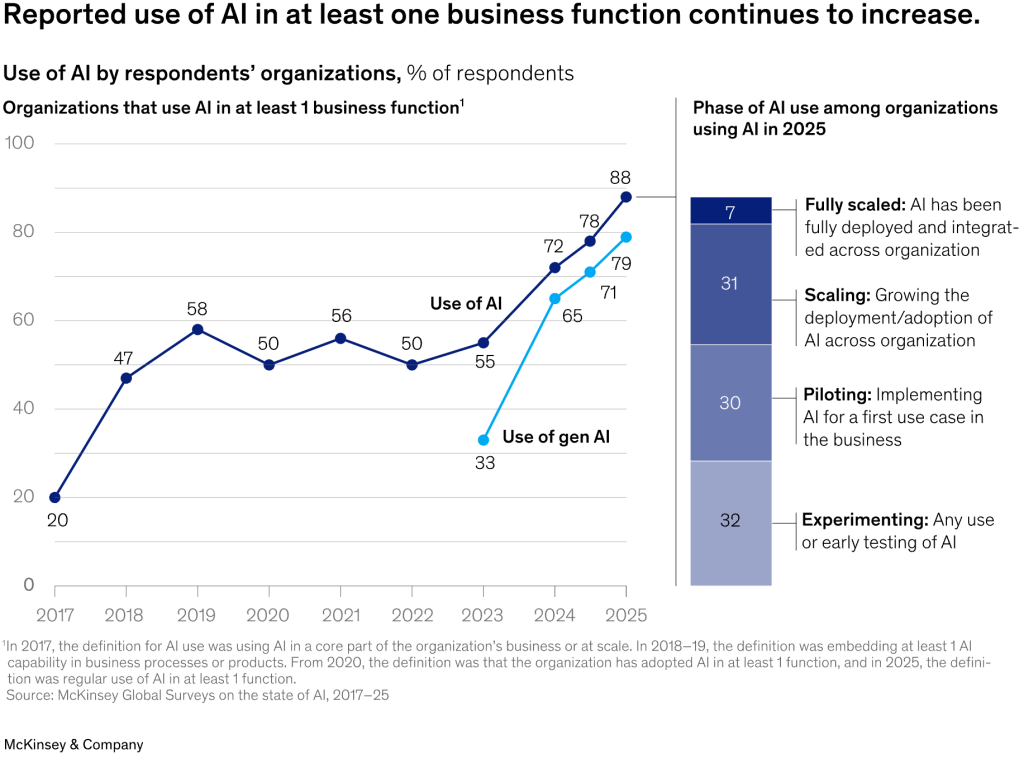
Third, the success of AI in e-commerce and online services has raised expectations that AI can deliver ROI in the physical world as well. Nearly 88% of companies worldwide now report using AI in at least one business function, and even traditionally "offline" sectors are rapidly catching up.
In short, offline AI is experiencing a breakthrough moment, driven by improved data, proven technology (such as vision and big data analytics), and a strong business need to enhance on-the-ground productivity.
What Does AI in Offline Business Really Mean?
When we talk about AI for brick-and-mortar businesses, we don't just mean robots roaming the aisles, although robotics can be part of it. AI in offline businesses refers to software and systems that use machine learning and advanced analytics to optimize physical operations.
Put simply, it’s about algorithms that help make smarter decisions and automate tasks in the real, physical environment. Examples include a computer vision system that monitors a store via security cameras to detect theft, a demand forecasting model that predicts how many pastries a bakery should bake each morning, and a tablet “copilot” that helps retail staff answer customer questions.
Unlike purely digital AI, such as recommendation engines on websites, offline AI bridges the digital and physical worlds. Offline AI ingests data from the real world, such as camera feeds, sensor readings, sales logs, traffic patterns, and weather, and provides insights or actions that tangibly impact store shelves, factory lines, delivery routes, and clinic schedules.
In essence, AI becomes an additional brain behind the scenes of physical operations. Importantly, this is not just hype or science fiction. Many offline AI solutions are fairly prosaic, such as replacing clipboards and guesswork with data-driven predictions or using cameras and machine learning for quality inspection instead of relying solely on human eyes.
The goal is to augment, not necessarily replace, the human workforce with AI-driven guidance and automation to improve key metrics such as revenue, cost, efficiency, quality, and safety.
In the following sections, we’ll explore concrete use cases by business objective.
Revenue Growth Use Cases
Offline businesses are using AI to boost sales and revenue through smarter planning and personalization. These use cases focus on drawing more revenue from the physical footprint – selling the right products at the right time, price, and experience. Key applications include demand forecasting, pricing optimization, personalized marketing, and AI assistance for front-line staff. Let’s explore how each works and the real KPI impact.
Demand Forecasting & Assortment Planning
For retailers, restaurants, and manufacturers alike, predicting demand accurately is gold. AI-powered demand forecasting analyzes historical sales, seasonality, promotions, local events, and even weather to predict what inventory you’ll need and when. This informs assortment planning (what products to stock or menu items to prepare) for each location. Traditional spreadsheet forecasting often leads to either overstock (tying up cash in excess inventory) or stockouts (missed sales). AI models can handle far more variables and nonlinear trends than a human planner.
Where it fits: This use case lives in merchandising and operations planning. It’s used by retailers for store inventory, by CPG companies for production planning, and by restaurants for prep planning.
Data needed: Historical sales transactions, product info, and contextual data (e.g. holidays, weather, local events) are the main inputs, often combined with foot traffic data or web search trends.
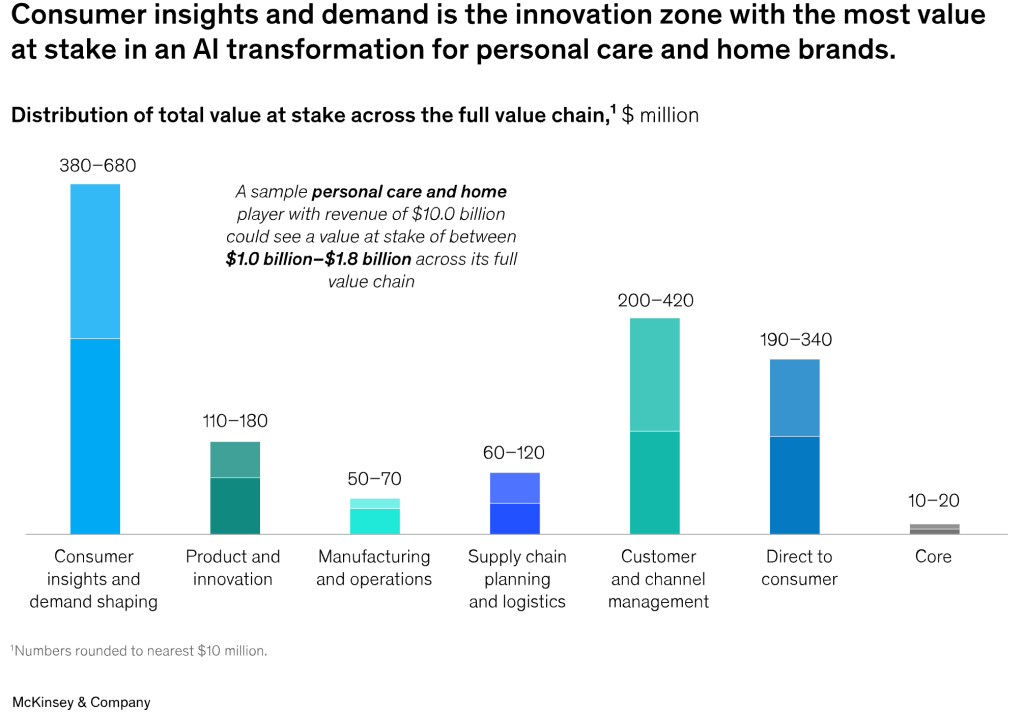
KPI impact: Better demand forecasts translate to higher sales and lower inventory costs. For example, one $10B personal care retailer invested in AI forecasting and saw accuracy improve 13%, product stockouts drop 40%, and inventory levels shrink by 35%. Fewer empty shelves and less overstock means more revenue capture and less waste.
Deployment notes: These AI models often integrate with the ERP or supply chain systems. Companies typically start with a pilot in a category or region to validate results. It’s important to retrain forecasts continuously as trends change. Planners may need to adjust their processes to trust and use the AI output (sometimes in a “forecast override” workflow).
Overall, AI-driven demand planning helps offline businesses ensure the right products are in the right place at the right time, directly lifting revenue and customer satisfaction (no more “sorry, we’re out of that item” moments).
Dynamic Pricing and Promotions Optimization
Pricing is one of the most powerful levers for revenue and margin – and AI is making pricing far more agile in physical businesses. Dynamic pricing algorithms adjust product prices or fees in response to real-time factors like demand, inventory levels, and competitor pricing. Meanwhile, promotion optimization uses AI to tailor discounts or offers that maximize sales lift without unnecessary margin sacrifice. In an era of persistent cost inflation and savvy consumers, many retailers find their old rule-of-thumb pricing tactics are leaving money on the table.
Where it fits: Primarily in retail (from supermarkets to apparel) and hospitality (e.g. hotels adjusting room rates). It’s also used in areas like fuel pricing at gas stations and ticket pricing for events or transport.
Data needed: Sales data, competitor prices (if available), inventory levels, and price elasticity models (how demand reacts to price changes) are key inputs. AI can also ingest broader data like local income demographics or even online pricing trends.
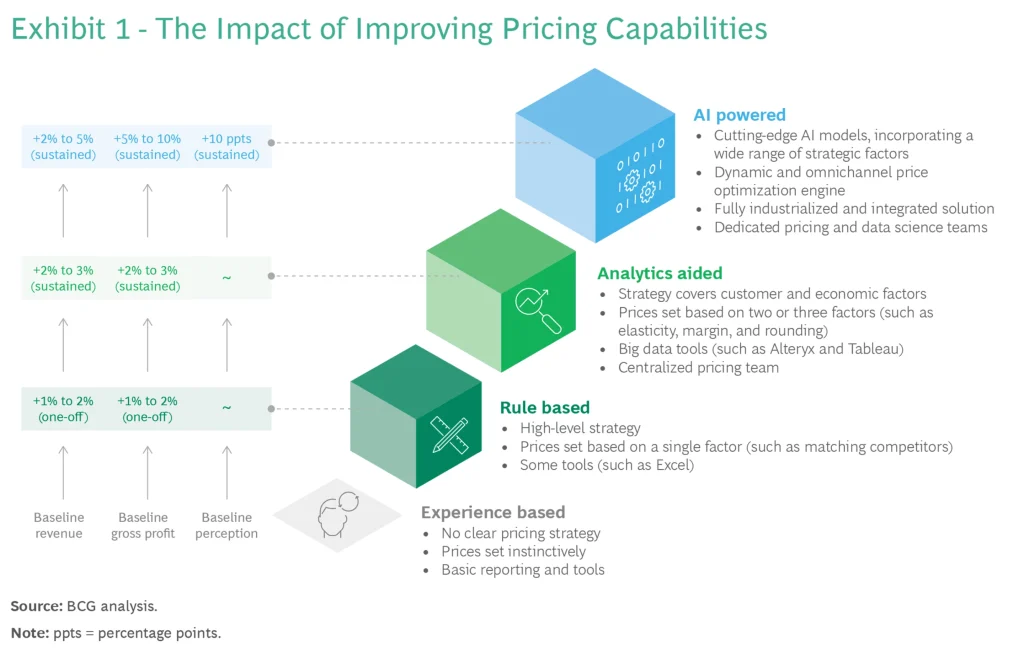
KPI impact: Done right, AI-driven pricing increases both revenue and profit. According to Boston Consulting Group, retailers that adopted AI-powered pricing saw gross profit increase by 5–10% while also sustainably growing revenue. They achieved this by optimizing prices at a very granular level (by store, by product, by day) in ways that traditional methods couldn’t handle. Promotions become more effective too – instead of blanket 50% off sales that erode margin, AI finds the minimal discount needed to entice each segment, and identifies which promotions truly drive incremental sales.
Deployment notes: Successful dynamic pricing requires a centralized pricing system and clear strategy (e.g. which items are okay to fluctuate vs. which should stay consistent for brand reasons). Businesses must also manage customer perception – price changes need to remain within a reasonable band to avoid alienating shoppers. Often, AI pricing is first tested on a subset of products or locations. Close monitoring is needed initially to ensure the algorithms’ suggestions make business sense (e.g. not accidentally pricing below cost or in violation of pricing laws). When implemented carefully, dynamic pricing AI acts like a “smart pricing manager” that continuously fine-tunes prices in response to market signals, something offline businesses have long wished they could do at scale.
Personalization and Customer Engagement
Physical businesses are borrowing a page from e-commerce by using AI to deliver personalized experiences and offers to customers, thereby driving higher sales per customer. In stores or restaurants, this can take the form of personalized coupons, product recommendations (via apps or kiosks), or localized assortment tailoring. The idea is to make each customer feel the business “knows” them – even without the benefit of online click tracking, AI can leverage loyalty program data, past purchases, or demographics to customize marketing in the offline context. For example, a cafe might use AI to analyze a customer’s past orders and push a tailored promo for a new dessert they haven’t tried yet, or a retailer’s app might guide a shopper in-store to items in their preferred style or size.
Where it fits: Marketing and sales teams use this for loyalty programs, in-app promotions, personalized direct mail or SMS offers, and in-store clienteling (associates armed with AI-driven insights about a customer’s preferences). It’s big in retail (fashion, grocery loyalty apps, etc.) and also in hospitality (hotels personalizing guest amenities) and healthcare (e.g. personalized reminders for patients).
Data needed: Customer profiles that include purchase history, loyalty interactions, perhaps survey responses or web behavior (if omnichannel). AI then segments customers or directly predicts what each individual might respond to.
KPI impact: Personalization is proven to increase conversion, basket size, and loyalty. A BCG study found retailers implementing advanced personalization strategies achieved 6–10% revenue increases, at a rate two to three times faster growth than retailers with more generic marketing. McKinsey research similarly notes companies excelling at personalization generate 40% more revenue from those efforts compared to average companies. For offline players, personalization can increase same-store sales by drawing customers in more often and encouraging them to spend more (for instance, through highly relevant cross-sell suggestions or targeted discounts that actually matter to that consumer).
Deployment notes: Key to offline personalization is merging online and offline data – often via a CRM or loyalty app – because in-store interactions need to feed the AI model. Staff training is important too; e.g. a store associate might get an “AI cue” about a customer’s likely interest in eco-friendly products, and they need to use that tactfully. Privacy is a consideration: customers should feel pleasantly surprised by personalization, not creeped out. Clear opt-ins for using their data help maintain trust. When balanced correctly, personalization AI in brick-and-mortar settings can recreate the “Amazon-like” tailored experience and boost sales metrics like units per transaction and repeat visit frequency.
AI Copilots for Store and Field Staff
Front-line employees in offline businesses – from retail salespeople and call center reps, to field technicians and nurses – are starting to get help from AI copilots. These are AI-driven assistants (often powered by generative AI or natural language processing) that can answer questions, provide recommendations, or handle routine tasks, thereby augmenting the human worker’s capabilities in real time. Think of it as giving each employee an on-demand expert or an extra pair of eyes/ears. For example, a store associate might use an AI on a tablet to instantly check if an item is in stock in the backroom or get suggestions for what product best fits a customer’s needs. Or a support center agent might rely on an AI to auto-summarize a previous customer interaction and suggest the best solution, speeding up service.
Where it fits: This use case touches customer service, sales assistance, and operations. Retail chains have begun deploying chatbots or voice assistants for employees on the floor. Fast-food outlets are experimenting with AI order takers at drive-thrus. Field service organizations (like appliance repair companies or utility firms) use AI to guide technicians through troubleshooting.
Data needed: These copilots are typically powered by large language models or domain-specific knowledge bases. They ingest company manuals, product catalogs, policy documents, and real-time inventory or account data. The more integrated the data, the more helpful the AI.
KPI impact: The benefits are improved customer experience (faster, more accurate service) and increased employee productivity. For instance, Target announced a generative AI chatbot called “Store Companion” to assist its store employees with on-the-job process questions – this can reduce training time and ensure consistent answers, ultimately leading to quicker customer service and possibly higher sales conversion (a well-informed associate can close a sale more often). Similarly, AI assistants can reduce error rates (e.g. making sure a service rep doesn’t forget a step) and free up staff to handle more customers or complex tasks. While hard ROI figures are still emerging, qualitative results show faster service times, more upsell opportunities, and even higher employee satisfaction (because staff aren’t left struggling for answers).
Deployment notes: Introducing AI assistants requires change management – employees need to trust and feel comfortable with the tool. Many companies pilot these internally (having corporate staff use the AI assistant for a while) to refine its accuracy before rolling out to front-line workers. Ensuring the AI’s information is up-to-date and accurate is crucial; it must be fed with current product info and SOPs. Also, guardrails are needed so the AI doesn’t give improper advice – often these copilots are configured to only answer within certain vetted knowledge. When implemented thoughtfully, AI copilots act like an ever-available mentor or support for staff, enabling even new employees to perform like seasoned pros, which can directly lift sales and service KPIs.

Margin Protection Use Cases
In addition to growing revenue, offline industries are using AI to protect their margins by cutting losses, waste, and fraud. These use cases aim to eliminate inefficiencies and leakages that silently eat into profits. Key applications include shrinkage (theft) prevention, fraud detection (e.g. return fraud), and waste reduction in operations. By deploying AI in these areas, companies can save millions that would otherwise be lost, directly improving the bottom line.
Shrinkage and Theft Prevention
“Shrinkage” – the industry term for inventory loss due to theft, fraud, or errors – is a massive drain on retailers and other offline businesses. AI, especially computer vision, is now being used to crack down on theft and process errors in stores and warehouses. AI-powered surveillance systems can monitor camera feeds in real time to detect suspicious behaviors (like someone concealing merchandise) or mistakes at checkout (like an item not being scanned). Unlike human security staff who can only watch a few screens at once, AI can watch all cameras 24/7 and identify patterns of theft that are hard to spot with the naked eye.
Where it fits: Primarily in retail stores (both grocery and general merchandise) and also in supply chain warehouses. Any environment with a lot of goods and potential for pilferage or error is a candidate – even clinics use AI to ensure medical supplies aren’t improperly taken.
Data needed: Video feeds are the main input for vision-based systems. Some setups also use point-of-sale transaction data in sync (to catch when an item passes a camera but isn’t recorded in the sales system). AI models are trained on examples of theft, like “sweethearting” (cashiers not scanning items for friends) or shoplifting methods.
KPI impact: The financial impact is huge – globally, retail inventory shrink was projected to reach $132 billion in losses in 2024, up from $112 billion in 2022. Every percentage point of shrink reduced goes straight to profit. AI has shown it can substantially reduce these losses. Retailers implementing AI video analytics have been able to respond to theft in real time and reduce shrinkage rates, in some cases saving tens of millions. For example, modern AI video systems, coupled with edge computing for speed, give retailers much more visibility to flag anomalies and patterns of shoplifting or internal theft as they occur. One major U.S. retailer noted that the AI was able to catch incidents that their security team missed, leading to a noticeable drop in inventory losses month over month. Beyond theft, these systems also prevent margin loss from errors – e.g. alerting if a cashier accidentally misses scanning an item or if RFID sensors detect a product leaving the store unpaid.
Deployment notes: To deploy this, companies usually start with adding AI analytics to existing security cameras. There’s an upfront cost and also a need to handle privacy concerns (customers should be notified of CCTV use, and AI should be tuned to avoid profiling or bias). Many retailers pilot AI cameras in a few high-shrink stores first. It’s also important to have a process for responding to AI alerts – e.g. training loss prevention staff on what to do when the AI flags an event. When integrated properly, AI becomes like a diligent digital security guard that massively scales your ability to prevent losses. Given that profit margins in retail are often just a few percent, cutting shrinkage by even 20–30% can make a significant difference in overall profitability.
Return Fraud and Abuse Detection
Handling product returns is a cost of doing business in retail and e-commerce – but it’s rife with fraud and abuse that cut into margins. Examples include people returning used or worn items as “new,” returning a different item than what was purchased (e.g. a brick in a box), or serial returners taking advantage of liberal policies. AI is now helping to detect fraudulent returns in real time. This can involve computer vision to inspect returned items, as well as pattern recognition in return transaction data to flag high-risk behaviors.
Where it fits: Retailers (especially in apparel, electronics, and online retail) and also reverse logistics providers. For example, warehouses that process returns are using AI to check if what’s in the box matches the original product.
Data needed: Images of returned products (from return center cameras or even customer-submitted photos), along with return reason codes, customer purchase history, and known fraud patterns. Natural language processing might also be used for return comments or social media (to catch “renters” who brag about wearing once and returning).
KPI impact: Return fraud is a multi-billion dollar problem. In the U.S. alone, retailers expected about $850 billion of goods to be returned in 2025, with roughly 9% of those returns deemed fraudulent. That’s over $76 billion lost to return fraud in one year. AI can help claw back a chunk of that. For instance, UPS’s returns subsidiary launched an AI tool called “Return Vision” that flags suspicious return packages for manual inspection – it aims to combat what they estimate as a $76.5B fraud problem by catching fake or empty returns before refunds are issued. Retailers deploying similar AI systems report that they can intercept many fraudulent returns (e.g. box of rocks scams or repeat offender customers) that would otherwise slip through. Even a 10–20% reduction in fraudulent returns can save millions. Moreover, by identifying abuse patterns, companies can tighten policies (for example, requiring original receipts or banning serial abusers) in a targeted way rather than across the board.
Deployment notes: These AI models often run in the return processing centers. A workflow might be: AI evaluates each return – if risk score is high, route that return for secondary inspection by a human. Integration with the refund system is key, so potentially suspicious refunds can be paused. One challenge is balancing fraud prevention with customer experience; you don’t want to wrongly accuse legitimate customers. So the AI threshold might be set such that it errs on the side of caution, only flagging clear-cut cases. Additionally, as fraudsters evolve tactics, the AI models need regular retraining on new data. Companies also share data via retail consortiums to improve fraud detection (since a bad actor might hit multiple brands). The bottom line: AI gives businesses a much-needed edge in a cat-and-mouse game against fraud, helping keep return losses within control and protecting margins.
Waste Prediction and Reduction
In sectors like food and beverage, agriculture, and retail with perishable goods, waste is a profit killer. Unsold fresh food, expired products, or unused supplies all translate to money thrown away. AI is being used to predict and reduce waste by optimizing ordering, production, and dynamic pricing of items nearing end-of-life. By forecasting more precisely and responding to real-time demand, companies can minimize how much product goes unsold or unused.
Where it fits: Grocery stores and restaurants use AI to forecast perishables demand (e.g. how much produce or bakery items to put out) to cut spoilage. Food manufacturers use it to plan production runs to match orders. Hospitality uses it for menu planning (reducing over-prepping). Even non-food industries have “waste” – for instance, fashion retail might have clearance stock, and AI can aid in markdown decisions to sell through inventory instead of scrapping it.
Data needed: Sales data, inventory levels, shelf life data, and often external data like weather (hot days can drive ice cream sales) or local events. Some solutions also use image recognition (smart shelves or cameras to track inventory and freshness).
KPI impact: The impact is twofold: cost savings (less waste to throw out, which is pure cost) and higher margin recovery (selling items on discount is better than not selling at all). Successful pilots have shown significant waste reduction. In one set of grocery case studies, AI solutions (from startups like Afresh and Shelf Engine) led to about a 14.8% reduction in food waste per store on average. Another example: IKEA’s food division deployed an AI-driven monitoring system in its kitchens and achieved a 30% decline in food waste within a year. These are meaningful numbers – for context, food waste is estimated to cost retailers and consumers hundreds of billions globally each year. Cutting waste not only saves those costs but also can improve gross margins by a few percentage points in grocery (which is huge in a low-margin business).
Deployment notes: A lot of waste reduction comes from better prediction (order only what you’ll sell) and smarter markdowns (discount items at just the right time before they spoil). AI models for this often start as advisory tools – e.g. recommending order quantities to the produce manager, or suggesting which items to put on clearance discount today. Over time, companies may automate more of the ordering via AI. Dynamic pricing electronic tags (marking down perishable goods as their shelf life dwindles) are another implementation – these rely on AI to set the optimal discount. Culturally, it may require convincing staff to trust the system’s recommendations over their gut feel (a produce manager might be used to ordering based on “what sold last week” whereas AI might catch a subtle trend or anomaly). But given the clear ROI in waste reduction and even sustainability benefits (less waste is good for the planet), many offline businesses are embracing AI to attack this long-standing problem of waste.
Operational Efficiency Use Cases
AI is also driving operational efficiency in offline industries – streamlining the behind-the-scenes processes and day-to-day operations to save time and money. These use cases range from labor optimization and queue management to routing vehicles and automating back-office paperwork. For physical-world businesses, even small efficiency gains (a few percent labor saved, a few minutes shaved off service times) can add up significantly across many stores or facilities. Here we group some major areas where AI is making operations leaner and faster.
Workforce Optimization: Scheduling and Queue Management
Labor is often the single biggest operating expense for offline businesses, and it’s notoriously tricky to get staffing “just right.” AI-powered workforce management attacks this by forecasting business activity and optimizing employee schedules accordingly. Instead of managers manually writing schedules based on gut feel (often leading to over-staffing in slow times or under-staffing in rushes), AI looks at data like sales patterns, foot traffic, weather, events, and staffing constraints to produce an optimal schedule. Similarly, AI-based queue forecasting can predict when lines will form (at checkout, service counters, etc.) and proactively adjust by calling additional staff or opening more checkout lanes before bottlenecks happen.
Where it fits: Retail stores, quick-service restaurants, banks (for teller staffing), call centers (for agent scheduling), really any setting with varying customer traffic. Also in manufacturing or logistics for shift scheduling aligned to workload.
Data needed: Historical sales or transaction counts by time interval, foot traffic data if available (maybe from sensors or camera counts), and employee availability/skills. AI models use this to forecast expected demand by hour or shift. They might also incorporate external factors – e.g. a concert in town that could spike restaurant demand, or a weather storm that could slow foot traffic.
KPI impact: The primary metrics improved are labor cost and service level. By aligning staffing with actual need, companies avoid overpaying during lulls and avoid losing sales or service quality during peaks. For example, one national retail chain that implemented AI-driven scheduling cut its labor costs by about 10% in one quarter while improving customer satisfaction. They achieved this by eliminating overstaffed shifts (no more paying 5 idle employees on a Tuesday morning) and ensuring busy periods like Saturday afternoon had full coverage (reducing checkout wait times and lost sales from impatient customers). Another case saw a family-owned store cut excess labor hours by 15% through AI scheduling, which directly boosted their margins. Queue management systems driven by AI have reduced average customer wait times significantly (some retailers report double-digit percentage drops in wait times), which improves customer experience scores and keeps throughput high.
Deployment notes: To deploy, businesses often integrate AI scheduling tools with their POS systems (for sales data) and workforce management software. Managers still oversee the schedules, but their role shifts to handling exceptions or approving AI suggestions rather than building from scratch. It’s important to consider employee preferences and fairness – modern AI scheduling can incorporate worker availability and even fair distribution of shifts, which can improve morale. Change management is needed as employees may be wary of a “machine” setting their hours; being transparent about how the system works and the fact that it aims to make schedules more stable and aligned with actual busy times helps get buy-in. Also, these systems should be continually updated with fresh data, especially when patterns shift (e.g. a new competitor opens nearby affecting traffic). Done correctly, AI workforce optimization makes operations more resilient and efficient – labor costs are contained (critical as wages rise) and customers get speedier service due to smarter staffing.
Route Optimization and Fleet Scheduling
For businesses that involve transportation – whether it’s delivering goods, servicing locations, or logistics operations – AI-powered route optimization is a game changer. This use case leverages AI and advanced algorithms to find the most efficient routes for vehicles or deliveries, considering factors like traffic, distance, delivery windows, and fuel costs. Humans have done route planning for ages, but with multiple stops and real-time conditions, it’s a complex problem that AI is well-suited to tackle (often known as the traveling salesman or vehicle routing problem). By shaving miles or time off routes, companies can save fuel, reduce driver hours, and improve on-time performance.
Where it fits: Logistics and parcel delivery (couriers, postal services), distribution fleets (trucks restocking stores), field service technicians (planning their daily service calls), and even public services (optimizing garbage pickup routes or school bus routes).
Data needed: Maps and distances, real-time traffic data, delivery addresses and time windows, vehicle capacities, driver schedules, etc. Modern systems also ingest live traffic feeds and can re-route on the fly if conditions change (accidents, road closures).
KPI impact: The savings here are often very tangible: reduced fuel consumption, lower mileage, and faster delivery times. A famous example is UPS’s ORION AI system. By optimizing routes for its drivers (even instructing things like minimizing left turns), UPS has saved on the order of 100 million miles and 10 million gallons of fuel annually, which equates to about $300–$400 million in cost savings each year. That also means fewer trucks on the road and less carbon emissions (UPS cites 100k metric tons of CO2 cut per year from these optimizations). Other companies report that AI routing improved their on-time delivery rates significantly and allowed more deliveries per driver per day. C.H. Robinson, a logistics provider, uses AI for supply chain routing and risk prediction – their clients saw on-time deliveries improve by 30% and logistics costs drop 15% on average. In field service, efficient routing means techs can complete more jobs per day (increasing revenue) and spend less time driving (reducing overtime and fuel).
Check out a related article:
Unconventional Intelligence: 12 Surprising AI Applications Reshaping 2025
Deployment notes: Many businesses start by piloting route optimization in a region or for a subset of drivers. It’s critical to involve the drivers or field personnel in the process – there can be tribal knowledge (“this alley is always blocked in afternoons”) that the AI should learn from them. Over time, as trust builds, drivers often appreciate the optimized routes as it reduces their stress and workload. Integration with dispatch systems and GPS is key so that routes can be pushed to drivers’ navigation apps. Maintenance of the underlying data (like accurate customer addresses, delivery time constraints) is important for the AI to be effective. Also, the system should be dynamic – if a new order comes in or a traffic jam appears, the AI can re-optimize mid-route. By embracing AI in routing, offline businesses essentially do more with less – more deliveries or visits with the same fleet, less fuel and time wasted – which hits both cost and customer service KPIs (customers get faster service).
Invoice Processing and Administrative Automation
Not all offline business AI is flashy – some of it works in the back office to eliminate tedious manual tasks. AI-based document processing is a prime example: using AI (especially OCR and machine learning) to read and process invoices, receipts, or other paperwork automatically. Many brick-and-mortar companies still deal with mountains of invoices from suppliers, bills of lading, inspection forms, etc., which historically required data entry or manual review. AI can extract the data, validate it, and even enter it into systems without human intervention, drastically cutting processing time and errors. This falls under the broader category of administrative automation or “intelligent OCR.”
Where it fits: Accounts payable departments (processing supplier invoices), accounting and finance (reconciling receipts, expense reports), procurement (reading vendor quotes), and compliance/admin roles in industries like logistics (customs forms, etc.) or healthcare (patient intake forms).
Data needed: Samples of the documents you want to process – e.g. hundreds of invoice PDFs – to train the AI on where key fields are (vendor name, invoice number, line items, totals). Modern solutions often come pre-trained on common invoice formats and then learn your specific variations. They use OCR to turn documents into text, then apply ML models to classify and extract fields.
KPI impact: The main benefits are cost savings, speed, and accuracy. Processing an invoice manually might cost anywhere from $5 to $15 in labor; AI can slash that by a large margin (often the cost drops to under $2, just the overhead of the software) – effectively an 80%+ cost reduction per document. In terms of speed, what took days of routing and data entry can be done in minutes. Companies have reported reducing their invoice cycle times by 50–70% using AI automation, which means suppliers get paid faster (leading to potential early payment discounts) and accounting books are more up-to-date. Accuracy improves as well – fewer human keying errors means less time fixing mistakes. One mid-sized retailer that automated its invoice processing noted their staff went from handling 5 invoices per hour to 20+ per hour, freeing the team to focus on exceptions and vendor management rather than rote data entry.
Deployment notes: Setting this up usually involves choosing an AI OCR platform or service, feeding it sample documents, and mapping the extracted data to your ERP or accounting software fields. There’s an initial training/tuning phase. It’s wise to run the AI in parallel with humans for a short period to compare results and build confidence. Any documents the AI can’t confidently parse should be flagged for human review (so you maintain accuracy where the AI is unsure). As more documents flow, the AI often gets better. It’s also important to integrate any business rules – e.g. flagging invoices over a certain amount for manager approval, or matching invoices to purchase orders (3-way match) and letting AI auto-approve the matches. By automating these admin tasks, businesses save on labor and can redeploy staff to higher-value work (like negotiating with vendors instead of typing data). It’s not as headline-grabbing as robots or cameras, but for many offline companies, back-office AI automation directly improves efficiency and cuts overhead costs, improving net margins.
Quality and Safety Use Cases
Quality control and safety compliance are critical in physical operations – defects can lead to costly recalls, and accidents can be devastating to workers and brands alike. AI is helping offline businesses achieve higher quality and safer operations by monitoring for issues and predicting problems before they happen. Key use cases include AI-driven visual inspection for product quality, predictive maintenance of equipment, and automated safety compliance monitoring. These applications not only reduce costs associated with defects and accidents, but they also protect the company’s reputation and ensure regulatory compliance.

Visual Inspection and Quality Control
Manufacturers and even retailers (for product intake) have long relied on human inspectors or basic sensors to catch defects. Now, AI-powered visual inspection systems using machine vision are dramatically improving the speed and accuracy of quality checks. These systems can be mounted on production lines or at quality stations to visually inspect parts and products for scratches, dents, misalignments, or other defects – far faster and more consistently than human inspectors. AI vision is also used in packaging inspection (ensuring labels are correct, seals are proper) and even in agriculture (sorting produce by quality grade).
Where it fits: Manufacturing assembly lines (electronics, automotive, pharma – you name it), food processing (detecting contaminations or misshapen products), and warehouse outbound checks. Retailers use it for returns processing (to check if a returned item is in good shape) and for online order QC (ensuring the right item is picked).
Data needed: High-resolution images of products, including examples of defects, to train the models. Many systems come with pre-trained models for common defects (like crack detection). They often use multiple cameras or scanners to get full 360-degree views.
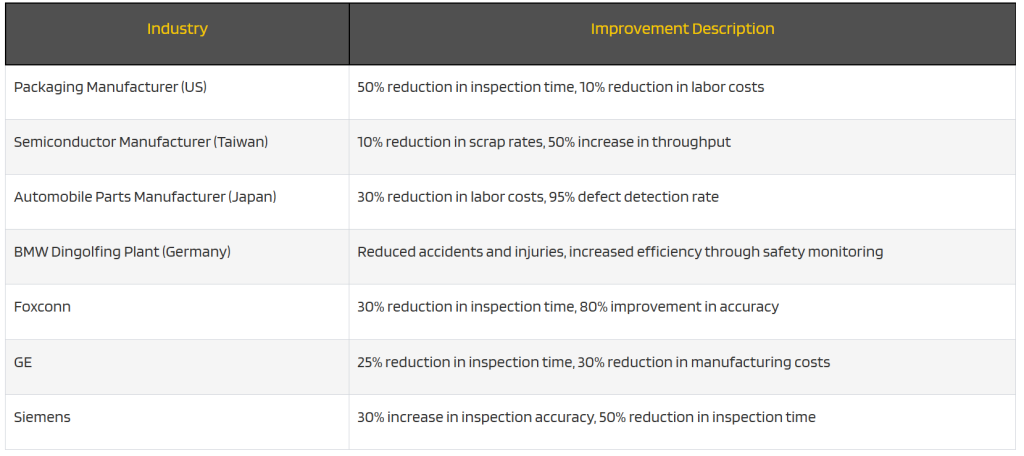
KPI impact: The goal is to catch more defects (protecting customer satisfaction) while reducing labor and false rejects. AI visual inspection can massively increase detection rates. A McKinsey study found AI-driven quality tests can improve defect detection rates by up to 90% versus manual inspection. In practice, companies like Siemens reported a 30% jump in inspection accuracy after implementing AI vision, and Foxconn achieved an 80% improvement in defect detection rates on its lines.
This means far fewer faulty products escape into the field (avoiding warranty claims or recalls). It also means fewer defects are missed internally, improving yield. Moreover, AI systems can inspect much faster – often checking every item where humans might only sample-check. This can increase throughput or allow quality inspection to happen in-line without slowing production. Cost-wise, while there’s an investment in cameras and software, companies save on labor (one AI system can replace or assist several QC inspectors) and on scrap/rework by catching issues early.
Deployment notes: Implementing visual AI usually involves a phase of “training” it on your specific product set and defect types. You still need some human in the loop initially to verify and tune the system (and periodically later to retrain on new defect modes). Lighting and camera setup is crucial – consistent image capture improves AI performance. Many firms start with a hybrid approach: AI flags potential defects and human inspectors double-check those, until the false positive rate is low enough to trust full automation. It’s also key to integrate the AI with production control systems – so if a defect is found, the item can be automatically rejected or machinery adjusted. Over time, the data collected by AI vision can even be analyzed to find root causes of defects upstream. In short, AI visual inspection enables near 100% quality checks at high accuracy, reducing defects and ensuring customers get products that meet specifications.
Predictive Maintenance of Equipment
Machines break – that’s a fact of any physical operation. Predictive maintenance is the use of AI to predict when equipment is likely to fail or need service, so you can fix it proactively before a breakdown causes downtime or safety issues. This is a shift from reactive (“fix it when it breaks”) or routine schedule maintenance (which can be inefficient) to a data-driven approach where maintenance is done at the right time. AI models analyze sensor data from machines (vibrations, temperatures, sound, motor currents, etc.) to detect early warning signs of wear or impending failure.
Where it fits: Factories (monitoring production machinery, robots), transportation fleets (predicting vehicle engine or tire issues), utilities (monitoring pumps, transformers), and even buildings (HVAC systems, elevators). Any critical equipment with sensors can benefit.
Data needed: Time-series data from sensors on the equipment – e.g. vibration readings, heat, pressure, oil analysis, performance metrics. Historical maintenance records and failure logs are also used to train models on what patterns precede a failure. Increasingly, IoT devices make it easy to collect this data in real time and feed it to cloud AI systems.
KPI impact: Predictive maintenance directly improves uptime and reduces maintenance costs. Instead of waiting for a machine to catastrophically fail (causing unplanned downtime), companies can schedule a repair during planned downtime when the AI indicates degradation. According to Deloitte, adopting sensor-driven predictive maintenance can cut maintenance costs by up to 25% and reduce unexpected equipment breakdowns (unplanned downtime) by 10–20%. Some studies even show higher uptime improvements – because preventing one major breakdown can avoid days of lost production. The ROI can be striking: McKinsey has noted predictive maintenance can lower overall maintenance expenses by 10–15% while reducing breakdowns by 50% in some cases. For example, an oil & gas firm using AI to predict pump failures managed to eliminate about 3 major disruptions a year, saving them several million in lost output and repair costs. Additionally, assets can be used closer to their true lifespan (as opposed to changing parts too early “just in case”).
Deployment notes: Implementing predictive maintenance starts with instrumenting critical equipment with sensors (if not already in place) and aggregating that data. A challenge can be the volume and noise in sensor data – AI techniques like anomaly detection and machine learning are great at sifting through it for patterns humans can’t see. Companies often pilot on one equipment type (say, all the air compressors in a plant) to prove the concept. Once the AI model is tuned to detect, say, a certain vibration pattern that means a bearing will fail in 2 weeks, maintenance teams then incorporate those AI alerts into their workflow (for instance, generating a work order to replace that bearing in the next scheduled maintenance window). It’s important to have human expertise involved – domain engineers help interpret the AI’s findings and set appropriate thresholds. Also, one must avoid overload: too many false alarms can irritate maintenance crews, so the AI should be calibrated to be as precise as possible. Over time, predictive maintenance systems can be extended across a fleet or multiple facilities, creating a smarter maintenance program that minimizes downtime and extends equipment life. This not only saves money but also improves safety (fewer sudden breakdowns) and production reliability.
Safety Monitoring and Compliance
Workplace safety and regulatory compliance (like OSHA rules in the U.S. or other local safety laws) are paramount in offline industries – and AI is increasingly used to bolster them. AI safety monitoring can include computer vision systems that watch workplaces to ensure employees are following safety protocols (e.g. wearing hard hats and high-vis vests, or not entering restricted zones), as well as analytics that predict risky conditions. Similarly, compliance monitoring might track environmental conditions (air quality, chemical leaks) or proper procedure adherence via sensors and alert if something’s off. By catching unsafe behaviors or conditions in real time, AI helps prevent accidents and keeps operations within compliance guidelines.
Where it fits: Construction sites, manufacturing plants, warehouses, oil & gas facilities – anywhere with significant safety hazards. Also in food processing for food safety compliance (ensuring hygiene practices) and healthcare (making sure protocols are followed).
Data needed: Usually video feeds for behavior/PPE monitoring, plus IoT sensor data for environmental conditions (temperature, gas levels, etc.). Historical incident data can train AI models to recognize precursors to accidents. Some systems use wearables that monitor worker vitals or fatigue indicators and send data to AI platforms.
KPI impact: The ultimate KPI is reduction in accidents, injuries, and compliance incidents. These are sometimes hard to quantify in dollars but are enormous in human and financial terms (avoiding lawsuits, downtime, insurance costs). AI can make a measurable difference. McKinsey research noted that companies using AI and machine vision for safety saw about a 30% drop in workplace accidents in the areas where it was deployed. Another example: an industrial firm using AI vision to enforce PPE compliance achieved a significant reduction in safety violations (one case study showed a 45% reduction in PPE-related violations and 60% faster response to potential hazards after AI implementation). In construction, AI-backed safety programs have been credited with reducing recordable incident rates substantially year-over-year. Compliance-wise, fewer violations mean avoiding fines and maintaining operational continuity.
Deployment notes: To implement this, companies often augment their existing CCTV with AI software that can detect, for instance, if a person on camera isn’t wearing a helmet where they should be, or if a forklift is operating too close to a pedestrian. Alerts can be sent to a supervisor’s phone or a site loudspeaker in real time (“Alert: person without hardhat in Zone 3”). Privacy is a consideration – employees should be informed about AI monitoring and it should be positioned as a safety aid, not a punitive Big Brother. Usually the goal is not to fire someone for a lapse, but to quickly correct it to prevent harm. On the predictive side, AI might analyze near-miss reports or minor incident data to identify patterns (e.g. a particular area of the warehouse has frequent slips – maybe lighting is poor there). Implementing AI safety solutions may involve collaborating with operations and safety managers to define the rules the AI watches for. It’s also critical to integrate any AI alerts with the safety response workflow (who intervenes, what actions are taken). Done thoughtfully, AI acts as a constant safety inspector that never gets tired – catching what humans might miss and providing an extra layer of protection. This keeps workers safer and ensures the business stays on the right side of regulations and ethical responsibility.
Real-World AI in Action: Mini Case Snapshots
To bring these use cases to life, let’s look at a few short examples of offline AI in action across different sectors. These snapshots show concrete results and how diverse industries are leveraging AI to move the needle on key metrics:
- Grocery Retail (Autonomous Store): Shufersal, Israel’s largest supermarket chain, opened the country’s first AI-powered autonomous grocery store in Tel Aviv. The store uses ceiling-mounted cameras and AI computer vision (from startup Trigo) to let shoppers walk in, grab items, and walk out without manual checkout. The AI automatically tracks what people take and charges them digitally, eliminating checkout lines. This frictionless shopping experience not only delights customers but also reduces labor needs and shrink (the AI vision monitors for any unpaid items). It’s a prime example of offline AI boosting convenience and efficiency simultaneously.
- Apparel Retail (Returns Fraud): UPS’s subsidiary Happy Returns partnered with fashion retailers like Everlane and Revolve to deploy an AI tool called Return Vision that combats return fraud. In 2025, U.S. retailers faced an estimated $76.5 billion problem from fraudulent returns (nearly one in ten returned items was fake or not the original). The AI system flags suspicious return packages – for example, if the weight or contents don’t match the original product – and routes them for human inspection before issuing a refund. Early use of this AI has helped these retailers intercept countless fraudulent returns, protecting their margins in a space that was historically hard to police.
- Logistics (Route Optimization): Global delivery giant UPS implemented the ORION routing AI for its drivers, and the results have been dramatic. ORION analyzes millions of routing options to give each driver the most efficient path. By 2024, it was saving UPS an estimated 10 million gallons of fuel per year (avoiding 100 million miles of driving), which translates to about $400 million in annual savings. Beyond cost, this AI-driven efficiency also improved UPS’s on-time delivery metrics and cut CO2 emissions by roughly 100,000 tons yearly. It’s a flagship example of how AI can optimize real-world operations at massive scale.
- Manufacturing (Quality Control): Electronics manufacturer Foxconn integrated AI visual inspection into several of its assembly lines. Traditionally, human inspectors caught defects with only so much accuracy. After deploying AI vision systems, Foxconn saw about an 80% improvement in defect detection accuracy and a 30% reduction in inspection time. Similarly, Siemens reported its AI-based inspectors increased quality inspection accuracy by 30%. These improvements mean far fewer faulty products leave the factory, saving millions in rework and warranty costs, and boosting customer satisfaction with product reliability.
- Food Service (Waste Reduction): IKEA’s food division (which operates cafeterias in IKEA stores) used AI to tackle food waste in their kitchens. By monitoring waste and using AI to adjust production, IKEA achieved a 30% reduction in kitchen food waste within one year. For a global retailer, this translates to significant cost savings and supports their sustainability goals. The AI would, for instance, suggest cooking fewer meatballs during slower hours or repurposing ingredients nearing expiration, thereby cutting down how much perfectly good food ended up in the trash each day.
Each of these cases underscores a real KPI impact – whether it’s higher sales, lower costs, faster service, or improved quality. They also show that AI isn’t science fiction for offline businesses: companies are already using it in pragmatic ways to solve age-old operational problems. From Israeli supermarkets to global logistics firms, the competitive edge is going to those who pilot and scale these AI solutions effectively.
Implementation Blueprint: How to Get Started with AI
For an offline business ready to dip its toes into AI, it’s important to approach implementation methodically. An AI project is not like flipping a switch – it requires clear goals, good data, and iterative development. Here’s a simple blueprint many have followed to go from idea to deployed solution:
- Start with a specific KPI and use case: Identify a business problem and the key metric you want to improve. For example, “reduce stockouts by 20%” or “cut checkout wait times in half” or “lower machine downtime by 30%.” Anchoring on a KPI ensures the project is business-driven, not tech-for-tech’s-sake. This also helps get executive buy-in – it’s easier to justify investment if you can say, “This AI system aims to save us $X or improve customer satisfaction by Y.”
- Assess data and collect what’s missing: Once you have a use case, audit what data you have that could feed an AI model. Do you have historical sales by hour for each store? Do your machines have sensors installed? Is your inventory data accurate? Often, companies realize they need to start capturing new data – e.g. installing IoT sensors on equipment or setting up a system to log customer foot traffic. At this stage, also ensure data quality (clean up errors, fill gaps) because garbage in will yield garbage out from AI. Some projects begin with a small manual data collection effort (like someone tagging a few hundred images or compiling recent maintenance logs) to have a training dataset.
- Run a pilot (proof-of-concept): Instead of trying to boil the ocean, start with a pilot project in a controlled setting. This could mean deploying the AI at one store or on one production line, or running a simulation with historical data. The pilot’s goal is to validate that the AI solution actually works and moves the KPI in the right direction. It’s akin to a trial run. Keep the scope narrow – e.g. forecast demand for one product category, not all; or use AI on one delivery route, not the whole network. In the pilot, involve end-users (store managers, technicians, etc.) to get feedback on the AI’s recommendations and results. This phase is also about proving ROI on a small scale. If the pilot shows promising results, it builds the case for broader rollout.
- Deploy and integrate into workflows: After a successful pilot, plan the deployment at scale. This means actually integrating the AI system into your day-to-day operations and IT systems. For instance, if it’s an AI scheduling tool, integrate it with your workforce management software so it can automatically generate schedules. If it’s a computer vision system, set up the hardware (cameras, edge devices) at all required locations. Change management is crucial here – you must train employees on new processes (e.g. how to interpret and act on the AI’s outputs). Many AI projects falter not due to tech, but because employees don’t adopt the new tool. It helps to have “champions” at different sites who advocate for the AI and assist colleagues. Also, redesign workflows as needed to accommodate AI. McKinsey found that high performers often redesign workflows to fully leverage AI – for example, automating re-ordering entirely rather than just advising a human. Align policies and incentives so that using the AI is encouraged (for example, adjust how you evaluate managers if AI is making some decisions now).
- Monitor performance and iterate: Deployment isn’t the end – it’s the beginning of continuous improvement. Set up metrics dashboards to monitor the AI’s impact on the KPI (e.g. track shrink rate monthly after AI vs. before). Also monitor the AI’s own outputs for any drift or anomalies. Over time, models can degrade if business conditions change (this is model drift – e.g. a demand model might get less accurate if a new competitor opens). So plan to retrain models periodically with fresh data. Solicit feedback from users: are they encountering issues? Do they trust the AI? Identify any bottlenecks or adoption hurdles and address them (maybe additional training or tweaking the UI of the tool). If the results are below expectations, investigate whether it’s a data issue, a modeling issue, or a usage issue. Often, small tweaks or more data can significantly improve AI performance. Keep an eye on ROI – ensure the benefits realized continue to outweigh the costs of running the system. Over time, you can also iterate by expanding the AI’s scope (e.g. roll out to more locations or add more features).
By following this blueprint – KPI focus → data foundation → pilot → scale → monitor – offline businesses can increase their chances of a successful AI implementation. It frames AI as a journey of incremental wins and learning, rather than a one-shot big bang. Starting small but planning for scale allows you to build organizational confidence in AI and minimize risk. Remember that an AI project is as much a people project as a tech project – involve the end-users early, get leadership support, and build cross-functional teams (ops, IT, data science, etc.) to drive it. With a solid plan, even companies new to AI can start reaping practical benefits in a matter of months.
Reference Architecture: Key Layers of an Offline AI System
When implementing AI for physical-world use cases, it helps to think in terms of an architecture stack – the layers of technology that make the solution work, from the edge (on-site at a store or factory) to the cloud. A robust architecture ensures the AI system is scalable, maintainable, and responsive in real time where needed. Below are the key layers and components typically involved in offline AI deployments:
- Edge Devices and Sensors: These are the “on the ground” data sources and compute devices at the physical site. It includes cameras for computer vision, IoT sensors on equipment, smart shelves, RFID readers, etc. It may also include edge computing units – small on-site servers or even powerful IP cameras – that can run AI models locally. For instance, a camera in a store might locally run a people-counting model to avoid sending all video to the cloud (which saves bandwidth and speeds up response). Edge AI is crucial for low-latency tasks – like a safety system that needs to yell “stop” when it sees a hazard, without the delay of cloud round-trip. The edge layer filters and preprocesses data, doing initial AI inference close to the source when real-time action is needed.
- Connectivity and Data Pipeline: This is how data flows from the edge to the central systems (and sometimes back). It can be traditional networks (Ethernet, Wi-Fi), cellular or 5G for remote sites, etc. The pipeline involves collecting data from sensors or store systems and streaming or batching it to the cloud or data center. Modern pipelines often use technologies like MQTT or Kafka for streaming data. Key considerations are bandwidth (video can be heavy – some architectures only send metadata/events upstream) and reliability (store-and-forward if connectivity drops). This layer also covers data transformation – cleaning or normalizing data as it flows. For example, converting raw sensor readings into structured time-series, or performing OCR on scanned documents before analysis. Ensuring secure data transit is important too (VPNs, encryption), especially if sensitive information (like customer images or PII) is transmitted.
- Cloud or Central Platform: At the heart is usually a cloud-based platform or data center that aggregates all the data and runs heavy-duty analytics and model training. This is where big data storage lives (data lakes or databases containing your historical sales, sensor logs, etc.). It’s also where you deploy AI model training pipelines and possibly centralized inference. For instance, training a demand forecasting model on years of data would happen in the cloud where scalable compute is available. The cloud platform will host the main application logic: it might take inputs from all stores, run the forecasting or optimization algorithm, and then send results/instructions back to the edge (e.g. new schedule suggestions or pricing updates). It often provides a single source of truth database that merges data from various sources (POS systems, ERP, sensor platforms) for the AI to draw from. Cloud compute also allows running multiple scenarios or complex algorithms that wouldn’t be feasible on a small edge device.
- AI/ML Models and MLOps: This is the brain of the architecture – the machine learning models (or rule-based AI algorithms) that actually generate predictions, detections, or decisions. Surrounding these is the MLOps framework – tools and processes to manage the lifecycle of models. MLOps handles versioning of models, deploying new models to production, monitoring model performance, and retraining. For example, an initial computer vision model might work at 95% accuracy; as it encounters new scenarios (maybe new product packaging that confuses it), the MLOps pipeline triggers a retraining with additional data. The architecture should allow seamless updating of models – sometimes pushing new ones to edge devices automatically. It’s also wise to design for feedback loops: when the AI makes a prediction (say, forecast sales) and the actual outcome is known later, that data should feed back to refine future predictions. This layer can use cloud ML services or custom frameworks depending on sophistication. In any case, treating models as evolving pieces (with proper monitoring and logging) is key to long-term success.
- Application Layer and User Interface: This is what the end-users interact with. It could be a dashboard, a mobile app, an alerting system, or an integration into existing software. For example, store managers might have a web dashboard showing AI-driven recommendations (with visualizations of data and confidence levels). Or an employee mobile app might send a push notification “AI predicts lunch rush in 30 minutes – start prepping more sandwiches now.” The UI needs to present AI outputs in a clear, actionable way. Often, this layer also allows users to give input or override (e.g. manager can adjust the AI-generated schedule if needed). Good design here is crucial for adoption – the best model won’t help if people can’t easily use its output. This layer sits on top of the AI and data layers, pulling in insights and marrying them with context (like business KPIs, thresholds, etc.) to make a usable tool.
- Integration and APIs: Offline AI rarely lives in a vacuum – it has to hook into existing systems like POS, ERP, WMS (warehouse management), or MES (manufacturing execution). Thus, a layer of integration (via APIs or middleware) is important. For instance, if the AI decides to order more stock of an item, an integration might automatically create a purchase order in the ERP. Or the schedule optimization AI writes back to the workforce management system. Well-defined APIs allow data to flow both ways between the AI modules and legacy systems. This ensures the AI solution enhances rather than disrupts current operations.
- Security and Privacy Controls: Throughout the architecture, it’s vital to embed security. This means controlling access to the data and models, encrypting sensitive data, and ensuring compliance with privacy laws. For example, if using cameras in a store, the system might blur faces or anonymize data to protect privacy, storing only necessary info (many vision AIs now do on-device processing and don’t stream video to cloud to mitigate privacy issues). Role-based access control on dashboards, audit logs of decisions, and robust data governance policies are part of this cross-cutting layer. If operating in heavily regulated industries (like healthcare or finance), additional compliance modules might be needed to satisfy audits (e.g. NIST or ISO standards).
In summary, an offline AI reference architecture spans from the edge to the cloud. It captures real-world data, processes it with AI, and feeds insights back into physical operations.
Designing with modular layers (edge, pipeline, cloud, MLOps, application, and integration) creates a scalable system that can easily accommodate more sensors or models. It is also resilient, as the edge can still handle critical tasks if the cloud connection drops. Additionally, it is maintainable, as you can update one layer without overhauling everything.
For instance, if a superior ML model emerges, you can replace it at the AI layer without altering the data collection process or the user interface.
Many companies find that a hybrid edge-cloud approach is optimal: use edge computing for instant local actions and the cloud for heavy analytics and oversight. This balance exploits the strengths of each.
The above architecture serves as a template that can be tailored to specific needs. Whether you are a retailer instrumenting stores or a manufacturer outfitting a smart factory, you will likely use some form of these components.

Pitfalls to Avoid on the Offline AI Journey
Implementing AI in brick-and-mortar environments comes with its own set of challenges. Being aware of common pitfalls can help you proactively avoid them and increase the odds of success. Here are some major ones, and how to mitigate them:
- Garbage In, Garbage Out (Data Quality Issues): AI is only as good as the data feeding it. Offline data can be messy – sensors can be faulty, sales records might have gaps, different stores may log data differently. If you train models on bad data, you’ll get bad advice.
Pitfall: Rushing to build AI without cleaning and understanding your data.
Avoidance: Invest time in data preparation. Standardize data collection across sites. Fix integration issues (e.g. ensure that all stores’ POS clocks are synced if doing hourly sales analysis). Use data validation rules and outlier detection – for instance, flag if a store reports sales an order of magnitude different than usual, and investigate. It can be useful to start with descriptive analytics on your data to spot anomalies before leaping into predictive mode. Remember that more data isn’t always better if it’s low quality; a smaller high-quality dataset can outperform a big noisy one. - Lack of Employee and Stakeholder Buy-In: AI projects can fail because the people who need to use them simply don’t trust or adopt the system. A fancy AI scheduling tool is worthless if store managers ignore its schedules and do things the old way.
Pitfall: Implementing AI in a silo (just IT or a data science team) without involving the operations folks or explaining the benefits. Also, fear of AI replacing jobs can cause resistance.
Avoidance: Communicate early and often. Involve front-line managers or workers in the project design – get their input on what would make their job easier. Emphasize that the AI is a tool to help them, not replace them (for example, “This system will free you from tedious paperwork so you can focus on customers”). Provide training sessions and make champions out of influential staff who can evangelize to peers. Also, show early wins: e.g. highlight a case where the AI prevented a stockout that a manager acknowledges they would’ve missed. Cultural adoption can be the hardest part, so treat the rollout as an organizational change initiative, not just a tech install. - Scaling from Pilot to Production (The “last mile” problem): Many companies manage a neat pilot in one location, but then struggle to scale it across 100 stores or plants. Issues of integration, costs, and variations across sites crop up.
Pitfall: Assuming success in one controlled environment means it will automatically work everywhere. Overlooking the need to adapt to differences (like different store layouts or regional demand patterns).
Avoidance: Plan for scale from the start. After the pilot, do a thorough post-mortem: What needed manual tweaks? What site-specific assumptions were there? Harden the system to be more general or configurable. Ensure you have the IT infrastructure to support scale – e.g. if each store needs an edge device, can your IT support 100 more endpoints? Budget and timeline for the rollout realistically (maybe phase it region by region). Also, monitor initial sites closely as you scale – catch issues early. A common approach is a staged rollout: 1 site → 5 sites → 20 sites → all sites, with lessons learned at each stage. This incremental approach can prevent a catastrophic company-wide roll-out failure by addressing kinks when the stakes are smaller. - Model Drift and Static Systems: The physical world is dynamic – seasons change, consumer behavior evolves, competitors react. An AI model that was accurate last year may slowly become less so if not updated.
Pitfall: Deploying an AI and forgetting about it, assuming it will stay accurate forever. Or not monitoring its performance and thus not noticing degradation until it causes a problem.
Avoidance: Establish a cadence for model retraining or refreshing with new data. Use MLOps practices: for example, automatically retrain the demand forecast model every month as new sales data comes in (with appropriate validation to ensure it’s not getting worse). Monitor key accuracy metrics – if the forecast error or false-alarm rate in anomaly detection starts creeping up beyond a threshold, alert the data science team. Additionally, keep an eye on concept drift – e.g. if consumer preferences shift, the features that mattered to the model might need adjustment. The business context can also change (new store formats, new product lines), and models need to be re-examined in light of those. Essentially, treat the AI system as a living system that needs care and feeding, not a one-and-done software install. - Privacy and Ethical Concerns: Using AI in physical settings (especially vision or tracking) can raise privacy issues. Customers and employees may feel uncomfortable if they believe they’re being overly surveilled or if personal data is mishandled. There are also regulations (like GDPR in Europe, various biometric data laws, etc.) to comply with.
Pitfall: Implementing AI solutions (like facial recognition for shoplifters or tracking employee movements) without considering the privacy implications or legal requirements. This can lead to backlash or lawsuits.
Avoidance: Design with privacy in mind. For example, use anonymized data whenever possible (the AI doesn’t need to know a customer’s identity to count them in a store). If using video analytics, consider edge processing that doesn’t store identifiable video. Be transparent – signage or internal memos should inform people what’s being monitored and why. Get legal compliance involved early to ensure you’re following all relevant laws. For biometric or sensitive data, obtain consent if required (e.g. employees opting into wearable monitoring for fatigue). Put in place data protection measures – encrypt data streams, limit who can access the AI outputs (e.g. only LP managers see theft alerts, not every associate). By respecting privacy and being upfront about the purpose (safety, efficiency, etc.), you can mitigate concerns. Ethics go beyond privacy too – ensure the AI isn’t inadvertently discriminating or creating unfair outcomes. For instance, if an AI scheduling tool isn’t careful, it might systematically give fewer shifts to certain groups if trained on biased data. Regular audits of AI decisions for fairness are a good practice. - Lack of Clear Ownership and Skills: Sometimes AI projects falter because it’s not clear who owns it after deployment. Does IT manage the sensors while analytics manages the model and operations manage the usage? Without defined ownership, things fall through the cracks (like software updates or responding to alerts). Also, some companies underestimate the need for certain technical skills to maintain the AI.
Pitfall: Treating the AI system as a black box and not assigning a specific team to oversee it. Or not investing in upskilling staff to use and interpret AI outputs.
Avoidance: Define roles from the outset. Perhaps create a cross-functional AI task force that includes IT, a data analyst, and an ops manager for the given use case. This group ensures the system runs smoothly and improvements are implemented. Over time, you might transition ownership to an operational team once it becomes part of normal processes. Also, consider training an internal “AI champion” at each site – someone who’s tech-savvy and can be the first line of support or liaison. If you lack in-house skills for certain aspects (maybe no one on staff can update the machine learning model), plan either to train someone or arrange a support contract with the vendor or a partner. An experienced AI implementation partner can be valuable here, helping not just launch but also set up governance and skill transfer for long-term success.
By watching out for these pitfalls – data quality, user adoption, scaling hurdles, model maintenance, privacy, and clear ownership – you can navigate around them rather than hitting them head-on. Many AI initiatives in traditional industries have stumbled on one of these; learning from those who went before will make your journey smoother. In essence: keep the human and organizational factors front and center alongside the technology. The combination of good data, engaged people, and adaptive processes is what ultimately unlocks AI’s value on the ground.
Decision Guide: Matching Problems to AI Solutions
With so many potential AI applications, decision-makers often ask: Where should I apply AI first? A practical way to decide is to start from the business problems or goals you have, and then see which AI use case best addresses them. Below is a simple guide mapping common offline business challenges to fitting AI solutions:
- “We keep running out of stock on popular items (or overstocking the wrong stuff).” – Use Case: Demand Forecasting & Assortment Optimization. AI can predict sales and help you stock just the right amount of each product. This solves stockouts (driving revenue up) and reduces excess inventory (cutting costs).
- “Margins are tight because we mark down too much and experience a lot of theft and waste.” – Use Case: Pricing Optimization and Shrink Reduction. AI-driven dynamic pricing ensures you markdown only as needed (protecting margins). For theft/waste, computer vision and predictive analytics can catch fraud and forecast spoilage, saving money that’s leaking out.
- “Customer service is inconsistent, and wait times are hurting satisfaction.” – Use Case: AI Assistants and Scheduling. An AI copilot can guide staff to give quick, correct answers (improving service quality), and AI-based scheduling can align staffing to busy periods so customers aren’t kept waiting in long lines.
- “Our production yields and quality need improvement; defects are getting through.” – Use Case: Visual Quality Inspection and Predictive Maintenance. AI vision systems will catch defects far better than manual checks, and predictive maintenance algorithms will reduce machine-related defects/downtime by fixing issues proactively.
- “We’re facing labor shortages / high labor costs, and need to do more with less staff.” – Use Case: Workforce Optimization and Process Automation. AI scheduling can maximize productivity of the staff you have, and AI automation (like invoice processing or robotic process automation in admin tasks) can free your employees from low-value tasks to focus on higher-value work. Also, AI insights can enable one manager to effectively oversee more stores or operations by highlighting where attention is needed.
- “Customers have very different preferences across locations, and I want to personalize locally.” – Use Case: Personalization & Localization AI. Use AI to analyze local buying patterns and tailor each store’s promotions or assortment to its neighborhood. For example, AI might identify that one store should stock more dairy-free products due to local demand, while another should focus on budget brands – a level of micro-targeting that increases local sales. Personalization engines can also customize marketing offers for segments of customers in each area.
- “Our delivery routes and logistics are a mess, often delayed and costly.” – Use Case: Route Optimization and Fleet Management AI. If you have vehicles or deliveries, an AI route planner will significantly cut travel time and fuel usage, while improving on-time performance. This is ideal for any company doing multi-stop deliveries or service calls.
- “We worry about safety incidents or compliance violations; we can’t watch everything manually.” – Use Case: AI Safety Monitoring. If keeping people safe or staying compliant is a concern (factories, construction, food safety, etc.), AI vision can continuously watch for violations (like missing PPE or sanitation issues) and alert instantly. It’s like having a diligent inspector 24/7, preventing accidents and fines.
Using this problem-to-solution guide, you as a decision-maker can pinpoint where AI might deliver the most immediate value in your unique context. For instance, a retail chain might prioritize shrinkage and pricing solutions, whereas a manufacturing plant might start with predictive maintenance and quality inspection. A logistics or delivery company will see quick wins in route optimization, and a restaurant group might focus on demand forecasting (to prep food efficiently) and personalization through their loyalty app to drive visits.
It’s also wise to consider feasibility and readiness: Do you have the data for that use case? Is the technology proven in that area? For example, if you have cameras already, vision-based AI might be low-hanging fruit. If all your data is in disparate systems, maybe start with something like invoice automation which can be done with scanned documents as a self-contained project. The decision guide essentially encourages a match between your pain points and AI’s strengths. This ensures you’re not doing AI for novelty, but as a targeted strike on business pain.
One more angle: consider the competitive context. If your competitors are known to be using AI in a certain area, that might elevate its priority for you to not fall behind (e.g. many big retailers are doing AI pricing – it might become necessary to stay competitive on margins). Conversely, doing AI in an area your competitors aren’t could leapfrog you ahead (like being the first in your region to have an autonomous checkout store could build a tech-savvy brand image and draw customers for novelty and convenience).
In summary, let your business needs drive the AI agenda. By using a decision framework like the above, you can create a roadmap: perhaps Phase 1 solves immediate cost issues (shrink, scheduling), Phase 2 tackles growth (personalization, expansion planning with AI), and Phase 3 pushes innovation (autonomy, robotics). Aligning AI initiatives to strategic goals ensures each project has a clear purpose and success measure. That way, AI becomes a means to an end (higher revenue, lower cost, better safety), not an end in itself.
Conclusion
The playbook for operational excellence in offline industries is being rewritten with AI. In 2025–2026, AI is no longer a moonshot for brick-and-mortar businesses – it’s a practical tool delivering measurable gains across revenue, efficiency, and quality. From retailers that reduce losses and optimize pricing, to factories that cut downtime and boost output, the physical world is becoming as data-driven as the online one. Companies moving early are seeing stronger margins, better labor and inventory utilization, and safer operations – while laggards risk falling behind as leaders raise expectations for speed and responsiveness.
As you consider AI in your own operations, keep the approach consultative and grounded. Start with use cases that solve real problems, prepare your data and teams, and iterate toward scale. Offline AI works best when it augments people: better forecasts for planners, clearer insights for managers, smarter monitoring for security, and earlier warnings for maintenance.
And you don’t have to do it alone. Implementing AI end-to-end – from data pipelines and infrastructure to model training, integration, and change management – can be complex. Many organizations accelerate time-to-value by partnering with experienced AI and software teams that understand both the technology and the realities of physical operations.
In the end, the key is to start: pick a pilot, define the KPI you want to move, and learn fast. The technology is ready for the physical world. The question is whether you’re ready to put it to work on your store floors, factory lines, roads, and clinics – and turn “offline AI” into real, repeatable business wins.
Leave a Comment